Note
The SOAP API is a legacy interface. For new integrations, use the REST API (REST 2.0). SOAP remains available for existing integrations.
What is SOAP API?
SOAP (Simple Object Access Protocol)
SOAP is based on transferring data as a block of XML, respecting the expected format as defined in the SOAP WSDL (Web Service Description Language) file. You will generally use a specific programming library called a SOAP client to interact with this technology, which will process the WSDL, automatically determine the API endpoints that will accept data, and pre-validate the values required for each API method.
Request
The requests you send to the API will need to have the following parts:
URL
https://<your-engage-domain>/api/soap/v7/
Body
An XML file starting with <soapenv:Envelope> and ending with </soapenv:Envelope>.
Example: Create a Contact
<soapenv:Envelope
    xmlns:soapenv="http://schemas.xmlsoap.org/soap/envelope/"
    xmlns:ecm="http://ecircle.com/developer/ecmapi">
    <soapenv:Header/>
    <soapenv:Body>
        <ecm:contactCreate>
            <contact>
                <contactId>1</contactId>
                <emailAddress>test@test.com</emailAddress>
                <mobileNumber>48505606707</mobileNumber>
                <applicationAlias>?</applicationAlias>
                <identifier>?</identifier>
                <!--Zero or more repetitions:-->
                <attributes>
                    <name>test</name>
                    <value>test</value>
                </attributes>
            </contact>
        </ecm:contactCreate>
    </soapenv:Body>
</soapenv:Envelope>
Response
Code | Message | Action |
|---|---|---|
HTTP 200 | Success | Not necessary. Everything went well. |
HTTP 401 | Unauthorized | Add authorization header. |
HTTP 403 | Forbidden | Validate user type, username, and password. |
HTTP 404 | Page Not Found | Provide a valid URL. Make sure no "\" in the URL. |
HTTP 500 | Internal Server Error | Contact Support. Server error or load too high. |
Starting a new SoapUI Project
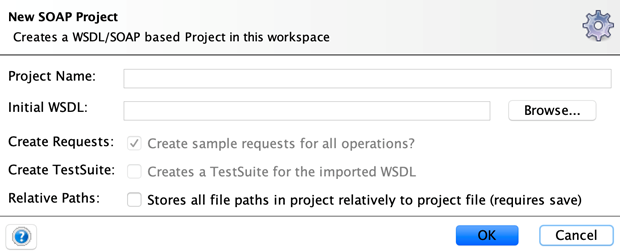
After opening SoapUI, click on the SOAP button to create a new "project". This is a connection to a specific SOAP server that will then display all the methods that you can use from the SOAP WSDL URL. The "Project Name" is free text, you can name your project how you want. The Initial WSDL path is the URL to the WSDL that describes the web service you want to connect to. Click OK to create the project.
Start testing with SoapUI
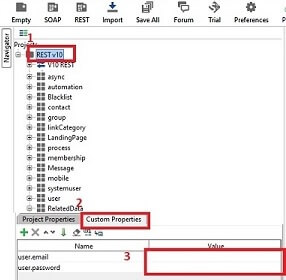
Import your project into SoapUI.
Add the user and password as shown in the picture.
WSDL
The WSDL file is a complex file that describes how you can interact with the web service. The file describes the web service functions (called "methods") along with the obligatory and optional variables that the methods require, along with how the web service will respond. All data is exchanged in requests and responses in a block of XML, called an "envelope". The Mapp Engage SOAP 2.0 v7 WSDL of your instance can be viewed under:
https://<your-engage-domain>/api/soap/v7?wsdl