---
title: "Advanced Form Tracking"
slug: "advanced-form-tracking"
updated: 2024-03-16T06:02:34Z
published: 2024-03-16T06:02:34Z
canonical: "docs.mapp.com/advanced-form-tracking"
---
> ## Documentation Index
> Fetch the complete documentation index at: https://docs.mapp.com/llms.txt
> Use this file to discover all available pages before exploring further.
# Advanced Form Tracking
## Multiple Forms on a single Page
Since only one form can be measured per page and pixel instance, you need to initialize an own pixel instance to measure the second form if you want to track two forms on the same page.
This second instance serves exclusively to capture this second form and will not collect any further data, as they are already measured by the first instance and would count twice in Intelligence.
If you want to measure two or more forms on a single page, proceed as follows:
1. In Tag Integration, navigate to *Parameters* and click **New parameter.** 
2. Now configure the parameter as follows: 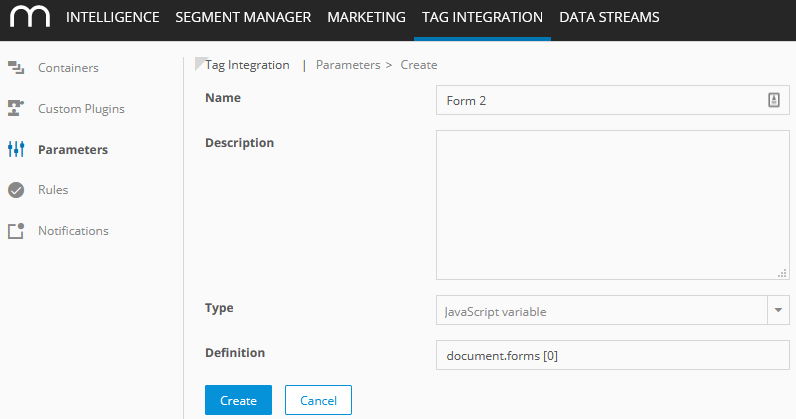
| Parameter | Description | Example |
| --- | --- | --- |
| Name | Enter a name for the parameter | Form 2 |
| Description | Optionally, add a description to the field provided. | |
| Type | Select from the dropdown list the required type, from which the value should be read out: - JavaScript variable | JavaScript variable |
| Definition | Add the required variable. | document.forms[0] |
3. Click **Create**.
4. Now, open the Mapp Intelligence plugin of the container you want to configure and open the tab **Form**. ****
5. Click **+ Add form tracking**.
6. Select from the dropdown list the parameter that you have created in step 3 (for example, "Form 2") and select the page area where the form is included.
## Manual Update of Form Fields
If you modify the content of form fields by means of JavaScript or simulate a form focus, then call the following method and submit the changed form field:
**Example**
```plaintext
wts.push(['updateFormFieldStatus', document.getElementById('firstname')]);
```
If you measure multiple forms on your page use the following call instead:
**Example**
```plaintext
wts.push(['multipleUpdateFormFieldStatus', document.forms[0], document.getElementById('firstname')]);
```
## Tracking Forms without the