Overview
What can I do in this window?
Create an SMS message.
Add personalizations and Mapp Engage Variables to an SMS message.
Add a link to an SMS Message, shorten the link, and add parameters.
Select the SMS encoding. The encoding determines the character limit.
Navigation Path
During message creation, follow the message creation process until you reach Content.
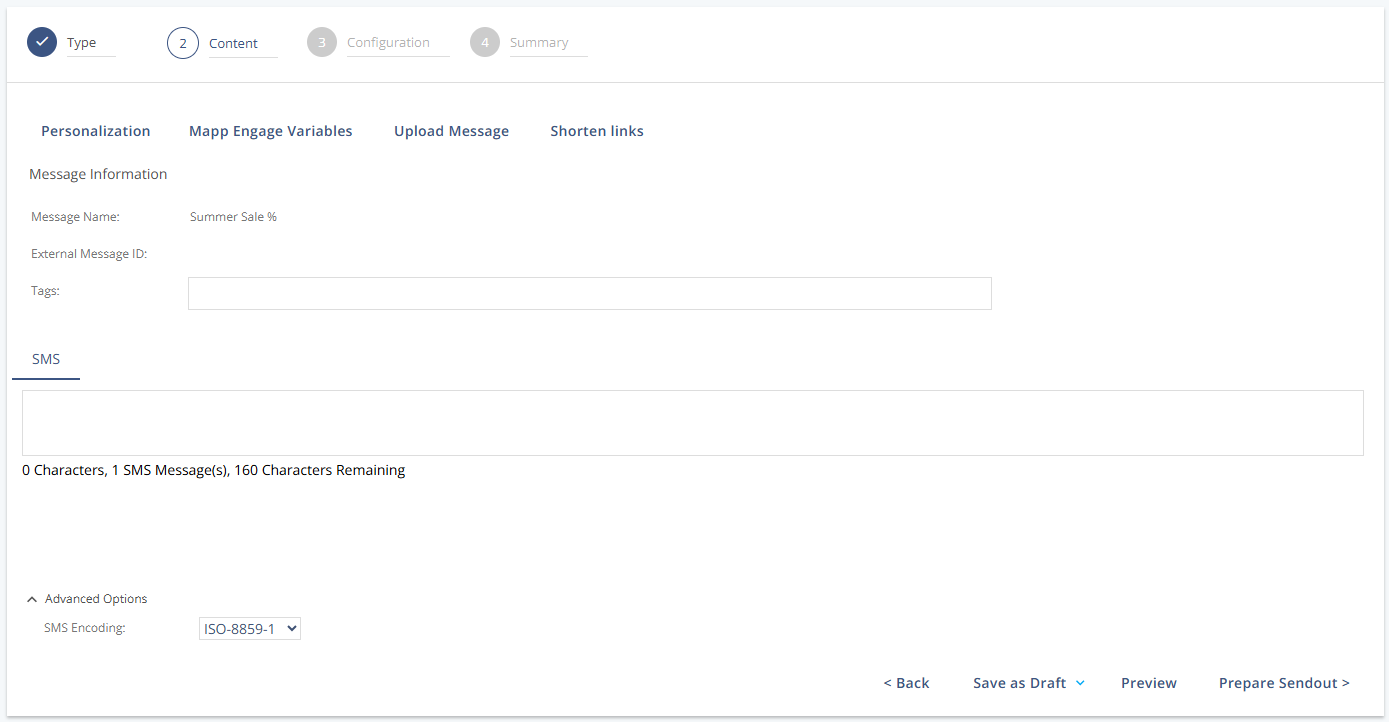
Content Tools
Tool | Description |
|---|---|
Personalization | Inserts placeholders for individual user data, like names. Also supports rule-based variations for segments. Example: |
Mapp Engage Variables | Inserts static variables that render the same content for all recipients. Example: |
Upload Message | Imports SMS content from an external file. You can also specify the character encoding here. |
Shorten Links | Converts long URLs into shorter links to conserve character space. Parameters can be added to these URLs. |
Message Information
Setting | Description |
|---|---|
Message Name | Required field that defines how the message is labeled within the system. |
External Message ID | Adds a custom ID to outbound links for tracking in external systems. The External Message ID is helpful for tracking across analytics or eCommerce platforms. |
Tags | Internal keywords to help categorize or search for the message. Use commas. |
SMS | Your SMS message text goes here. |
Characters | Shows the current number of characters in the message and the total allowed.
|
SMS Messages | Indicates how many concatenated SMS parts will be sent based on the length.
|
Remaining | Displays the number of characters that are available before a new SMS message is required for sendout. |
Actions
Setting | Description |
|---|---|
Save as Draft | Saves your current message to resume editing later. |
Preview | Opens a preview view to test and review the personalized message. |
Prepare Sendout | Moves to the next configuration step, where sendout details are set. |
Advanced Options
Setting | Description |
|---|---|
SMS Encoding | Defines the encoding format used, which affects the character set and limit. |
Character Limits
Bit Size | Encoding | Single Message Maximum |
|---|---|---|
GSM 7-bit | ISO 8859-1 or ISO 8859-15 | 160 characters |
16-bit | UTF-8 | 70 characters |