Goal
Create Data Views that join multiple Related Data Sets, so you can run cross-table queries in Segmentation Builder.
Background Information
A Data View is a predefined link between Related Data Sets that enables cross-table queries. In Segmentation Builder, you can select a Data View and then add conditions for all columns from each connected table.
For single-table queries, each related data set connected to the profile attribute is available as a table view by default, without requiring any additional setup.
For cross-table queries, you can connect up to three Related Data Sets into one table view.
Data Views are available in the context of a Related Data Set that is linked to the user profile attribute. You access them under Administration > Attributes > Related Data.
Note: The user interface in Administration > Attributes > Related Data has been upgraded. Existing videos may show the previous version, but the navigation paths and core functionality remain the same.
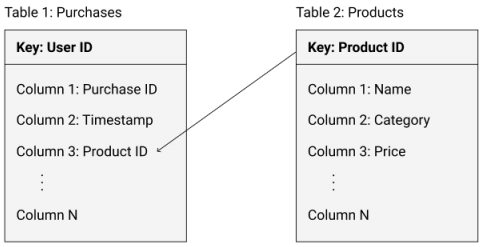
Data View Schema
Linking two tables
Linking three tables
You can add a third Data Set that is linked to the second Data Set and create a double-nested structure:
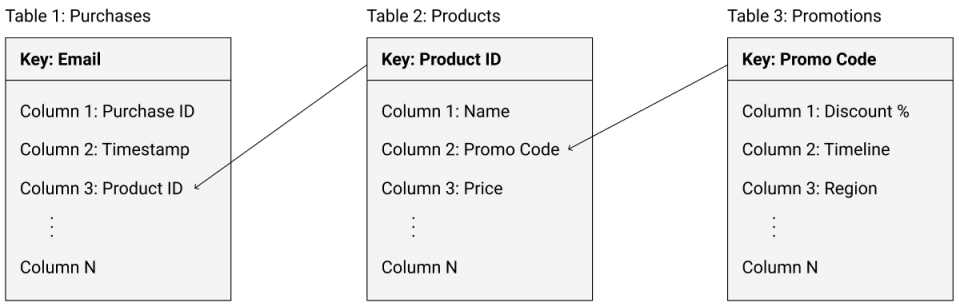
Example
Procedure
Go to Administration > Attributes > Related Data.
Select the main Related Data Set and click Show Structure followed by Table Views.
Click Create Data View.
Fill in the form to define the new Data View.
Settings
Setting | Description |
|---|---|
Data View Name | Name of the Data View that will appear for selection in Segmentation Builder. |
Link To | The main Data Set that you want to link to another table. |
Linking Column | The column in the main Data Set that should match the key in the second Data Set.
|
Linked Data Set | The second Data Set that you want to link to the main Data Set. |
Querying Methodology
When you use a Data View for cross-table queries, the system processes the linked tables in a specific order:
Queries are executed by table, from the last table to the first.
The result set for each table is limited by the results from the previous table in the sequence.
Selected users must fulfill all filter conditions across all tables in the Data View.
Queries are executed by table, from the last to the first.
Query results for each table are limited by the results from the previous table.
Selected users fulfill all of the filter conditions specified for all of the tables.