Overview
In the Create new Source interface, users define a source identifying where new contacts originate. This helps track the effectiveness of marketing efforts and external partnerships. Each source is linked to a specific account and is credited based on contact registrations.
Navigation Path
Administration > Categories > Sources
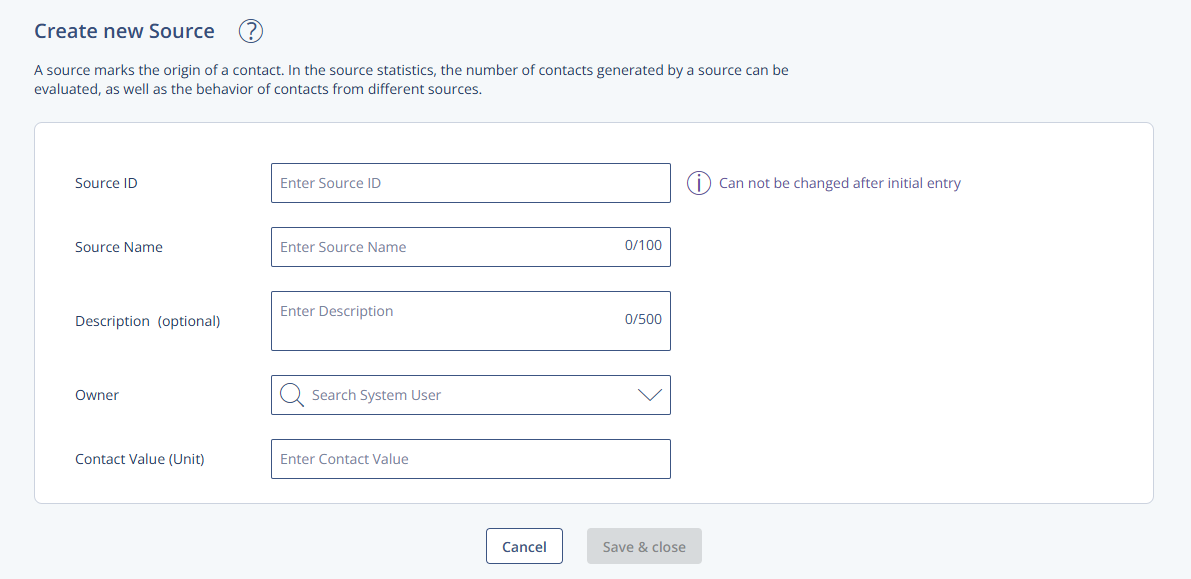
Settings Table
Setting | Description |
|---|---|
Source ID | A unique identifier for the source (max. five characters). Once saved, this ID cannot be changed. It is used throughout the contact's lifecycle and is added to the contact's profile upon import or via a subscription link. |
Source Name | A descriptive name for the source (max. 50 characters). Can represent internal sources (e.g., campaigns) or external ones (e.g., partner sweepstakes). |
Description (optional) | Optional internal description to clarify the purpose or usage context of the source. |
Owner | An email address associated with a valid Mapp Engage account. This account receives credit for every contact generated via the source. Only existing system accounts can be entered. |
Contact Value (Unit) | Defines how many units are credited to the Account Holder for each new contact registration through this source. Units are only granted upon the contact’s first group registration. |
Additional Information
Units are only allocated when a contact is added to a group.
Only the first group registration per contact triggers unit crediting.
For contact-level analysis, see: Source Statistics.
Contact profiles update with the source ID during imports or through subscription links.