Introduction
High-quality analytics data depends on tracking traffic that reflects real user behavior. This page focuses on data quality for websites and explains what relevant and non-relevant traffic is in a web context, as well as how non-relevant traffic can be handled in Mapp Intelligence.
Mapp automatically excludes well-known search engine crawlers during data collection. You do not need to take any action for this traffic. Other forms of non-relevant traffic, such as monitoring tools or AI-based crawlers, are tracked and require explicit handling using the approaches described below.
Relevant and non-relevant traffic
Relevant traffic is generated by real users interacting with your website as intended. This traffic forms the basis for reliable reporting, analysis, and decision-making.
Non-relevant traffic typically originates from automated or technical sources. Search engine crawlers are excluded automatically. Other sources, such as monitoring or scanning tools and AI-based crawlers, are usually tracked and must be handled explicitly to avoid distorting analysis results.
Prevent non-relevant traffic before it is collected
At this stage, tracking is suppressed before any data is sent. This effectively removes clearly non-relevant traffic at the earliest possible point. The earliest and most effective way to ensure data quality is to prevent tracking from being triggered at all.
Depending on your integration approach (for example, direct JavaScript integration, tag management systems, or server-side setups), tracking can be conditionally suppressed, such as:
In test or staging environments
For internal test accounts or tools
When specific conditions reliably indicate non-relevant traffic
If tracking requests are never sent, the traffic does not enter the dataset and does not require later filtering.
Important
Traffic that is not collected cannot be analyzed later. Preventive exclusion is therefore only suitable when the traffic is clearly irrelevant for any evaluation.
The exact implementation depends on the individual setup and is outside the scope of this documentation.
Exclude non-relevant traffic during data collection
At this stage, traffic is evaluated during collection and excluded before it becomes part of the dataset. If tracking cannot or should not be fully suppressed, non-relevant traffic can be excluded during data collection.
A common approach is exclusion based on IP addresses or IP ranges, for example for known tools, networks, or automated systems. Because IP addresses are not stored in Mapp Intelligence, server log files are typically required to identify such sources.
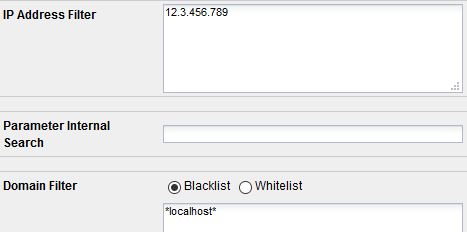
Identified IP addresses or ranges can then be excluded in the system configuration, preventing this traffic from entering the dataset.
Identify non-relevant traffic in collected data
Before traffic can be excluded, it must be identified. This typically starts with looking for patterns that differ clearly from normal user behavior.
A common first step is to analyze activity at the level of individual visitors or technical sources and check for unusually high volumes within a short time frame.
Typical indicators include:
Very high numbers of Visits or Page Impressions compared to normal users
Repeated access within short time intervals
Requests that focus on specific pages
To make such patterns visible, it is useful to work with visitor-level metrics that reflect accumulated activity rather than only the selected analysis period. For example, lifetime-based visitor metrics can help identify End Device Visitor IDs with unusually high overall activity, which may indicate automated behavior.

These patterns do not automatically mean that traffic is non-relevant, but they provide a starting point for further investigation.
Exclude identified traffic from analyses
Once data has been collected, it cannot be removed retroactively. Instead, it can be excluded from analyses using filters. This keeps the data available for investigation while ensuring it does not affect regular reporting.
For recurring use, it is recommended to define these filters as a segment. A segment allows you to centrally define and save a set of filter criteria using the Segmentation Builder and reuse it consistently across analyses and reports.
Using segments has several advantages:
Filters can be applied consistently across multiple analyses and reports
Changes only need to be made once and take effect everywhere the segment is used
Ongoing maintenance is more practical than managing filters individually
The same principle applies regardless of which criteria are used in the segment.

Filter criteria
Filtering by organisation or network
As an alternative, traffic can be filtered using the Organisation dimension.
The Organisation dimension shows the company or internet provider from which users accessed the website. The information is derived from the IP address and may also reflect VPNs or intermediary services.
This approach is useful for:
Recurring traffic from corporate networks or tools
Identifying automated systems that consistently originate from the same organisations
Ongoing monitoring of suspicious traffic patterns
If IP addresses are fully deleted during data collection, organisation information cannot be determined.
Filtering by End Device Visitor ID
Traffic from individual users or systems can be excluded by filtering specific End Device Visitor IDs.
This approach:
Is precise and granular
Works well for small, clearly identified sets of users
Requires manual maintenance
Because each ID must be managed individually, this method does not scale well for large or frequently changing traffic sources.
Other filtering criteria
Organisation and End Device Visitor ID are two common and widely used approaches for excluding non-relevant traffic. In principle, all dimensions and criteria that are available for analysis can also be used for filtering.
Depending on the situation, this may include, for example:
Landing pages or requested URLs
Browser or device information
Other tracked characteristics that help distinguish automated or technical traffic from genuine user behavior
The practical applicability of such filters depends on the available data, data protection requirements, and system limitations. Not all technical attributes can be collected, stored, or used with the same flexibility.
For this reason, organisation-based filtering and End Device Visitor IDs are typically preferred as reliable and manageable approaches.
Apply filters globally or per analysis
Identified traffic can be excluded at different levels:
Login-level filters, where users automatically see only the relevant data when they access the system
Analysis or report-level filters, where reports and analyses are configured to display only relevant data by default
Both options ensure that excluded traffic is no longer considered in calculations, while the underlying data remains unchanged.