Overview
Export group contacts to a CSV file, either for all members or only those matching specific criteria. Exports can be used to synchronize contact profile data with external systems.
Navigation Path
Go to Audience > Contact Management > Group Members.
Select the group from the drop-down.
Click Export.
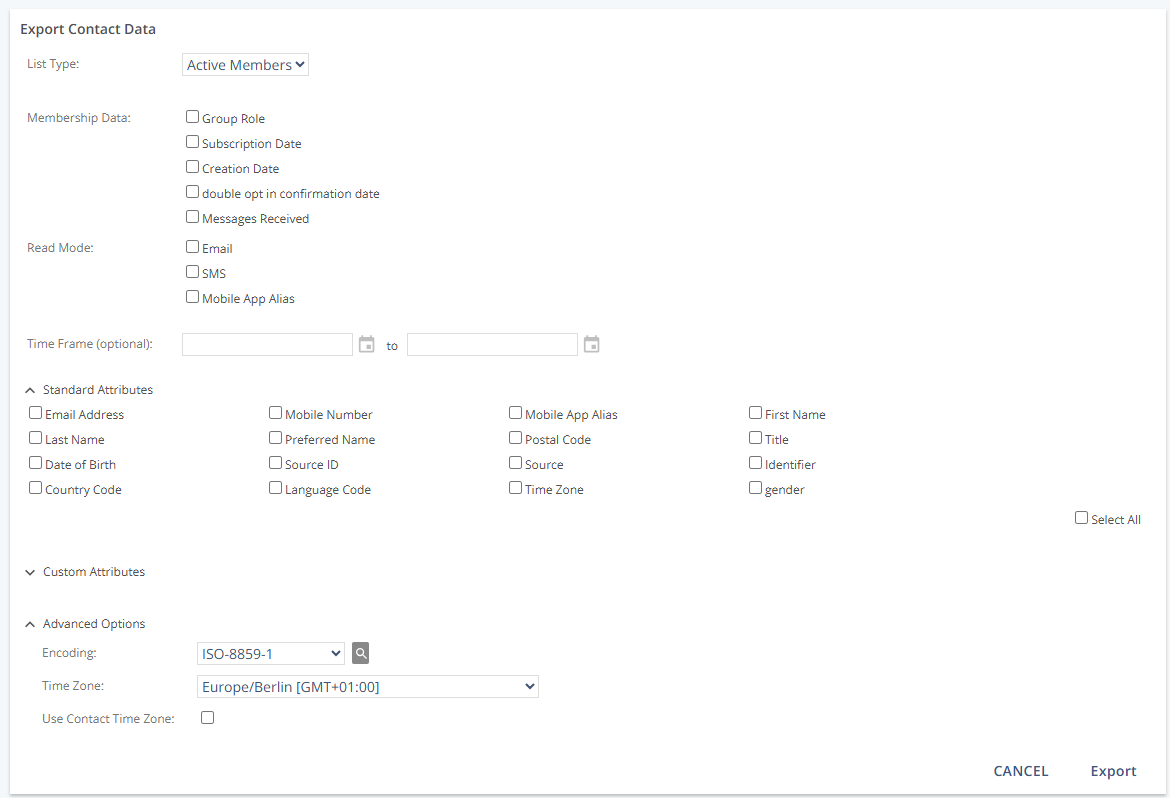
Settings
List Type
Determines which group members are included. Additional options appear based on the selected list type.
Setting | Description |
|---|---|
All Members | Exports all members of the group. |
Active Members | Exports contacts with active member status. |
Self-subscribers | Exports contacts who enrolled themselves (for example, via a subscription form). |
Unsubscriptions | Exports contacts who unsubscribed from the group (for example, via an unsubscribe link). |
Deactivated | Exports contacts with deactivated member status. Deactivated members no longer receive group messages. The contact can still be a group member even if deactivated system-wide. |
Pending | Exports contacts who have not yet accepted an invitation to become a member and have “Pending” or “Awaiting Approval” status. |
Membership Data
Includes additional group-membership information for each exported contact.
Setting | Description |
|---|---|
Group Role | Exports the role assigned to the contact in this group. |
Membership Status | Exports the current membership status. |
Subscription Date | Exports the date the contact joined the group. For single opt-in, this is the add date; for double opt-in, this is when membership was confirmed. |
Creation Date | Exports the date the contact was added to the group. With double opt-in, the initial status is “Not Verified” or “Pending,” and the date does not indicate when the contact began receiving messages. |
Messages Received | Exports the number of messages received as a group member. |
Response Category | Exports the response type that caused deactivation (within the group). |
Deactivation Date | Exports the date of deactivation. |
Response Text | Exports up to 1000 characters from the system response the Mapp Engage system received when a message could not be delivered. |
Read Mode
Includes channel-specific preference settings.
Setting | Description |
|---|---|
Exports email preference settings. | |
SMS | Exports SMS preference settings. |
Mobile Push | Exports mobile push preference settings. |
Subscription Data
Setting | Description |
|---|---|
Subscription Date | Exports the date the contact joined the group (single vs. double opt-in behavior as above). |
Source | Exports the IP address used to subscribe. |
Source Address | Exports the IP address used for web-based double opt-in confirmation. |
Subscription Mode | Exports how the contact was added: Self (self-enrolled) or Added (added/imported by someone else). |
Opt-in Mode | Exports whether the group uses single or double opt-in. |
Executor ID | Exports the system user ID for imports that simulate self-subscription (such contacts appear as self-subscribers). |
Unsubscription Data
Setting | Description |
|---|---|
Unsubscription Date | Exports the date the contact was unsubscribed. |
Source | Exports the IP address used to unsubscribe. |
Unsubscription Mode | Exports how the contact was unsubscribed (self or during import). |
Message ID | Exports the message ID if the unsubscribe link contained a Mapp Engage message ID. |
Time Period (optional)
Limits the export to a date range.
Setting | Description |
|---|---|
From Date | Start date. If none is selected, the group’s creation date is used. |
To Date | End date. If none is selected, the current date is used. |
Attribute Filter
Filters exported contacts by up to two profile attributes (combined with AND).
Setting | Description |
|---|---|
Yes / No | Enables or disables the attribute filter. |
Select Attribute | Defines the profile attribute used as filter criteria. |
Equals | Defines the value the attribute must match to be included in the export. |
Standard Attributes
Selects which standard profile attributes to export. If a profile lacks data for an attribute, the export field is blank. Use Select All to include all standard attributes.
Setting | Description |
|---|---|
Email Address | Exports the contact’s email address. |
Mobile Number | Exports the contact’s mobile phone number. |
Mobile App Alias | Exports the mobile app alias. |
First Name | Exports first names. |
Last Name | Exports last names. |
Preferred Name | Exports a preferred name, which can differ from first or last name. |
Postal Code | Exports the postal code. |
Title | Exports a numeric prefix value: “1” = Mr., “2” = Ms., “-1” = No data. |
Date of Birth | Exports date of birth. |
Source ID | Exports the associated source ID. |
Source | Exports how the contact was added (examples: “Web”, “Add”, “Import”, “Connect”). |
Identifier | Exports the external identifier. |
Country Code | Exports the ISO-3166 country code. |
Language Code | Exports the ISO-639-1 language code. |
Time Zone | Exports the contact’s time zone. |
Custom Attributes
Selects which custom attributes to include. Use Select All to export all custom attribute data.
Member Attributes
Select which group-specific member attributes to include. Use Select All to export all member attribute data. Empty profile fields are exported as blank.
Advanced Options
Defines file-level options and how dates/times are represented.
Option | Description |
|---|---|
Encoding | Defines the character set for the contact list export. |
Time Zone | Selects the time zone used for subscription and unsubscription timestamps. |
Use Contact Time Zone | Overrides the Time Zone selection and uses each contact’s profile time zone; if none is set, the group’s default time zone is used. |
Example: Impact of Time Zone Settings
Scenario: Two contacts unsubscribe at exactly the same moment (12:00 UTC).
Contact A lives in Berlin (time zone: Europe/Berlin, UTC+1 / UTC+2 with daylight saving).
Contact B lives in New York (time zone: America/New_York, UTC–5 / UTC–4 with daylight saving).
The group’s default time zone is set to Europe/Berlin.
When “Use Contact Time Zone” = Off
Both unsubscribes are recorded using the group’s default time zone (Europe/Berlin).
Export shows both unsubscribes as 13:00.
When “Use Contact Time Zone” = On
Contact A’s unsubscribe is exported as 13:00 (Berlin local time).
Contact B’s unsubscribe is exported as 08:00 (New York local time).
Each timestamp matches the contact’s individual profile time zone.
Result:
Off = consistent timestamps across the file (easier for group-level analysis).
On = accurate local times for each contact (useful for personalized reporting).
Actions
Action | Description |
|---|---|
Export | Generates the CSV file with the selected data. A notification email with a link to the file is sent to the system user who started the export. The export is retained in the database for seven days. |