Overview
Use the Export Conversion Tracking Statistics step to download key conversion data, such as purchases, message impact, and attribute-specific filters, into a structured CSV file. This enables further analysis of campaign performance and user behavior based on collected tracking data.
Navigation Path
Administration > Categories > Conversion Tracking
In the Actions column, click Export
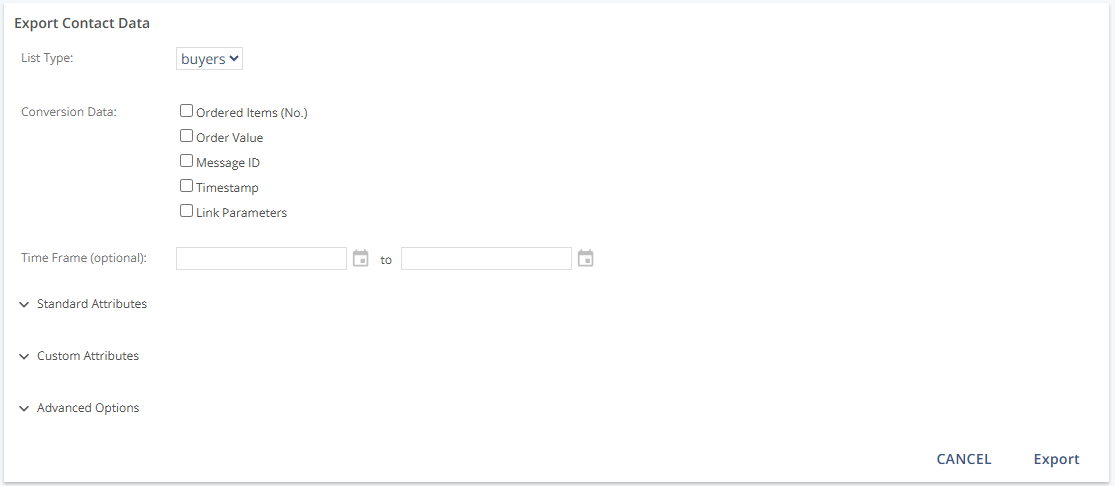
Settings Table
Setting | Description |
|---|---|
List Type | Defines the group or list of contacts included in the export. |
Conversion Data | Select the types of tracked conversion information to include:
|
Time Frame (optional) | Restricts exports to a specific date range.
|
Standard Attributes | Choose which standard profile fields to export. Includes: Email Address, Mobile Number, First Name, Last Name, Preferred Name, Postal Code, Title (Mr./Ms./No data), Date of Birth, Source ID, Source, Identifier, Country Code (ISO 3166), Language Code (ISO 639-1), Time Zone |
Custom Attributes | Select custom contact fields to include in the export. Use Select All to include all custom fields. |
Advanced Options |
|
Actions
Action | Description |
|---|---|
Export | Initiates the export process. Once the file is ready, a download link is sent via email. The CSV is stored for 7 days and includes column headers for easy data interpretation. |
Additional Information
The field will appear blank in the export if a contact profile lacks a selected attribute.
For more information on URL parameters, see: Add Parameter to a Link Manually
CSV files are available via a secure email link and can be downloaded within 7 days.