Overview
Post-purchase emails utilize the Mapp Fashion outfit engine to automatically generate complete outfits based on the item a customer has just purchased. Each outfit is built around the purchased item. When multiple items are bought, the highest-value fashion garment is used as the anchor product. The outfit engine then adds complementary products using styling rules and enriched attribute logic.
The engine evaluates attributes such as silhouette, fit, material, and style category to assemble fully coordinated looks rather than simple related-product suggestions. For each eligible purchase, the system typically generates two outfits, often representing different styling directions such as casual and formal, to illustrate the versatility of the purchased item.
This use case helps retailers extend post-purchase engagement and reinforce confidence in the purchased item. It also encourages shoppers to explore additional products that match the styling context.
If a product shares a Set ID with the purchased item, it is prioritized as a pairing here too. See this page for more details.
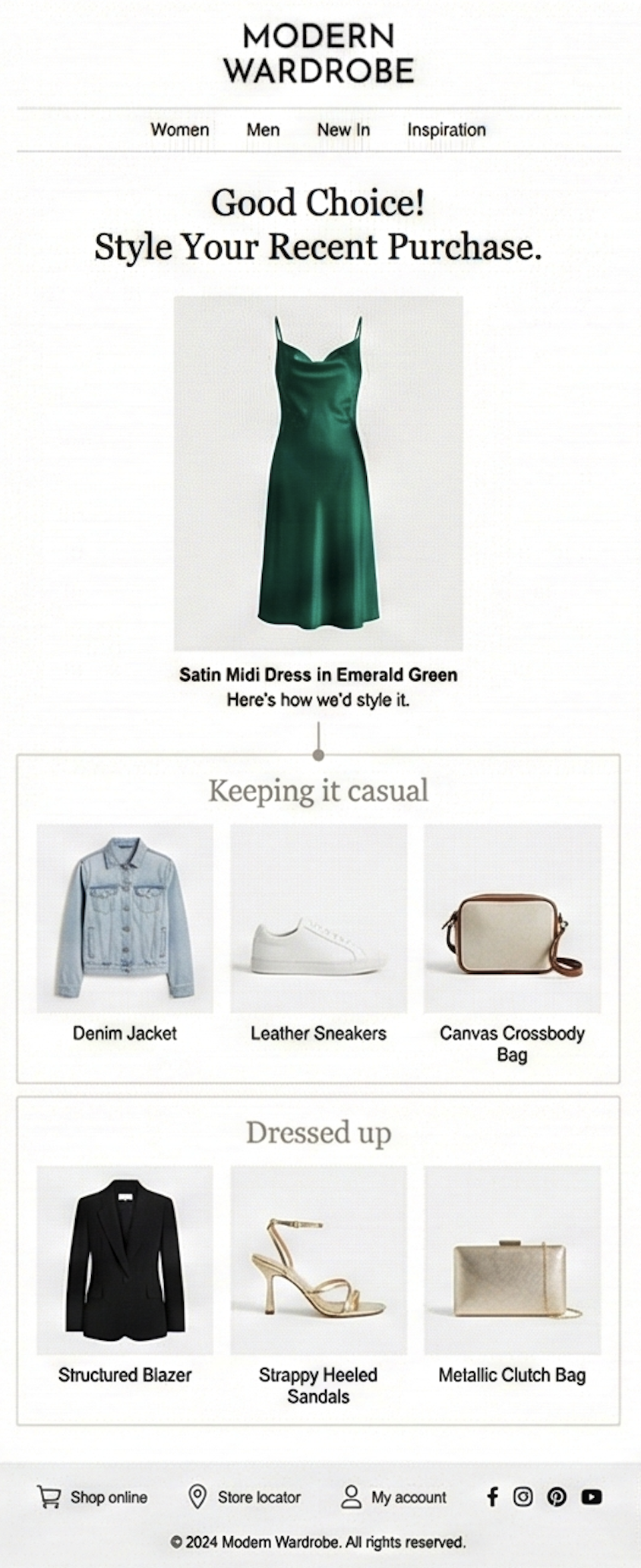
Post-purchase email showing outfit recommendations for the purchased item.
Benefits
Extended Engagement: Keeps shoppers connected with the brand after purchase.
Higher Repeat Visits: Encourages shoppers to return with new outfit inspiration.
Increased Cross-Sell Potential: Surfaces complementary products that complete the look.
Styling Reassurance: Shows ways to wear the item, helping shoppers feel good about their purchase.
Integration
Configuring post-purchase emails involves collaboration with the Creative Team to ensure image layouts and visual elements match your brand’s design.
Setup Steps
Define styling logic and outfit templates: Mapp configures the styling rules used to generate outfits for your brand. These rules guide how product types are paired (e.g., which shoes match a dress silhouette) and which outfit templates (such as Evening or Casual) apply to the styling strategy.
Review and approve visual layouts: The Creative Team prepares the image layouts and visual design elements. You review and approve the final layouts to ensure brand consistency.
Pass the purchase details: For each email, your email tool fills in the send ID, the SKU of the purchased item and the customer ID in the links. For post-purchase emails, the send ID is typically the order ID. If several items were bought, use the item with the highest value.
Generate and deliver image-based recommendations: Mapp produces the final outfit recommendation blocks as images, delivered as simple
<a>/<img>embeds. No API calls or custom code are required.Embed and schedule in your ESP workflow: Insert the generated images into your post-purchase email template and proceed with your standard preview, testing, and send-out steps.
Requirements
For the link format and its parameters, see Outfit Emails. For the requirements, see the column Outfit Emails in the Prerequisites Matrix.
For which identifiers to use, see Product and Customer Identifiers.