1 Introduction
Mapp Engage provides a flexible messaging framework to communicate with your contacts across multiple channels, including email, mobile, and web. Messages can be used for marketing campaigns, transactional updates, or system notifications.
Note: The availability of features depends on the selected channel. Some functions (e.g., personalization, rendering tests, inbox monitoring) are only available for email, while others (e.g., push or SMS) have their own limitations.
2 Common Use Cases
2.1 Marketing Campaigns
Run targeted promotions via email, SMS, push, and web push.
Coordinate timing with the calendar view to avoid overlaps and maximize impact.
Test and refine content through A/B testing, rendering checks, and inbox monitoring before sendout.
Control communication frequency with message limitation rules to avoid overwhelming contacts.
2.2 Transactional Messages
Deliver critical updates such as receipts, order confirmations, and password resets exactly when needed.
2.3 System Messages
Send system notifications for account changes, subscription confirmations, or password resets.
2.4 Automated and Triggered Messages
Respond to user actions instantly with automated single messages (e.g., abandoned cart reminders, birthday greetings).
Build multi-step journeys using whiteboards and automations to deliver messages at the most relevant moments.
2.5 Personalization and Engagement
Customize content with dynamic fields and variables for higher relevance.
Adapt messaging to audience behavior to improve engagement and conversion.
2.6 Performance and Optimization
Analyze performance with detailed statistics to track opens, clicks, conversions, and refine strategy.
Visit our Use Case library for inspiration.
3 Message Channels
We support multiple communication channels so you can reach your audience where they are most active. Each channel has its own strengths and use cases, and you can combine them in cross-channel strategies to increase impact.
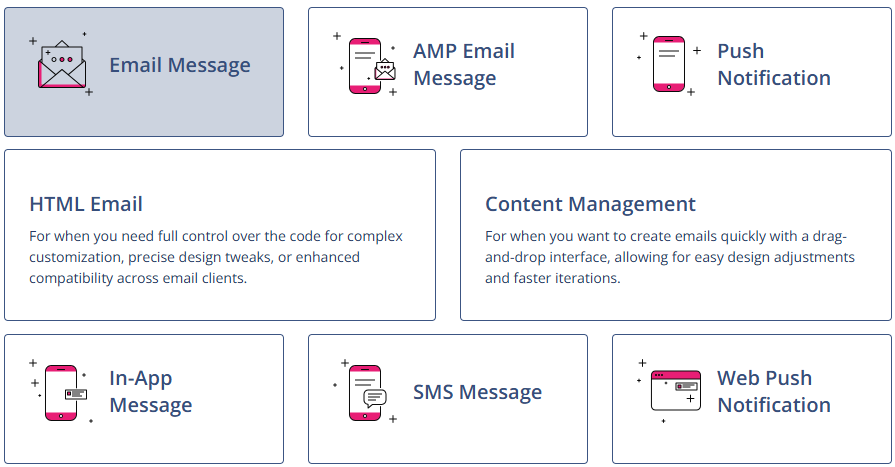
Note:
Some channels, such as SMS, mobile push, in-app, or web push, must be activated and set up before use. Please contact your customer success manager or account manager to enable these channels in your system.
Email Message – HTML or CMS emails.
AMP Email - interactive email campaigns.
Mobile Push – notifications sent to a mobile app.
In-App Message – messages displayed inside a mobile app.
SMS Message – short text messages to mobile numbers.
Web Push Notification – browser-based push messages.
4 Message Types
4.1 Group Messages
Sent to some or all members of a group.
Each sendout has its own Message ID (MID) and statistics.
Subject to message limitation rules.
For more information, see Group Messages and Single Messages in Mapp Engage.
4.2 Single Messages
Sent to one specific contact.
Commonly used for personalized, automated, or system-triggered communication.
Includes automated replies and externally triggered single messages.
Excluded from message limitation.
For more information, see Group Messages and Single Messages in Mapp Engage.
4.3 Transactional Messages
Triggered by external events, such as purchases or registrations.
Identified by a transactional message ID (TMID) for individual tracking.
Used for receipts, confirmations, and account-related notifications.
Can be sent via API or automations.
Must comply with legal consent requirements - TMIDs do not override permissions.
For more information, see Transactional Messages.
4.4 System Messages
Notifications automatically sent by Mapp Engage for system events.
Group (General), Group (Specific), and System-Wide options.
Delivered by email (default) or SMS.
Can be customized or templated for branding and tracking.
For more information, see System Messages.
5 Message Lifecycle
5.1 Email and SMS
Outbox: Shows all scheduled, sent, and processing email and SMS messages.
Draft Messages: Saved messages that are not yet scheduled or assigned.
Prepared Messages: Assigned to a group, reusable in Whiteboards, and editable anytime.
5.2 AMP, Push, In-App, SMS, Web Push
Dedicated overview pages offer insights and management options for messages in all stages of their lifecycle. To access the overview page, go to Messages > AMP Email / Push Notifications / Web Push Notifications / In-App Messages.
5.3 Calendar
The Calendar offers a consolidated, time-based view of all scheduled and sent messages across channels. It includes filtering by channel, message type, and sendout status.
6 Optimization and Testing
6.1 A/B Testing (Split Sendouts)
Send different versions of a message to a test group.
Evaluate success by open, click, or conversion rates.
The winning version can be sent automatically to the remainder.
For more information, see Split Sendout.
6.2 Inbox Rendering
Sends test emails to real clients and devices to preview design and layout.
For more information, see Inbox Rendering.
6.3 Inbox Monitoring
Uses Validity’s Everest platform to measure inbox placement, IP reputation, and delivery speed.
Run tests before the main sendout to optimize deliverability.
For more information, see Inbox Monitoring.
7 Personalization and Variables
7.1 Personalization
Personalization adds recipient- or group-specific content to messages. Available for email, SMS, and push.
For more information, see Personalization.
7.2 Variables
Variables insert standardized content automatically across all recipients, such as disclaimers or links.
For more information, see Mapp Engage Variables.
8 Whiteboards
Whiteboards enable time-based or event-based workflows.
They provide a visual interface for building multi-step marketing journeys.
Messages can be sent automatically in response to user activity or scheduled events.
Transactional messages can also be triggered from Whiteboards.
For more information, see Whiteboards.
9 Statistics and Reporting
Message History – view individual contact activity for any message.
Single Message Statistics – analyze opens, clicks, and conversions for single messages.
Group Message Statistics – track the performance of each group sendout separately.
Raw Data Export – export results to external CRM or BI tools.
API Polling – retrieve message responses using the API.
For more information, see Statistics.
10 Message Limitation
Restricts how many marketing messages a contact receives.
Default limit: 9 per day, cannot be overridden.
Additional system-wide or contact-specific limits are possible.
Excludes system and single messages.
For more information, see Limitations.