Overview
View the complete history of messages sent to a specific contact, including sendout details, delivery status, and engagement indicators. This helps verify communication activity, troubleshoot delivery issues, and audit what a contact received.
Note: If a message is deleted from the system, message statistics and the preview are removed; the entry remains listed in the message history.
Navigation Path
Go to Audience > Contact Management > All Contacts
In the Actions column, select Message History for the desired contact.
You can use the input fields in the table header to search by name, address type (“email”, “SMS”, or “mobile app alias”), or external identifier.
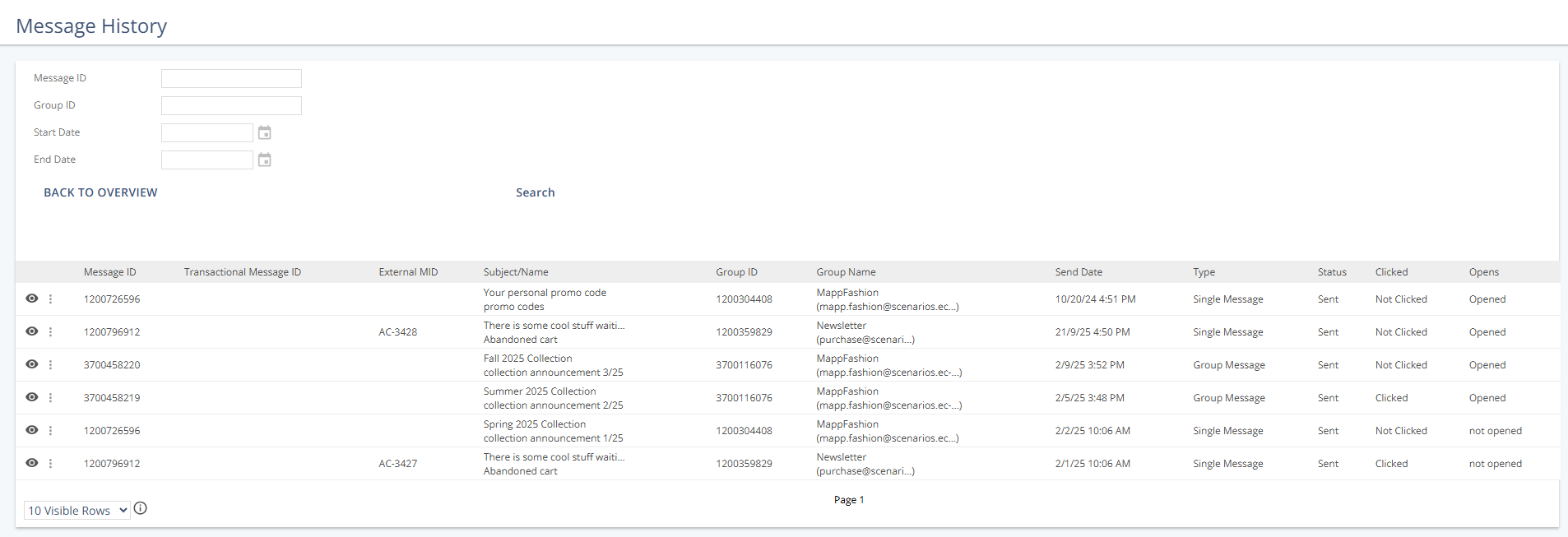
Settings
Search Fields
Use these fields to refine which messages are shown for the selected contact.
Setting | Description |
|---|---|
Message ID | Searches for a specific message by its full message ID. Partial values are not supported. Each group sendout receives a unique message ID. Single messages that are sent with a prepared message share a message ID. |
Group ID | Searches for messages sent within a specific group by its full group ID. Partial values are not supported. |
Start Date | Shows messages sent on or after the selected date. |
End Date | Shows messages sent on or before the selected date. |
Message Information
The message history lists one row per message sent to the contact.
Column | Description |
|---|---|
Message ID | The unique identifier assigned to a message sendout. Each group sendout receives a new, unique MID. All single messages sent with a prepared message share a message ID. |
Transactional MID | The transactional message ID (TMID), if available. Identifies which transactional message was sent to the recipient. Without a TMID, individual single sendouts of a prepared message cannot be distinguished. |
External MID | The external message ID, if available. Added to links during sendout and transmitted to external systems (for example, a web analytics tool or e-commerce shop). |
Subject | The required subject of the message as shown in the recipient’s inbox. |
Name | The internal message name used for identification elsewhere (for example, in statistics). Not visible to recipients. |
Group ID | Shows the unique ID of the sendout group. |
Group Name | The name and email address of the sendout group. |
Send Date | The date and time the message was sent (for email: when the message reached the Mapp MTA). The timestamp is shown in the current system user’s time zone. |
Type | The message type:
|
Status | Delivery status:
|
Clicked | Link engagement: • Clicked: The recipient clicked at least one link. • Not Clicked: No clicks were recorded, and link tracking was not active for the group. For SMS messages, Not Clicked is displayed. |
Opens | Shows whether the recipient opened the message. |