Overview
The Outbox view provides access to all scheduled, sent, and processing email messages in Mapp Engage. Users can track delivery statuses, manage sendouts, and access message details and statistics. This view supports quality assurance, auditing, and follow-up activities after sendouts.
Permissions
The following permissions may be relevant:
Permission 602 Messaging: Moderate messages - to moderate messages.
Permission 605 Messaging: View Sent Messages - to see the messages.
Permission 608 Messaging: View Message Statistics - to see the KPIs and a link to statistics.
Permission 618 Messaging: Schedule Message Sendout - to reschedule a message.
Navigation path
Messages > Outbox > Email
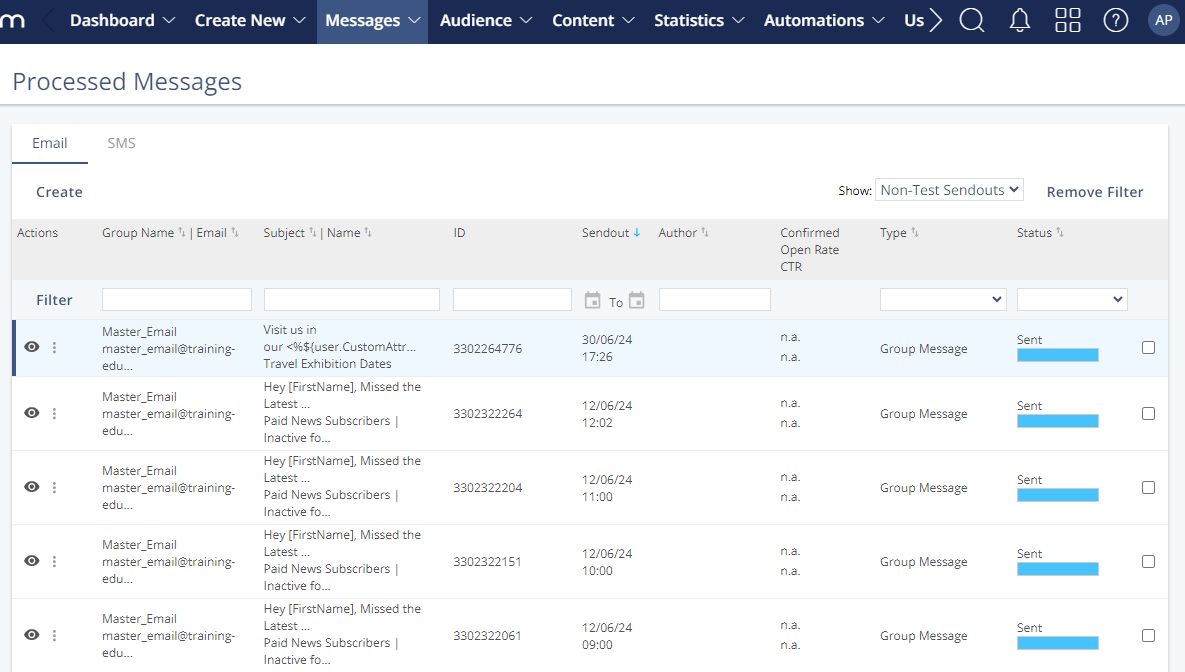
This view does not display system or group messages sent by automation.
Split sendouts have dedicated statistics visible in the Details for Split Sendouts panel.
Settings
Setting | Description |
|---|---|
Group Name | Email | Shows the target group name and the sender email address. |
Subject | Name | Displays the subject line of the email and internal message name. |
ID | Unique system identifier for the message. |
Sendout | Timestamp when the message was (or is scheduled to be) sent. |
Author | The user who created or initiated the sendout. |
Confirmed Open Rate | CTR | Engagement data, if available: confirmed opens and click-through rate. |
Type | Indicates the type of message, such as “Group Message.” |
Status | Delivery status of the message:
|
Actions
Action | Description |
|---|---|
View | Opens message details and metrics. |
Copy | Duplicates the message setup for reuse. |
Archive | Moves the message to an archive to clean up the list view. |
Delete | Permanently removes the selected message. |
Cancel / Pause / Resume Sendout | Manages the timing of eligible sendouts. |
Edit Links | Modify links in a sent message post-delivery. |
Approve / Reject | Used for messages that require moderation before sending. |
Switch to SMS Tab | Navigates to the outbox view for SMS messages. |
Details
This panel shows additional data for a selected email message. The information varies depending on whether the message is a group or single sendout.
.png "image(617).png")
Field | Description |
|---|---|
External Message ID | A unique identifier appended to message links during sendout. Useful for tracking performance in external systems such as web analytics or eCommerce platforms. |
From Address | The sender address shown to recipients. It may differ from the group’s email address and is defined in the group settings. |
Size | The estimated size of a personalized standard message. Actual message size may vary by recipient. |
Category | A keyword used to organize and tag related messages for easier search and segmentation. |
Attachments | Lists any files attached to the email. |
Processing Start | The timestamp when message processing began. Can start up to 72 hours before transfer. |
Processing End | Time when message processing completed. If empty, processing is still in progress. |
Processing Duration | Total time taken for processing. If blank, processing hasn't started. |
Transport Start | Time when message delivery (transport) began, as set in message scheduling. |
Transport End | Timestamp when all messages finished transferring. If blank, delivery is ongoing. |
Transport Duration | Total time taken to complete delivery. If blank, delivery has not yet started. |
Group Size | Number of active contacts in the target group at sendout time. Excludes blacklisted addresses. |
Selection | The selection filter (if any) applied to define the target audience. Empty if no filter was used. |
Skipped | Number of contacts excluded from sendout (e.g., deactivated or blacklisted addresses). Details are available in the statistics view. |
Messages Sent | Total number of emails sent by Mapp Engage's Mail Transfer Agent (MTA). |
Hard Bounces | Messages permanently rejected by the recipient’s server (e.g., due to non-existent email addresses). |
Accepted | Number of emails accepted by the recipient’s MTA. Includes messages that landed in spam or junk folders. Only shown for group messages. |
Confirmed Openers | Count of unique recipients who opened the message, based on pixel tracking or link clicks. Group messages only. |
Clickers | Unique recipients who clicked at least one link in the email. Available for group messages only. |
Conversions (Unique) | Unique recipients who completed a defined conversion event (e.g., purchase). Displayed only for group messages. |
Details - Split Sendouts
Field | Description |
|---|---|
Main Sendout Criteria | Lists the evaluation criteria defined during split setup. These criteria determine which variation was selected as the main sendout. |
Date Sent (Main Sendout) | The timestamp when the winning version (main sendout) was delivered. |
Number of Variations | Indicates how many message variations were tested, and what percentage of the group received them. This excludes the main sendout. |
% of Group Size | Shows the portion of the group used for the initial split test. |
Attribute for Uniform Distribution | Specifies the attribute used to evenly distribute contacts across variations. If not specified, “Random” is shown to indicate random assignment. |