Overview
The SMS Outbox provides a centralized location to view and manage your scheduled and sent SMS messages. This interface supports message moderation, rescheduling, and access to message performance metrics when permissions allow.
Background Information
Only messages that are sent manually to groups or through automations as single sendouts are listed.
System messages and automated group sendouts are excluded.
Due to SMS limitations, interaction tracking (like opens or clicks) is unavailable.
Permissions control visibility and access to various features:
605: View Sent Messages
608: View Message Statistics
618: Schedule Message Sendout
Navigation Path
Messages > Outbox > SMS
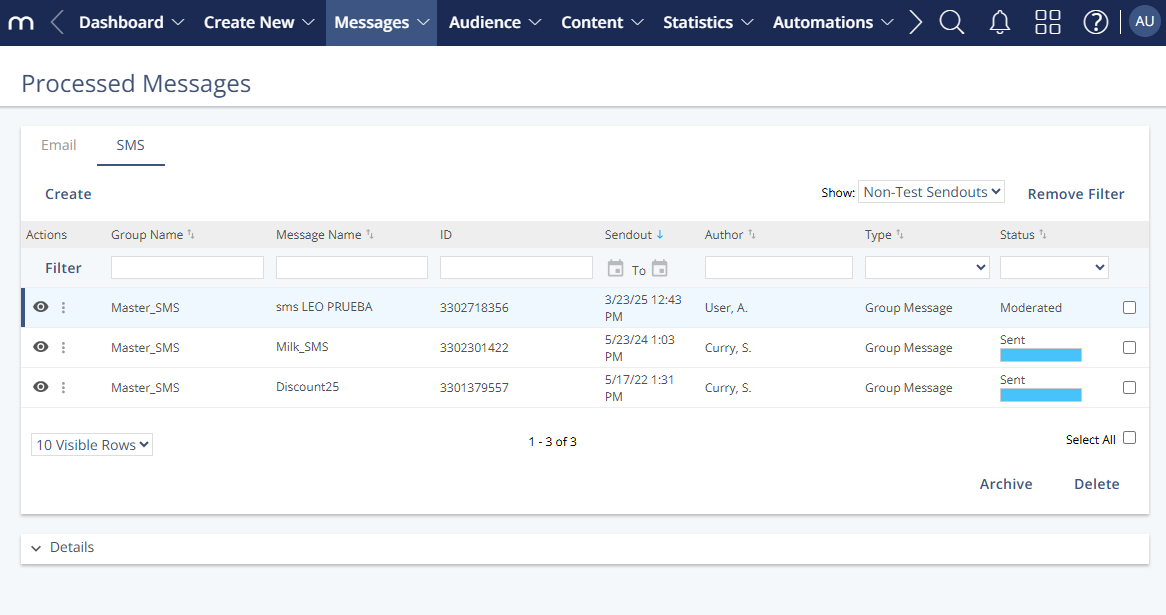
Settings
Setting | Description |
|---|---|
Status | Displays the current state of the SMS (e.g., sent, scheduled, failed). |
Subject / Message Name | Indicates the name or subject line of the SMS message. |
Send Date | Shows the time and date when the message was or is scheduled to be sent. |
Target Group | Lists the group of recipients assigned to the message. |
Moderation Status | Displays whether the message is pending approval, approved, or rejected (if moderation is used). |
KPIs | Shows basic performance indicators for sent messages (requires permission 608). |
Details | This opens a panel with more information about the selected message. The content varies by message type (group vs. single sendout). |
Actions
Actions for Scheduled SMS Messages
Action | Description |
|---|---|
Edit | Modify the content or settings of a scheduled SMS message. |
Reschedule | Change the scheduled send time (requires permission 618). |
Cancel | Stop a message that is scheduled but has not yet been sent. |
Delete | Remove the message from the outbox before it is sent. |
Approve / Reject | Manually approve or reject a message if moderation is enabled. |
View | Open and inspect the content and setup of the message. |
Actions for Sent and Prepared SMS Messages
Action | Description |
|---|---|
View | Open and inspect the content and settings of the message. |
Copy | Create a duplicate of the message for reuse. |
View Statistics | Access key performance indicators and metrics (requires permission 608). |
General Actions
Action | Description |
|---|---|
Archive | Moves the SMS message out of the active outbox view. Useful for decluttering the interface. |
Reactivate | Returns an archived SMS message to the active view, making it visible again for tracking or action. |
Delete | Permanently removes the message from the system. This action cannot be undone. |
Details
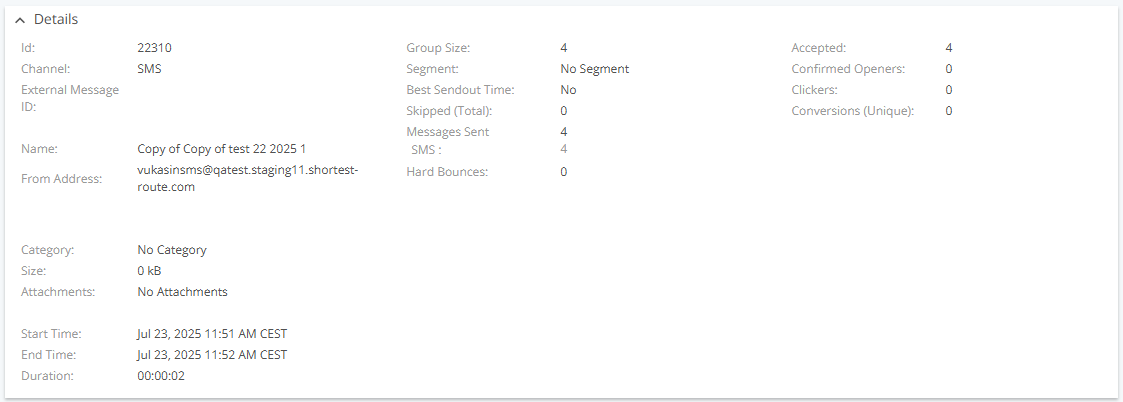
Setting | Description |
|---|---|
Channel Type | Always “SMS” for messages in this view. |
External Message ID | Optional tracking ID added to message links. Helps match sendout data with analytics or e-commerce tools. |
Size | Estimated message size based on personalization logic. Final size may vary per recipient. |
Attachments | Not applicable for SMS messages. |
Category | Custom label to organize and classify messages. Useful for filtering and reporting. |
Start Time | The time when Mapp Engage began delivering the message. |
End Time | Not available for SMS. |
Duration | Not available for SMS. |
Group Size | The number of active members in the group at the time of sendout. It may differ from the final count due to exclusions like blacklists or selections. |
Segment | Name of the selection applied to the sendout, if any. A selection filters contacts based on defined criteria for targeted delivery. |
Skipped | Number of addresses excluded before sendout due to conditions such as blacklisting or missing contact data. Specific reasons are available in the Skipped Messages tab in Statistics. |
Messages Sent | Total number of messages Mapp Engage successfully sent. |
Hard Bounces | Number of failed deliveries due to permanent issues. Refer to View SMS Statistics for more details. |
Accepted | Not available for SMS. |
Confirmed Openers | Not available – SMS does not support open tracking. |
Clickers | Not available – SMS does not support click tracking. |
Conversions (Unique) | Not available – SMS does not support conversion tracking. |