With the help of additional page parameters, you can measure the effectiveness of publishers' websites.
To create publisher page parameters, proceed as follows:
Log in to your Mapp Q3 account and go to Configuration > Custom Parameters > Page Parameter > Create new custom parameter.
Add title and select from the preconfigured dropdown list one of the predefined parameters, which are used for publisher tracking:
Article heading
Page title
Page type
Page length
Days since publication
Paywall calls
Content tags
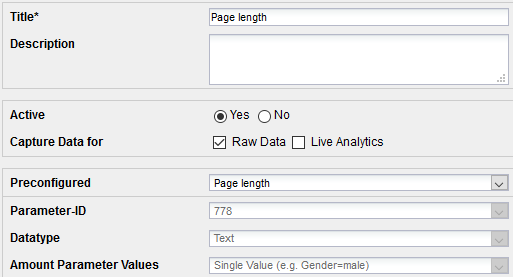
Click Save to save your settings.
Settings
Article title
Pass the current article headline here.
Manual tracking
wts.push(["articleTitle", "Article heading"]);Page title
Pass the page title here.
Manual tracking
wts.push(["pageTitle", "Title of the page"]);Page type
Pass the page type here.
Manual tracking
wts.push(["pageType", "Type of page"]);Page length
Pass the page length here, i.e. short, medium, long.
Manual tracking
wts.push(["pageLength", "Length of the page"]);Days since publication
Pass the number of days since the publication of the current content here.
Manual tracking
wts.push(["daysSincePublication", "3"]);Paywall calls
Pass the info if the user saw a paywall here.
Manual tracking
wts.push(["paywall", "1"]); // Paywall calls [1, 0]Content tags
Pass the tags of the content here.
Manual tracking
wts.push(["contentTags", "Tags of an article"]);