Overview
The Related Data Overview provides a consolidated list of all related data sets available in the system. From here, users can review existing datasets, check their status, and perform actions to manage structure, ownership, and data content. This overview helps keep related data organized and accessible for use in personalization, segmentation, and automation scenarios.
Navigation path
Administration > Attributes > Related Data
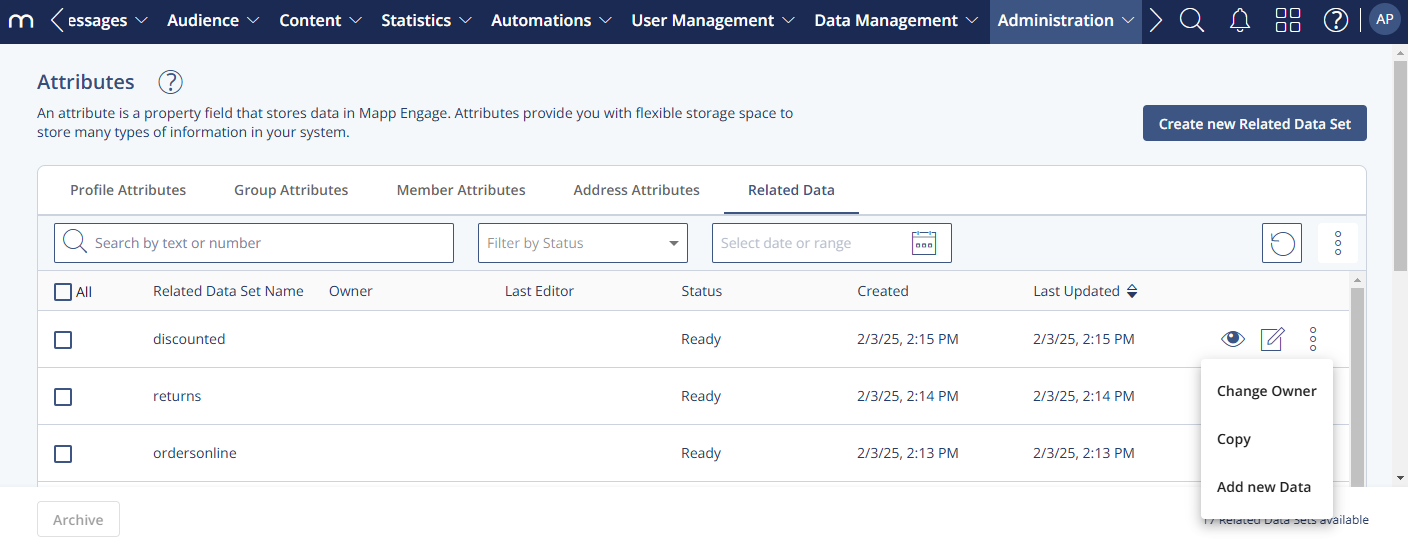
Settings
Column | Description |
|---|---|
Related Data Set Name | Name of the related data set. |
Owner | User responsible for the related data set. |
Last Editor | User who last modified the related data set. |
Status | Current state of the data set, for example “Ready” or archived. |
Created | Date and time when the data set was created. |
Last Updated | Date and time of the most recent change. |
Actions
Action | Description |
|---|---|
Create new Related Data Set | Creates a new related data set. |
Edit | Changes metadata, descriptions, or linked attributes. |
Change Owner | Assigns a different owner to the related data set. |
Copy | Creates a duplicate of an existing related data set. |
Archive | Archives the selected data set to remove it from active use. |
Reactivate | Restores an archived data set. |
Delete | Permanently deletes the related data set. |