Goal
Reschedule or cancel a message sendout that is already scheduled but has not yet been sent.
Prerequisite
A message has been scheduled for sendout at a future date and time. Scheduled messages have the status Scheduled in the Status column and are saved in the Processed Messages Overview window (see Email Messages: Outbox or SMS Messages: Outbox).
Reschedule a Sendout
Note
Group-level sendout time frames (set in Group Sendout Options) can delay the sendout if they conflict with the time defined during preparation.
Go to Messages > Outbox > Email or Messages > Outbox > SMS.
In the Status column, apply the Scheduled filter.
Open the context menu next to the message you want to change, and click Reschedule.
In Message Transfer, enter the new date and time.
(Optional) To send in recipients’ local time, choose the desired time zone from the drop-down list.
Click Reschedule.
Cancel a Sendout
Go to Messages > Outbox > Email or Messages > Outbox > SMS.
Next to the message you want to cancel, select Cancel Sendout from the 3-dot menu.
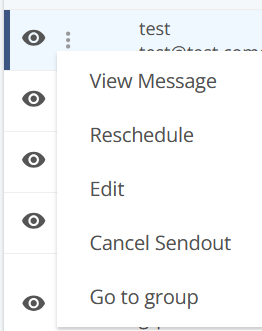
The sendout is cancelled. The message is saved and available for further editing in the Prepared Messages Overview window.