Overview
The final step of the SMS message creation flow provides a complete overview of the configured message and sendout settings. Users can verify all information, make last-minute changes, preview the message, and initiate or schedule the sendout.
Navigation Path
During message creation, follow the message creation process until you reach Summary.
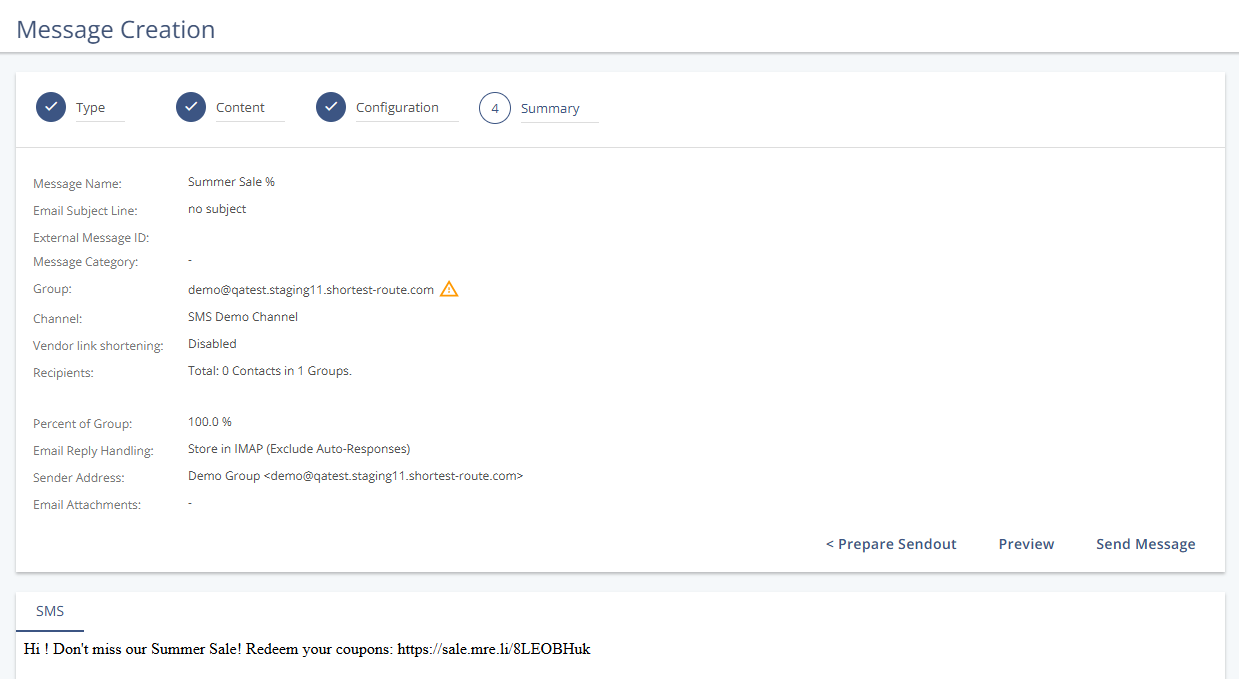
Sendout Information
Setting | Description |
|---|---|
Message Name | Internal name used to identify the SMS in Mapp Engage. Not visible to recipients. |
External Message ID | Internal tracking ID added to links. Not typically used in SMS messages. |
Message Category | An optional tag selected in the previous step to help categorize the message. |
Group | The group of recipients selected for the sendout. |
Message Channel | The SMS channel defined for the sendout. |
Vendor link shortening |
|
Recipients | Shows the estimated number of recipients, based on the selected group. |
Segment | Indicates any applied segmentation criteria to filter the recipient list. |
Percent of Group | Displays what portion of the group will receive the SMS. |
Email Reply Handling | Email-related setting that appears here by default but is not relevant for SMS. SMS reply handling is managed in the group settings. |
Email Subject Line, From Address, Attachments | Not applicable for SMS messages and displayed for consistency only. |
Actions
Action | Description |
|---|---|
Prepare Sendout | Returns to step 3 to edit sendout settings. |
Preview | Opens a preview window with test and display options for the SMS. |
Send Message | Immediately initiates the message sendout. |
Schedule Message | Schedules the message to be sent at a future time, based on previous settings. |
Send to Managers | Sends the message to group moderators for approval. Only visible when user permissions do not allow direct sendout. |