Before you can use the Adblocker Plugin, you must create the following session parameter in Mapp Q3:
Parameter | Description | Type |
|---|---|---|
Adblocker | Contains the name of the content element | preconfigured |
To create it, do the following steps:
Log in to your Mapp Q3 account and go to Configuration > Custom Parameters.
Open the Session Parameter tab. and click Create new custom parameter.
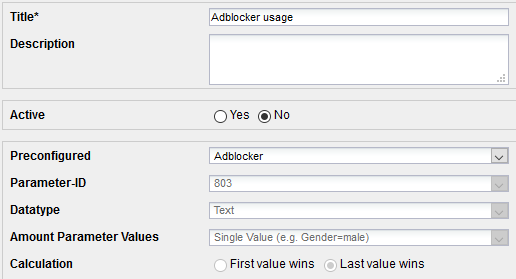
Make the following settings:
Parameter
Description
Title
Specify a title.
Description
Optional. Enter a short parameter description.
Active
Activate the parameter with the corresponding radio button.
Preconfigured
From the dropdown menu, select Adblocker
Click Save.