Custom formulas help you evaluate content engagement in a standardized and scalable way. You can use them to track key metrics across different pages or content types.
To create a custom formula, go to: Mapp Intelligence > Custom Figures > Custom Formulas and click Create Formula.
The configuration of the formula depends on the request configuration defined in your plugin setup (see Step 2 – Plugin Configuration). Two typical methods are described below.
A) Configuration: After reaching % of content
With this configuration, one tracking request is sent each time a defined visibility threshold is reached (e.g. 25%, 50%, 75%).
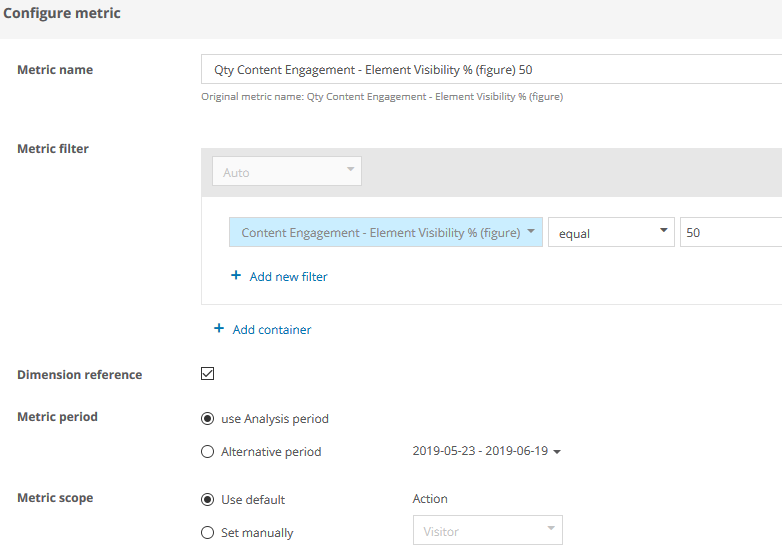
To evaluate how often at least 50 % of an element was visible, define a formula as follows:
Calculation: 
The first element of the formula is filtered as follows:
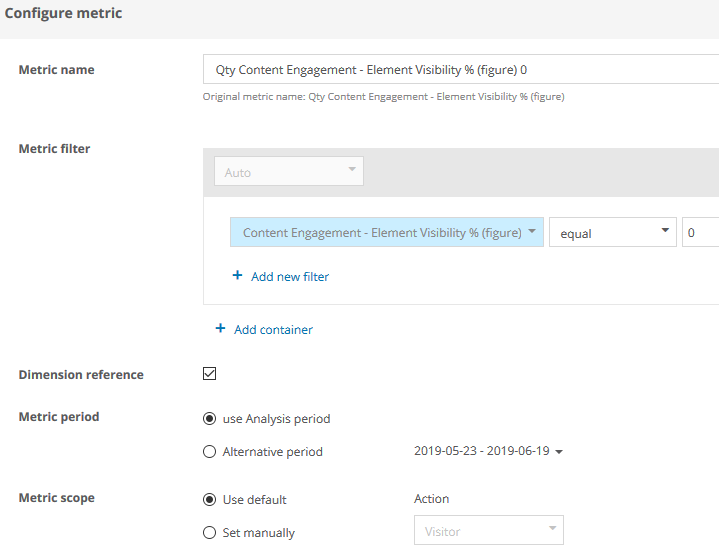
The second element of the formula is filtered as follows:
B) Configuration: On Leaving the Page
If you’re using the “on leaving the page” method, only one request is sent per page (or per visit, depending on the setup). In this case, you may want to evaluate the final visibility level per element.
Calculation:
The first element of the formula is filtered as follows:
