Introduction
Based on user interactions with products in your online shop, automated campaigns can be triggered in Mapp Engage. These campaigns help re-engage users who show purchase intent but do not complete a transaction.
The following abandoned activity scenarios are supported:
Abandoned Browse: A user views a product but takes no further action.
Abandoned Cart: A user adds a product to the cart but does not complete the purchase.
Wishlist: A user adds a product to a wishlist but does not purchase it.
To enable these use cases, product information must be made available in Mapp Engage. There are two supported integration methods, described below.
Integration Options for Product Data
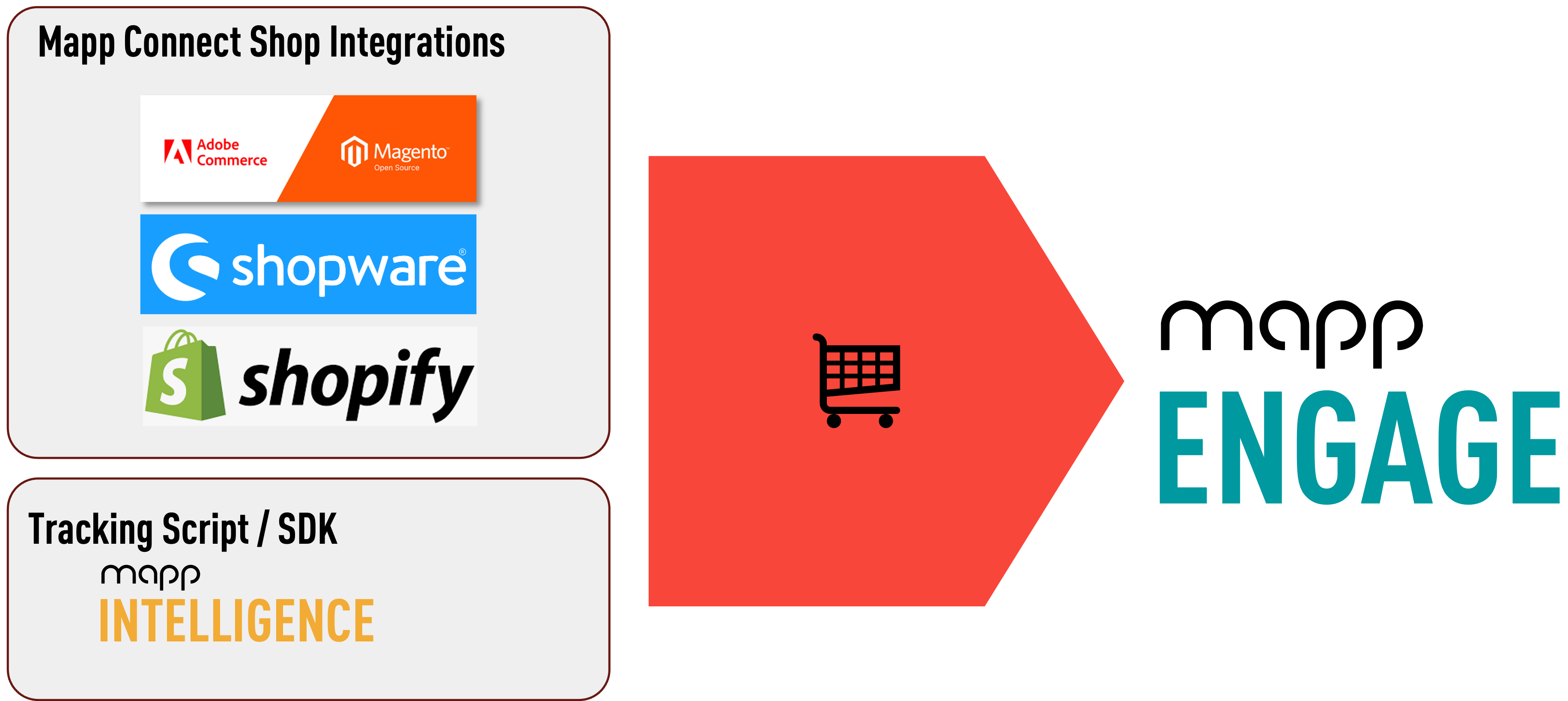
Product data can be provided to Mapp Engage using one of the following approaches:
Mapp Connect Shop Integration (Direct Import)
Mapp Intelligence Tracking Script or SDK (Web & App-Based Tracking)
Each option supports abandoned activity tracking but differs in setup, accuracy, and technical requirements.
Data Retention
Abandoned Browse data will only be kept 30 days, after which it is deleted. This does not apply to Wishlist or Abandoned Cart data.
Option 1: Mapp Connect Shop Integration (Direct Import)
With this option, your shop system sends product data directly to Mapp Engage via Mapp Connect. This method provides the highest data accuracy and is recommended whenever a supported shop integration is available.
Prerequisites
Configured Shop System: During configuration, map all the relevant product, wishlist, abandoned cart, and abandoned browse information via the mapping functionality in the Mapp Connect interface. The available mappings may differ depending on the shop system you are using.
See the respective integration documentation for more information:
Please look at Mapp Connect Basics and Mapp Connect How-Tos for more information.
Product information in Mapp Engage must be available in either the Product Catalog or Related Data. This is essential for the functioning of the predefined eCommerce tables (i.e., Wishlist, Abandoned Cart).
Option 2: Mapp Intelligence Tracking Script or SDK (Web & App-Based Product Tracking)
With this option, product data can be collected via web or app tracking and sent to Mapp Engage.
Supported Use Cases:
All use cases are supported: Wishlist, Abandoned Cart, and Abandoned Browse.
Easily integrates with all shop systems.
Supports website and app tracking.
Website tracking often relies on cookies and login information. However, long-term analyses based on this data might be inaccurate because some users employ tracking blockers or do not accept cookies. Track the email address as a customer ID to enable cross-device or cross-browser tracking. For more information, see Data quality for tracking options.
Prerequisites
User matching: User matching between Mapp Intelligence and Mapp Engage must be enabled. For more information, see Mapp Cloud User Matching.
Product information in Mapp Engage must be available in either the Product Catalog or Related Data. This is essential for the functioning of the predefined eCommerce tables (i.e., Wishlist, Abandoned Cart, Abandoned Browse).
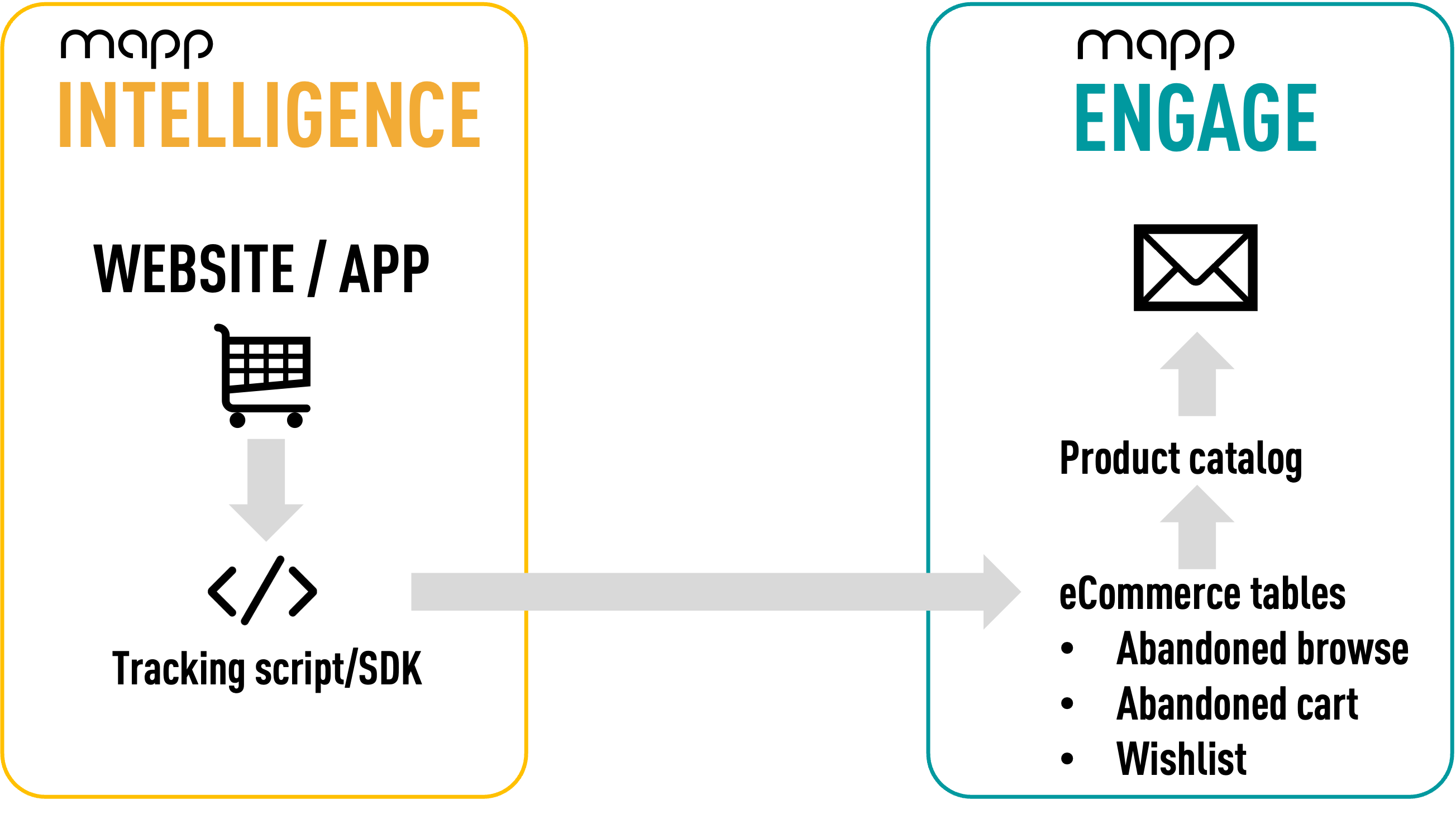
Product tracking: Must be activated in the Mapp Intelligence tracking script/SDK.
Use identical product identifiers
Please make sure that your are using the same unique identifiers for products in both, the Mapp Intelligence tracking script (productName parameter
ba) and the Mapp Engage product catalog (productSKU).