Categories are set up in Mapp Q3. To do so, click on Mapp Q3 > Configuration > Categories.
Various categories are available:
Category | Based on dimension |
|---|---|
Content Groups | Pages |
User Categories | Customer-ID |
Campaign Categories | Ad Media |
Media Categories | Media |
Product Categories | Products |
Time Categories | Date with Hours |
Click on "New Category" in the desired tab.
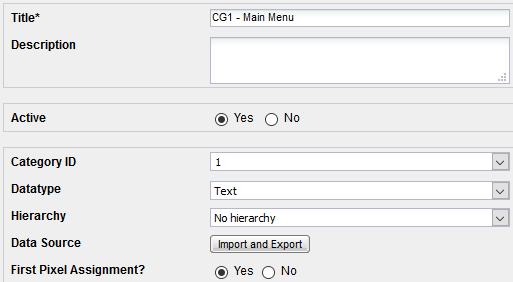
Field | Description |
|---|---|
Title | Shows the name of the category. Use a prefix (e.g. "CG" for content group) to group similar categories. Thus, for example, the categories are listed directly next to each other in the lists of dimensions and metrics. |
Description | helps others to understand what this dimension is good for. |
Active | In the case of deactivation, no data is collected, and the category will no longer be shown in the user interface. While this prevents analysis, the historical data will not be deleted. |
Category ID | This ID is used in Tag Integration or the standard pixel to assign values to this parameter. |
Datatype | When selecting "Text", this category is only available as a dimension, "Figure" is only available as a metric. Please note, that if you would like to use Figure as your data type, you must set constant to yes. |
Aggregation | If "Figure" is chosen as datatype, the figure type can be selected.
|
Constant (only when "Datatype" is set to "Figure" and "Aggregation" is set to "Quantity and Sum") | When "Constant" is chosen, the submitted value stays invariable independent of the number of accesses of the dimension. Example: Per import, a value of 100 is submitted in a product category for a jacket. The product is purchased ten times. |
With Time Reference (only when "Datatype" is set to "Figure") | The time reference allows the import of multiple values per day. |
Hierarchy (only when "Datatype" is set to "Text") | A tree of categories is built in Mapp Q3 (e.g., "Page Tree"). |
Data Source | Allows the export and import of this category. |
First Pixel Assignment | If set to "No," values submitted via the pixel are not tracked. This is only useful if incorrect data is submitted. |
Important
Categories must be set up prior to the data submission. This is necessary because the category is only read when the categorized dimension is first accessed.