In Mapp Intelligence, filters and containers can be negated, which means that you can explicitly exclude certain values or conditions from your analysis. Negation is only possible when the filter uses a dimension (not a metric).
1 Introduction
Negation allows you to exclude specific values or conditions from your analysis in Mapp Intelligence.
This is helpful when you want to focus on what did not happen, for example:
Visits that did not include a product view
Visitors who never used a tablet
Sessions in which no order was placed
Users who did not download a PDF during the selected time frame
There are different ways to set up such conditions: You can negate individual filters or an entire container that includes one or more filters.
At first glance, both approaches may seem similar, especially if the condition inside the filter or container is the same. However, they can lead to very different results depending on the scope and data structure.
The following sections explain the difference between these two methods and show practical examples to illustrate how filter- and container-level negation behave in different scopes.
2 Ways to Apply Negation
In Mapp Intelligence, there are two different ways to apply negation in filters:
Filter negation excludes specific values from the result, while keeping other values from the same dimension.
Container negation excludes an entire scope (such as a page, visit, or visitor) if a condition is fulfilled within that scope.
Although they may look similar at first glance, the result can differ significantly, especially when working with broader scopes such as Visits or Visitors.
2.1 Negating a Filter
Let’s start with a simple example: You want to analyze all visitors who did not use a tablet to access your website.
To do this, apply a filter on the dimension Device Class and exclude the value “Tablet”.

As a result, only sessions from other device types, such as desktop or smartphone, are included in your analysis.
This is a typical case of filter-level negation: A specific value is excluded from the result, while all other values from the same dimension are still included in the result.
2.2 Negating a Container
Unlike filter-level negation, where only a specific value is excluded, container-level negation allows you to exclude an entire session or user from the result, as soon as a defined condition is met.
This option is only available if the container has a fixed scope (e.g. Visits or Visitors). If the container still uses Auto Scope, negation is only possible at filter level. By negating a container, you tell the system: “If this condition is true anywhere in this session or for this user, then exclude the whole session or user from the analysis.”
Example: Exclude visits with a tablet-based purchase
Let’s extend the example in 2.1: You want to exclude all visits in which a tablet was used and an order was placed.
To do this, you create a container with the scope Visits, add both conditions inside, and negate the entire container.
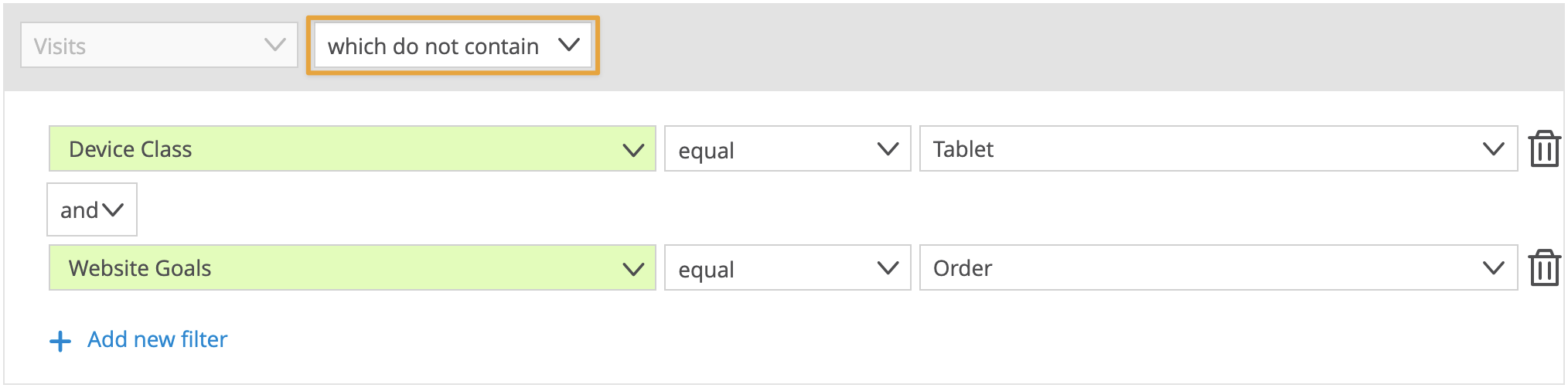
This excludes the entire visit as soon as both conditions are true.
3 Negation in Practice
Each example shows a user who performs various actions across two visits. We apply a negation in two different ways:
A single filter is negated.
An entire container is negated.
We then compare the impact this has on the analysis result.
All examples use a combination of the metrics Page Impressions and Visits. While the visualizations use a Page Analysis as the main example, the principles apply to other types of analyses as well.
3.1 Example: Page Scope – Contest Page
This scenario shows a visitor with two visits. In one of the visits, the page “Contest” was viewed.
We want to exclude all results related to this page.
Selected scope: Pages
Analysis type: Page Analysis
Filter is negated
We apply a filter on Pages not equal “Contest”.
.png)
Example 3.1 - Negated Filter
Result:
The page “Contest” is excluded. All other pages remain visible.
→ While all other values from the same dimension are still included in the result.
Container is negated
We place the same filter into a container with scope Pages and negate the container.
.png)
Example 3.1 - Negated Container
Result:
The result is identical. The page “Contest” is excluded. All other pages remain visible.
→ Since the container works in the same scope as the filter, there is no difference in this case.
3.2 Example: Visit Scope – Contest Page
This scenario shows a visitor with two visits. In one of the visits, the page “Contest” was viewed. We apply a filter in Visit scope to exclude the page Contest and observe the effect on the results depending on how the filter is negated.
Selected scope: Visits
Analysis type: Page Analysis
Filter is negated
We apply a filter on Pages not equal “Contest”, with the scope set to Visits.
.png)
Example 3.2 - Negated Filter
Result:
Both visits are shown. This is because the filter is evaluated at the visit level: as long as there is at least one page in the visit that does not match “Contest”, the entire visit is included.
→ All visits remain visible – even those that include the page Contest.
Container is negated
We now place the opposite filter – Page equals “Contest” – into a container with Visit scope, and negate the entire container.
.png)
Example 3.2 - Negated Container
Result:
The result excludes the entire visit that contains the page Contest. This is because the condition is evaluated at the visit level: if the condition “Page equals Contest” is met anywhere in the visit, the whole visit is excluded.
3.3 Example: Page Scope with Event Filter (Search Page)
This scenario shows a visitor with one visit. During this visit, two pages are viewed: Home and Search.
On the Search page, the user interacts with two different filters:
First, Filter Brand is used.
Then, Filter Price is used.
We apply a filter on the Filter Price event in Page scope and compare the effect of negating either the filter or the container.
Selected scope: Pages
Analysis type: Page Analysis
Filter is negated
We apply a filter on Event not equal “Filter Price” in Page scope.
.png)
Example 3.3 - Negated Filter
Result:
The Search page remains visible because not all interactions on that page include the excluded event.
In this case, the Search page is shown once, based on the interaction with Filter Brand, which was tracked before the excluded event occurred.
→ The page is included because there was at least one event (Filter Brand) that matched the filter condition.
Container is negated
We now place the opposite filter – Event equals “Filter Price” – inside a container with Page scope and negate the entire container.
.png)
Example 3.3 - Negated Container
Result:
The Search page is completely excluded.
Since the excluded event did occur on this page, the condition in the container was fulfilled—thus, the entire page is removed from the result, even though it also included other events like Filter Brand.
→ The entire page is excluded because the negated condition applied at some point during the page interaction.
4 Use Cases
The following examples illustrate typical questions that can be answered using negation, often by excluding visits or visitors based on specific behavior.
Note
These are just sample approaches. Depending on your setup, tracking configuration, and available data, there may be alternative or more precise ways to achieve the same result.
All Visits with no order
Show all visits in which no product was ordered.

All Visitors who have not downloaded a PDF
Identify users who didn’t download a PDF.

All Visits with no login
Show visits in which no login event occurred.
