Understanding filter scopes helps you get the most out of this page.
This guide builds on the concept of filter scopes in Mapp Intelligence – for example, how filters behave differently on the Action, Page, Visit, or Visitor level.
If you’re not yet familiar with scopes or need a quick refresher, check the page on Filter Scopes before continuing.
1 Introduction
When combining filters in Mapp Intelligence, you can choose between three logical operators: AND, OR, and THEN. This page focuses on how the AND operator behaves when filters are combined, either within a single container or across multiple containers.
A typical use case for combining filters with AND is the analysis of whether two specific interactions occurred within the same context, for example:
Page A and Page B were viewed during the same visit
The user came from Referrer X and landed on Page Y
Depending on the configuration, combining filters with AND may require additional container logic to work as expected. The following sections explain how AND behaves in different situations.
2 Combining with AND
You can combine filters with AND in two ways:
Inside a single container
Across multiple containers
Both options are valid. However, the way your filters are evaluated depends on the scopes involved.
2.1 Combining filters within a single container
When you place multiple filters in the same container and combine them with AND, the evaluation occurs based on the shared scope – meaning the narrowest scope that applies to all included filters (e.g., Page, Visit, or Visitor). This means that both conditions must be true within the same scope unit (e.g. the same page, visit, or visitor).
Examples:
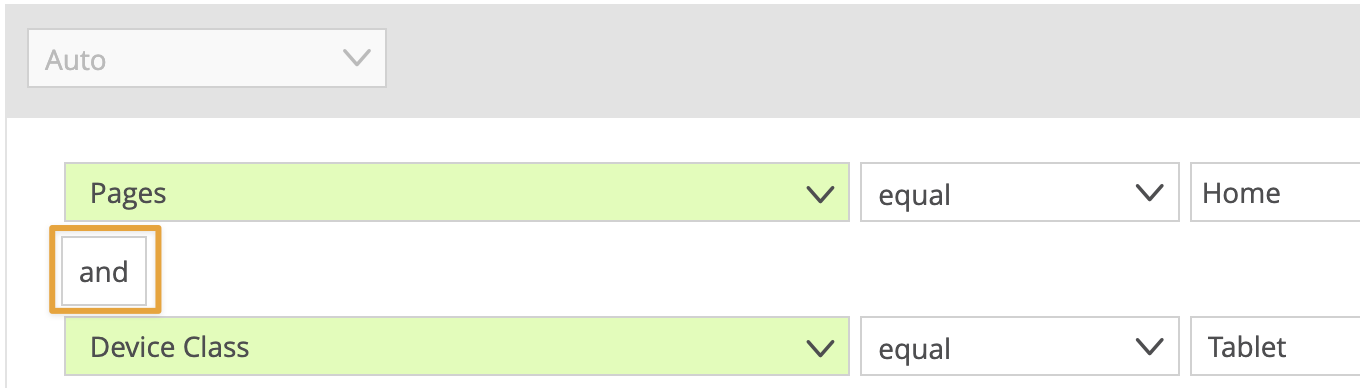
Page = Home AND Device Class = Tablet
Page uses the Page scope, Device Class uses the Visit scope. The smallest shared scope is Visit, so both conditions must be true within the same visit.
Page = Home AND Referrer = Google
Both filters are based on the Page scope. The evaluation occurs on the page level: both conditions must be true on the same page request.
Device Class = Tablet AND Website Goal = Order
Device Class has the Visit scope, Website Goal the Action scope. The smallest shared scope is Visit.
Tip
You don’t need a container if the smallest shared scope is already what you intend to analyze. However, when the default scopes of your filters would result in an evaluation that is too narrow (e.g. Page level), a container lets you explicitly set a broader scope like Visit.
Note
When combining two filters from the same dimension with AND (e.g. Page = A AND Page = B), the result is typically empty — unless you’re using placeholders or exclusions, such as Page contains “Mobile” AND Page ≠ “Mobile Home”.
2.1.1 Special Case: AND with Single- and Multi-Value Parameters in One Container
In most cases, combining filters with AND inside a container works as expected – each condition is evaluated, and only results that meet all conditions are shown.
However, there is one important exception: When combining a single-value parameter with a multi-value parameter inside the same container, the result may unexpectedly return zero results, even though matching data exists.
Why this happens
All filters in a container are evaluated at the same granularity, which means the system looks for one data row where all conditions are true at the same time. This behavior is sometimes referred to as “strong binding.”
This causes problems when the filters refer to values that are stored across different rows in the tracking data. This is typically the case for multi-value parameters, which may be tracked multiple times per interaction, for example:
multiple tags per page view,
multiple product attributes per product,
or multiple values per event.
In contrast, single-value parameters, such as Login Status, are usually tracked only once per hit (e.g., once per page or visit) and stored in a single row.
Example
Let’s say you want to analyze visits where both of the following are true:
The page was tagged with Sports
The user was logged in
Both filters are placed in the same container. However, the result unexpectedly returns 0 pages, even though this combination occurred.
Here is how the raw data might look:
request_id | position_id | Content Tag | Login Status |
|---|---|---|---|
1234 | 1 | News | true |
1234 | 2 | Sports |
The Content Tag Sports exists in position 2, but Login Status was only submitted with position 1. Since no row contains both values at the same time, the filter does not return a result.
Solution
To solve this, place each condition in a separate container and combine them using AND. This ensures that each filter is evaluated independently using its respective standard scope:
Login Status → evaluated at the Page or Visit level
Content Tag → evaluated at the level of individual tags
The system then joins the matching rows across the shared scope (e.g. pages), and returns the correct result.
2.2 Combining multiple containers with AND
For more flexibility, you can also place each filter in its own container and combine the containers with AND. This is especially useful when you want to evaluate conditions at different levels or need to customize the scope for each part.
Each container has its own scope setting, and the evaluation takes place within the specified scope of each container.
Example:
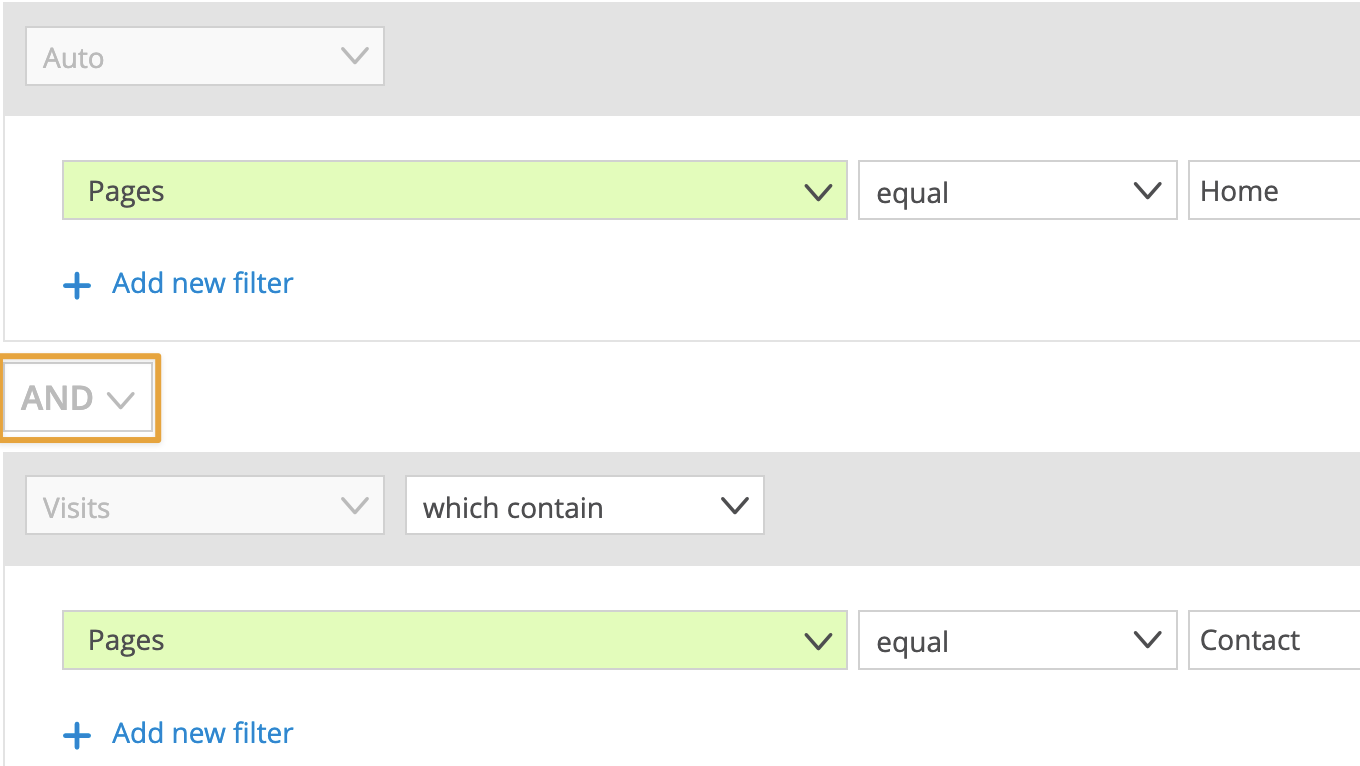
Container 1: Page = Home, scope: Page
Container 2: Page = Contact, scope: Visit
This setup checks for users who saw Page Home at some point, and Page Contact during the same visit. The scope of each condition is respected individually.
Using separate containers allows each filter group to be evaluated independently within its configured scope, and their results are then combined with AND logic.
3 Combining with OR
You can combine filters with OR in two ways:
Inside a single container
Across multiple containers
Both options are valid. However, some restrictions apply when using OR inside a single container. Using multiple containers gives you more flexibility when combining filters.
3.1 Using OR between filters
Use OR to match when at least one of several conditions is met. This is helpful for analyzing visits or users who fulfill either condition A or B.
Note
Filters combined with OR must have the same standard scope. If they don’t, the OR operator is not available in the UI.
If you want to combine filters with different standard scopes, place each filter in its own container and connect the containers with OR instead.
Example:
This filter includes visits where the device class is either Tablet or Smartphone.
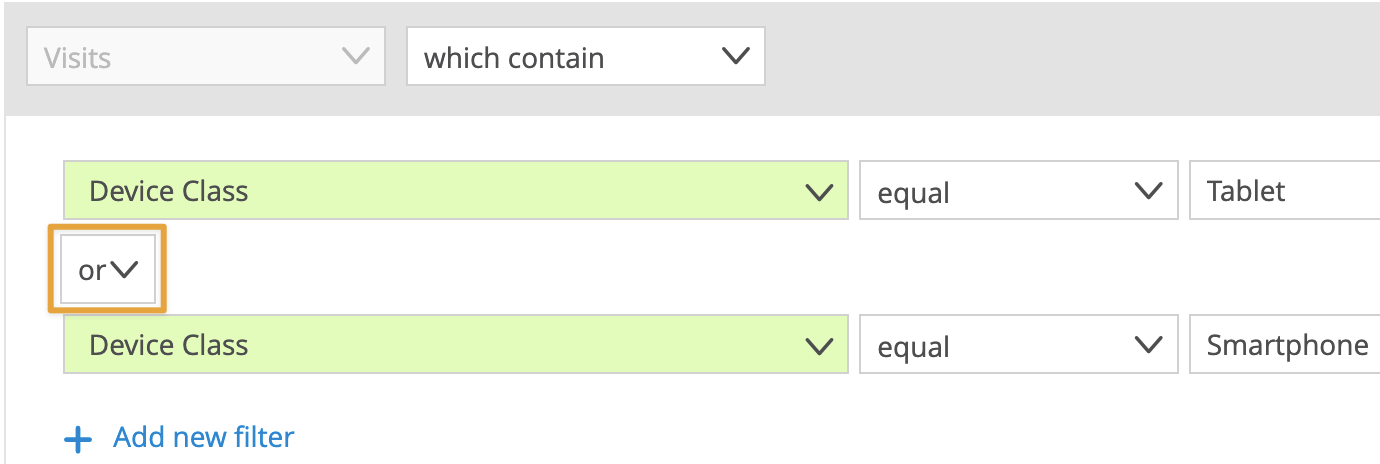
The standard scope of both filters is Visit, so the combination is valid.
3.2 Using OR between containers
OR can also be used to combine entire containers. This allows you to group multiple conditions and apply logical alternatives on a more complex level.
This approach is particularly useful when:
Filters have different standard scopes
You want to define distinct logical blocks, each with its own scope or grouping
You want to build more readable filters for complex combinations
Example:
The goal is to include visits where either:
The user is on a tablet and has viewed at least three pages, or
The user is on a desktop/laptop and has viewed at least five pages
This can be implemented as:
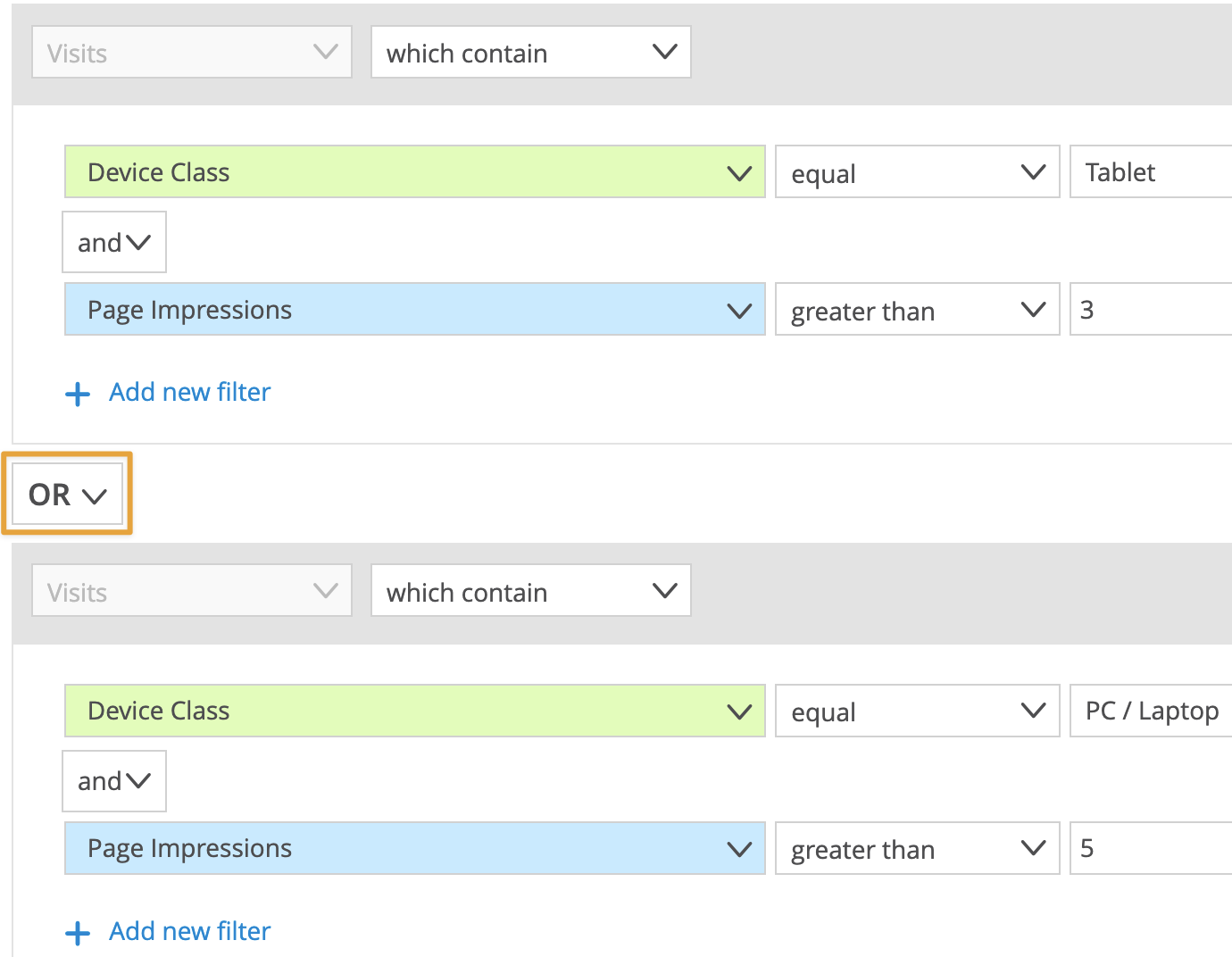
Each container is internally using AND logic, but the overall combination allows for either condition to be true.
4 Combining AND and OR
When building more complex filter logic, it’s often necessary to combine both AND and OR.
You have two main options:
Use AND and OR inside a single container
All filters are grouped together in one container and evaluated based on a shared scope.
Use AND and OR to connect multiple containers
Each container functions as a logical block, essentially acting as a visible bracket.
You can assign different scopes to each container and connect them flexibly using AND and OR.
4.1 Inside a Single Container
When combining filters with both AND and OR inside a single container, the platform automatically groups them based on the operator.
If you use both AND and OR: Filters with the same operator are grouped together using brackets. This behavior is fixed; you cannot manually change the grouping logic.
Example:You define the following filters inside a container:
.png)
The system will interpret the logic exactly as: (Device Class = Smartphone OR Device Class = Tablet) AND Pages = Home.If you use multiple filters for the same attribute (e.g. multiple values for Browser or Device Class), these filters are grouped automatically. This ensures that the logic reflects your intent, even if both AND and OR are used.
Example:You define the following filters inside a container:
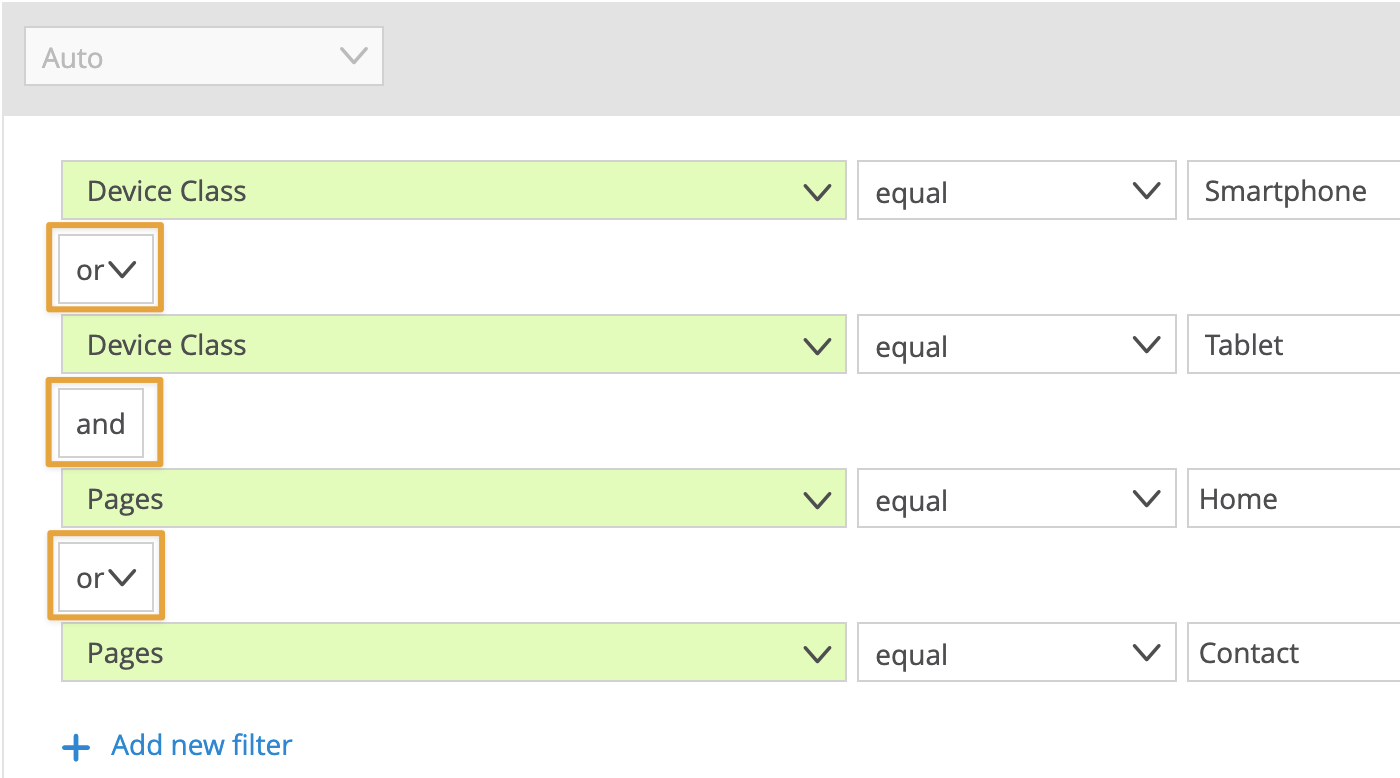
The system will interpret the logic exactly as: (Device Class = Smartphone OR Device Class = Tablet) AND (Pages = Home OR Pages = Contact).
4.2 Across Multiple Containers
Use multiple containers to gain full control over complex filter logic. Each container is evaluated independently based on its assigned scope and can be connected to others using AND or OR.
This gives you several advantages:
You can freely combine logic blocks (containers) in the order that matches your use case.
You can assign a different scope to each container, enabling more flexible analysis.
You can override standard scope limitations that apply when using filters within a single container.
You make the filter logic more readable and easier to debug.
Example:
You want to find:
All users on a smartphone with at least 3 page impressions
OR
Users on a desktop device with at least 5 page impressions
To achieve this, create two separate containers:
This allows you to express both conditions clearly and combine them flexibly.
5 Combining with THEN
The THEN operator defines a specific order of events. It can be used to analyze sequences of user behavior, such as when users first perform action X and then action Y.
5.1 Important characteristics of THEN
THEN defines a sequence: It checks whether one event happened after another, in the order you specify.
You can define sequences with more than two steps (e.g., A → B → C).
Other events may occur between steps — THEN only checks the sequence, not strict succession.
Sequences can occur on different levels, depending on the scope of the container.
Here are typical examples:
Within a page: For example, the order in which filters are clicked (e.g., price filter → brand filter).
Within a visit: For example, users visit the homepage, then the product page, then the checkout.
Across visits: For example, users sign up in one session and return in a later session to make a purchase.
5.2 Technical requirements and limitations
THEN is only available within a single container.
The container must have a scope that is broader than the standard scope of the filters (e.g., use Visit if your filters use Page).
You cannot combine THEN with AND or OR within the same container.
THEN is not available for certain filter types (e.g., Segments, Depths of Engagement)
5.3 Examples
Example 1: Simple sequence with Pages
This filter identifies visits where the homepage was viewed first and the contact page was accessed later.
.png)
This identifies visits in which users viewed the homepage before accessing the contact page, regardless of how long it took or how many other pages were in between.
Example 2: Combining THEN with AND across containers
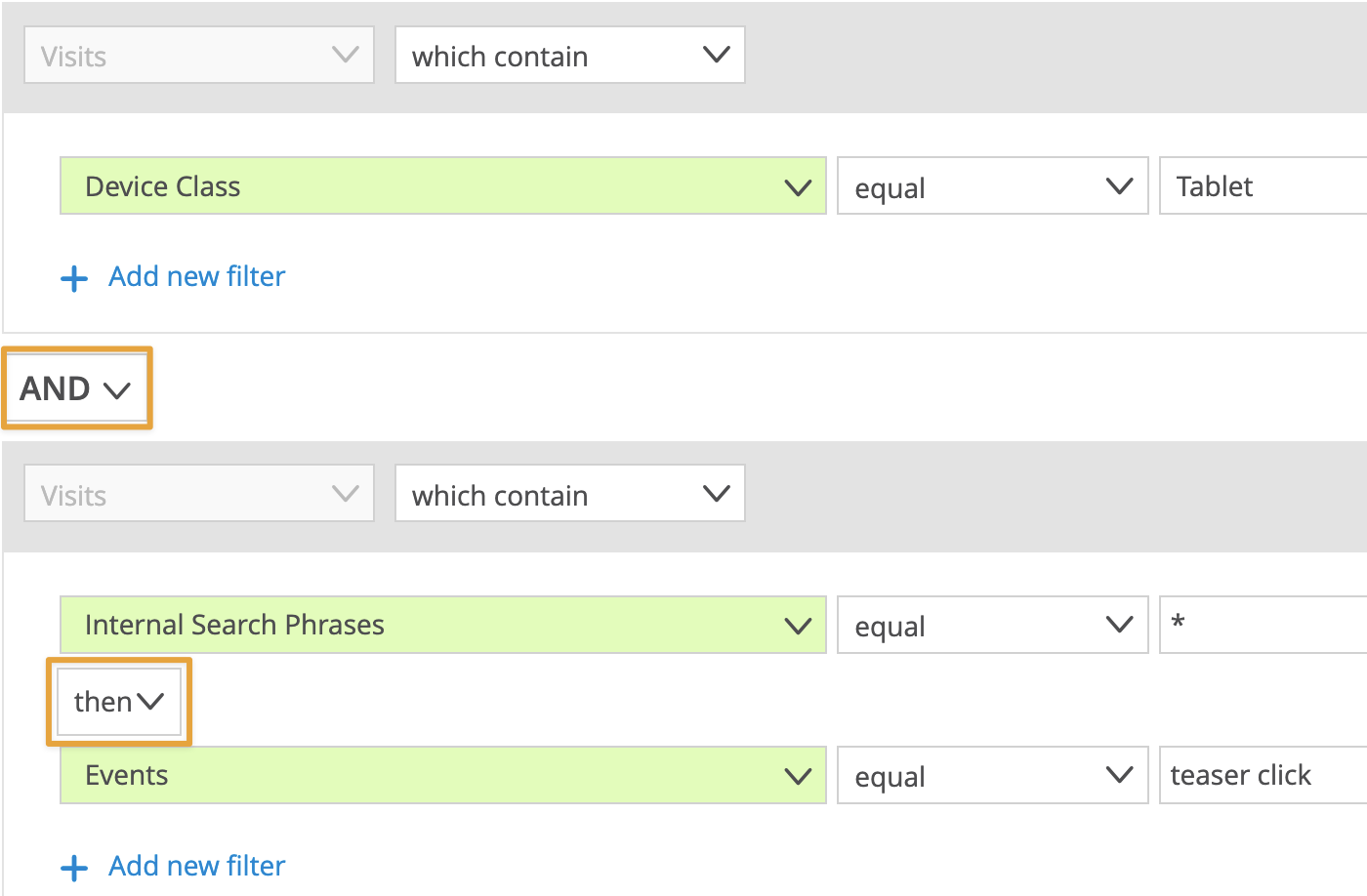
This example identifies tablet users who first used the internal search and then clicked a product teaser.
This setup enables you to analyze how often tablet users actively search before engaging with a promoted product.