The examples in this section contain the following metrics:
Visitors
Visits
Page Impressions
Page Impressions per Visit
Duration
Visit Duration Avg
Browsers, Unique
Entries
New Visits
New Visit Rate %
Active Users, daily (DAU)
Example 1: Visitors, Visits, Page Impressions
A user opened the following pages on June 26:
.png)
Analysis: Visitors > Traffic
.png)
Metric | Description |
Page Impressions | Access to a single page. |
Visits | It starts when the first Page Impression/Click on a website is detected and ends after 30 minutes of inactivity. |
Visitors | Starts when the first Page Impression/Click on a website is detected. |
Example 2: Days vs. Months
2 users visited the following pages on June 26/27:
.png)
We use two different analysis and compare the results:
Analysis: Visitors > Time > Month.png)
Analysis: Visitors > Time > Days
.png)
Metric | Description |
Visits | Describes the duration of time from the entry to the exit. |
Entries | Refers to the date on which the visit started. |
Example 3: Page Impressions per Visit, Visit Duration Avg
A user opened the following pages on June 26:
.png)
Analysis: Visitors > Traffic.png)
Metric | Description |
Page Impr. per Visit | The average number of Page Impressions per Visit. |
Visit Duration Avg | The average duration of a visit. 30 seconds are used as a default value for the exit page. If a link is clicked on the exit page, the time until the click of the link is also considered. Event requests generated by Mapp Intelligence Plugins (e.g., the Content Engagement Plugin) are also considered. |
Example 4: New Visits
2 users performed the following visits on February 13 and 14:
.png)
Analysis: Visitors > Traffic.png)
Metric | Description |
New Visits | The number of first visits. |
New Visit Rate % | The ratio of first visits compared to the total visits. |
Example 5: Visitors VS. Browsers, Unique (Customer ID)
By providing a unique customer ID, a user can be identified even when he uses different devices and browsers or deletes his cookies.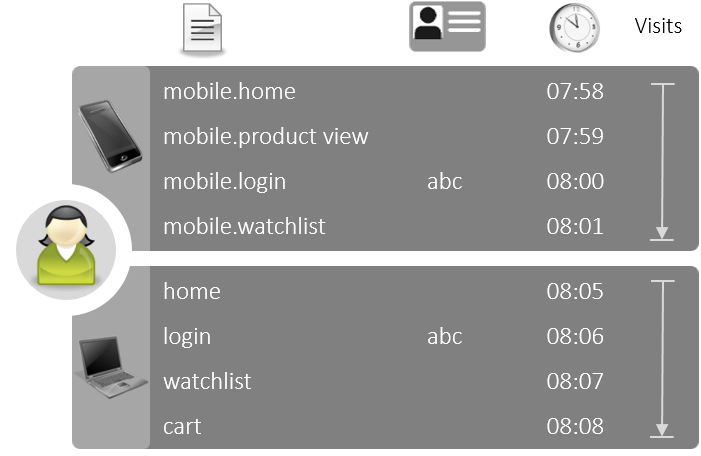
Analysis: Visitors > Traffic.png)
Metric | Description |
Visitors | It shows the unique number of users across browsers and devices. This requires login information (CustomerID) to be passed. |
Browsers, Unique | The number of browsers and devices used. Recognition by cookies. |
Visits | Always calculated on a per-browser and per-device basis. |
Example 6: Multiple Customer IDs in a browser
The following pages were opened on June 26. Logging in is performed twice in the same browser using different credentials.
.png)
Analysis: Visitors > Traffic
When a different Customer ID is sent during a visit, a new visitor and visit are measured.
Extensive information on cross-device visitor recognition can be found in the article User Centric Tracking.
Example 7: Active Users weekly/daily
By using engagement metrics it is possible to analyze the long-term usage behavior by day.
.png)
Analysis: Visitors > Engagement.png)
Metric | Description |
Active Users weekly (WAU) | The number of unique visitors within the last 7 days. |
Active Users daily (DAU) | The number of unique visitors on the respective day. It equates to the “Visitors”. |