Goal
Modify the email header for a single email sendout.
Background Information
You can customize email headers during HTML email creation by defining specific parameters. These custom settings override the default options defined in the group sendout settings.
To add CC or BCC headers, you must have the following system permission:
Permission 254 – Messaging: Create CC and BCC Header
For more information about default header options, see the Group Management documentation documentation.
Procedure
Navigate to Step 2: Content in the message creation wizard.
Expand the Advanced Options section.
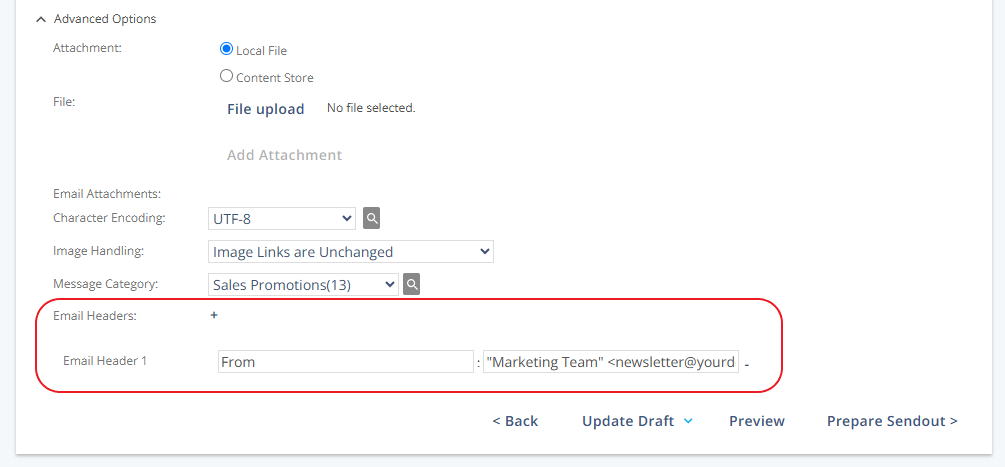
In the Email Headers area, click the + symbol to add a new parameter.
Enter the header name in the first field.
Enter the corresponding value in the second field.
Note: These settings will override the default group-level header configuration.
Header Modification Guide
Modification | Header Name | Header Value Example |
|---|---|---|
Specify a custom "From" address |
|
|
Send a copy (CC) of the message |
|
|
Send a blind copy (BCC) |
|
|
Warning: Modifying email headers may affect message deliverability. If unsure, contact your account manager.
Note for DMARC Compliance: Use one of the following formats for the "From" address:
Display Name <username@domain>
<username@domain>
Example: