Overview
The Anonymize Contact action permanently removes all personal data associated with a contact to meet data privacy requirements. This ensures that sensitive information cannot be recovered or misused.
Important Information
The Anonymize Contact action takes effect immediately. There is no confirmation step.
Once anonymized, the system:
Displays a success message.
Sends an email confirmation indicating the Contact ID and email have been anonymized.
Irreversibly hashes the contact's email address, profile data, and message history using Secure Hash Algorithm 3 (SHA-3).
Deletes the contact from the system.
The anonymization is permanent. The contact cannot be restored, and their history cannot be recovered.
However, the user can be re-added to the system later. A new Contact ID is created in this case, and no previous data or history is linked to the new record.
Anonymizing a contact is one of several ways a contact can become permanently unreachable. For a complete overview, see How a Contact Stops Receiving Messages.
Navigation Path
Go to Audience > Contact Management > All Contacts
Locate the desired contact.
In the Actions column, select Anonymize Contact.
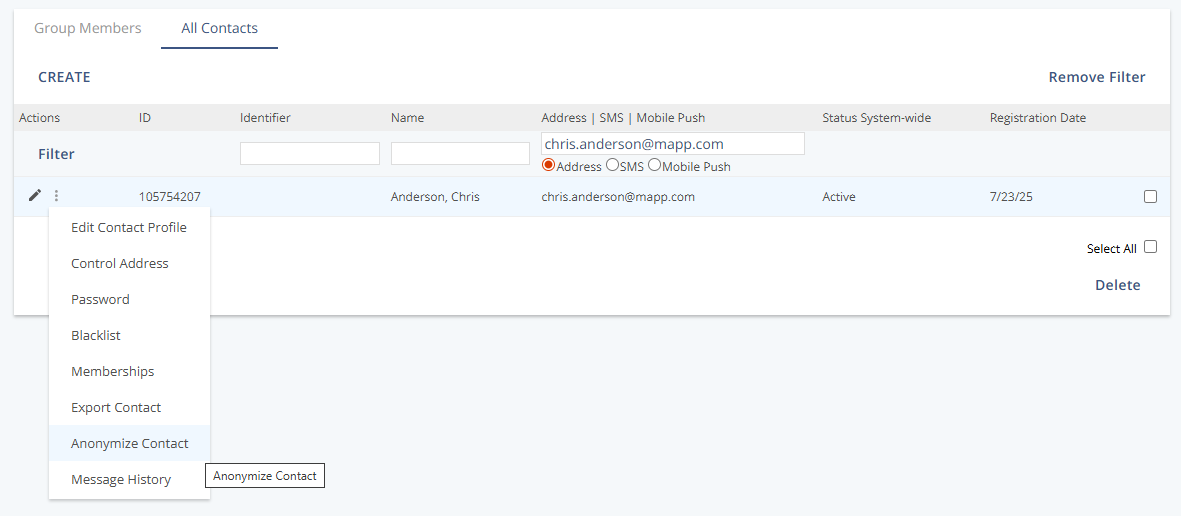
Actions
Action | Description |
|---|---|
Anonymize Contact | Immediately anonymizes the selected contact. The action has no confirmation step and takes effect at once. |