Overview
Use this interface to view and manage location clusters.
Navigation path
Go to Audience > Location Management
Open the Clusters tab.
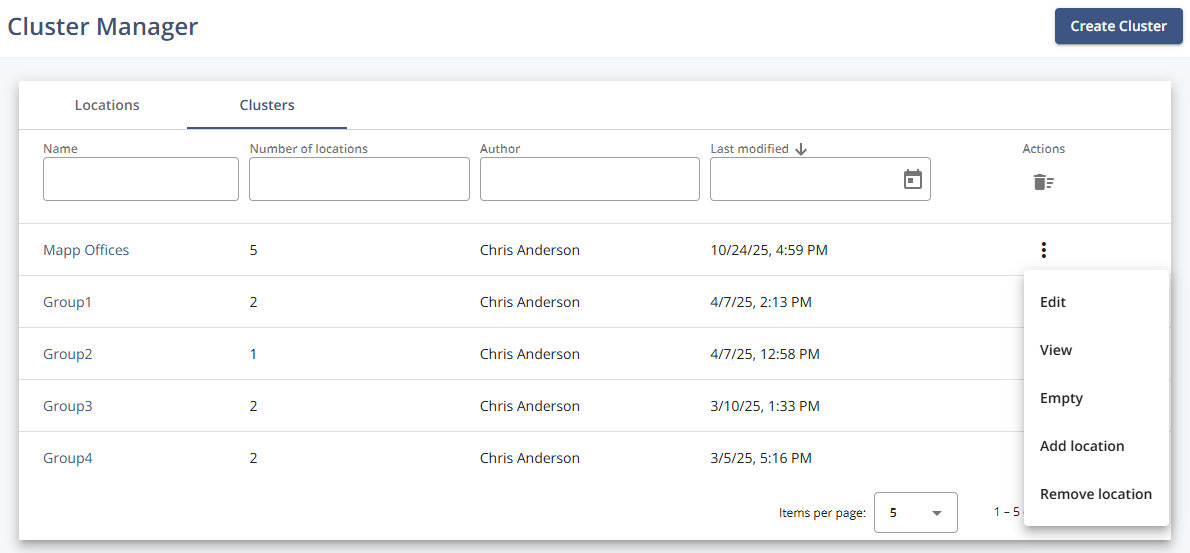
Settings
Setting | Description |
|---|---|
Name | Displays the name of the cluster. |
Number of locations | Shows how many locations are included in the cluster. |
Author | Indicates the user who created the cluster. |
Last modified | Displays the date and time when the cluster was last updated. |
Actions
Action | Description |
|---|---|
Create Cluster | Opens the creation view where you can define a new cluster by selecting one or more existing locations. |
Edit | Opens the configuration view for the selected cluster, allowing you to rename it, modify its locations, or update other details. |
Delete | Permanently removes the selected cluster from the system. |
Empty | Removes all locations from the cluster but keeps the cluster itself. The cluster remains available for later reuse. |
Add location | Adds one or more existing locations to the selected cluster. |
Remove location | Removes one or more specific locations from the cluster without deleting the cluster. |
View | Opens a read-only view of the cluster, showing its name, included locations, and modification history. |