Overview
The Notifications tab defines whether XML notifications are sent for group-related events. These notifications allow external systems to receive structured information about specific changes or activities related to groups.
Navigation Path
Go to Audience > Group Management > Configuration Templates.
Click the pencil icon (Edit) next to the template.
⇒ The template opens on the General Settings tab.Click the Notifications tab.
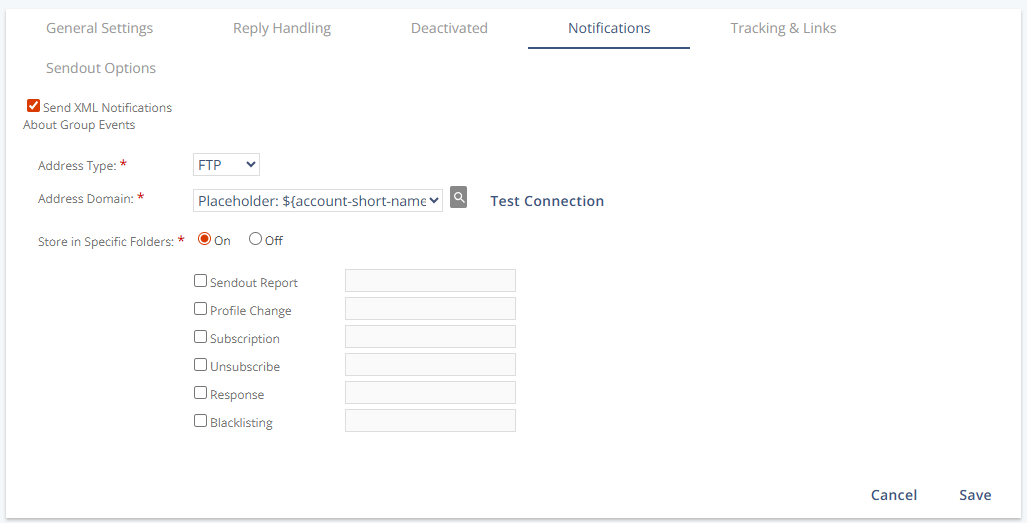
Settings
Setting | Description |
|---|---|
Send XML Notifications About Group Events | Enables the sending of XML notifications for selected group events. When enabled, additional configuration fields become available. |
Address Type | Defines the destination type for XML notifications. Supported options are FTP, HTTP, SOAP, and Email. |
Address Domain | Defines the destination address where XML notifications are sent. The required format depends on the selected Address Type. |
Store in Specific Folders | Defines whether XML files are stored in specific subfolders. When enabled, separate paths can be defined for each notification type. |
Sendout Report, Profile Change, Subscription, Unsubscribe, Response, Blacklisting | Select the group events for which XML notifications are sent. With Store in Specific Folders, enter a path for each event. Details: Group Creation: Notifications. |
Profile Data | Defines whether the notifications contain full or minimal profile data. |
Skip Mapp Engage Subscribes / Skip Mapp Engage Unsubscribes | Defines whether subscriptions and unsubscribes are managed in an external system instead of Mapp Engage. Details: Group Creation: Notifications. |
Actions
Action | Description |
|---|---|
Test Connection | Verifies that the configured destination address is reachable. |
Save | Saves the notification settings in the configuration template. |
Cancel | Discards any changes made in the Notifications tab. |
Additional Information
XML notifications can be sent for various group events, including sendout reports, profile changes, subscriptions, unsubscribes, responses, and blacklisting.
The following permission is required to configure XML notifications: 430 Group Administration: Receive XML Notifications and Edit Settings.
FTP, HTTP, and SOAP destinations support secure transfer mechanisms.