Beta
The Product Catalog is currently in Beta and is not yet available to all customers. Availability is being expanded gradually. Functionality, configuration, and behavior may change before general availability.
Overview
Product Attributes define how product data is structured, validated, and reused within the Product Catalog. Attributes describe products at various levels, ensuring that product data can be consistently imported, validated, exported, and utilized by downstream Mapp services.
The Product Catalog includes a set of predefined attributes. You can also create custom attributes to add product data specific to your needs.
Custom attributes are reusable — once created, they can be added to multiple catalogs. The attribute configuration (name, data format, and settings) is shared across catalogs, but the data stored against each catalog remains fully independent.
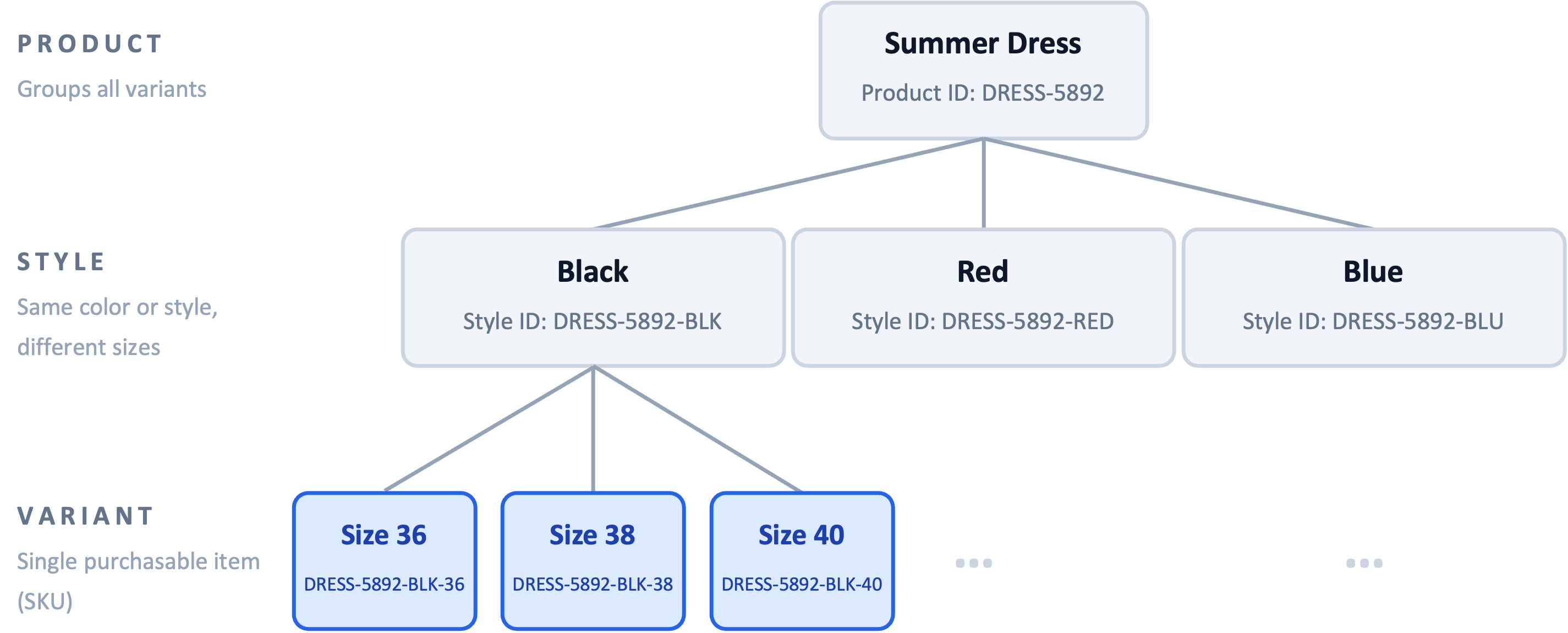
Figure: The Product Catalog stores all attribute values at the variant level. Product and style act as grouping layers; variants carry the actual data.
Key Characteristics
Predefined attributes: Each Product Catalog includes a set of predefined attributes that are available by default and cannot be modified.
Custom attributes: You can create custom attributes to extend product data for business-specific needs and assign them to one or more Product Catalogs.
Reusable attribute definitions: Custom attributes act as templates and can be reused across multiple catalogs.
Strong validation model: Attributes follow defined data formats, limits, and character rules to ensure compatibility with exports and integrations.
State and Status: Each attribute has a State (Mandatory, Mandatory for fashion, or Optional) that controls whether it is required during import, and a Status (Active or Inactive) that controls whether new values can be imported. Inactive attributes remain readable, but new data cannot be written to them.
Purchasable Product Option: Attributes can be marked as a purchasable Product Option to indicate that they distinguish variants a customer can buy, such as color and size in fashion.
Predefined Attributes
Every Product Catalog includes a fixed set of predefined attributes. These attributes carry the core product information that Mapp Engage, Mapp Intelligence, and downstream services rely on. Predefined attributes cannot be created, renamed, or removed, and their Data format is fixed.
The State of each predefined attribute depends on whether the catalog operates in Standard mode or in Fashion-enabled mode. Switching a catalog to Fashion-enabled mode makes several attributes Mandatory for fashion and makes additional Fashion-specific predefined attributes available. An attribute that is Mandatory for fashion is required only for variants that are imported with the Enrichment Type fashion. Variants with the Enrichment Type none can omit it. For details, see Mixed Catalogs and Enrichment Type below.
Attribute | State (Standard) | State (Fashion-enabled) | Data Format |
|---|---|---|---|
Variant ID | Mandatory | Mandatory | Text |
Product ID | Mandatory | Mandatory | Text |
Style ID | Optional | Mandatory for fashion | Text |
Style Title | Optional | Optional | Text |
Product Title | Mandatory | Mandatory | Localized text |
Variant Title | Optional | Optional | Localized text |
Product Description | Optional | Mandatory for fashion | Localized text |
Price | Mandatory | Mandatory | Localized number |
Currency | Mandatory | Mandatory | Localized text |
Size | Optional | Mandatory for fashion | Localized text |
Color | Optional | Mandatory for fashion | Localized text |
Image URL | Optional | Mandatory for fashion | List |
PDP URL | Optional | Mandatory for fashion | Localized text |
Brand | Optional | Mandatory for fashion | Text |
GTIN | Optional | Optional | Text |
MPN | Optional | Optional | Text |
Variant Status | Optional | Optional | Number |
Variant Availability | Optional | Optional | Boolean |
Category 1 | Optional | Optional | Text |
Category 2 | Optional | Optional | Text |
Category 3 | Optional | Optional | Text |
If Variant Status is not provided during import, it defaults to ACTIVE for newly created variants. For details on all possible values and how Variant Status affects downstream services, see Variant Status below.
Image URL can hold several image URLs per variant. For which images to provide and how, see Image URL below.
Note
Fashion-enabled mode is activated per catalog and cannot be disabled in the user interface. For details on enabling Fashion mode and the resulting catalog behavior, see How Product Catalogs Work.
Variant Status
The Variant Status predefined attribute records the lifecycle phase of a variant. Its value is consumed by downstream services and determines which variants are eligible for recommendations and personalization.
Variant Status uses the Number data format. The following values are accepted:
Value | Status | Meaning |
|---|---|---|
0 | PREORDER | The variant is announced but not yet available for purchase. |
1 | ACTIVE | The variant is available for purchase. This is the default for newly created variants when no value is supplied during import. |
2 | DISCONTINUED | The variant has been retired and is no longer offered. |
Variant Status drives downstream behavior across Mapp Cloud:
Recommendation widgets in Mapp Intelligence exclude variants with the status DISCONTINUED.
Mapp Engage personalization scenarios such as Abandoned Cart reminders skip variants with the status DISCONTINUED.
Mapp Fashion recommendations automatically exclude variants with the status DISCONTINUED.
Image URL
The Image URL predefined attribute stores the URLs of the product images of a variant. It uses the List data format, so one variant can carry several image URLs.
Requirement
In Standard mode, Image URL is Optional. In Fashion-enabled catalogs, Image URL is Mandatory for fashion. Each variant with the Enrichment Type fashion needs at least one image URL. Variants with the Enrichment Type none can omit it. For details, see Mixed Catalogs and Enrichment Type.
A single image URL meets this requirement. Providing more than one image is a recommendation, not a validation rule.
Recommended Image Coverage
Mapp Fashion labels each garment based on its product images. Stylists and the automated labelling both work with these images. A single image rarely shows all features of a garment, for example details on the back, the fit on a model, or the fabric structure. Features that are not visible in any image cannot be labelled.
For the best labelling results, provide all available product images of each variant, including different views where available. Useful views are:
Product only: front, back, and side view
On a model: front, back, and side view
Close-ups on a model, for example of the front or back
Colour swatch
If possible, include at least one front view, either of the product only or on a model.
Providing Several Images in One Import
Provide all image URLs of a variant in the same row and in one column of your Source Feed, and map this column to Image URL. Each file column can be mapped to only one attribute. Separate columns per view, for example one column for the front view and one for the back view, cannot all be mapped to Image URL. For details, see Attribute Mapping.
In a CSV file, separate the image URLs with commas and enclose the whole value in double quotes, for example "https://cdn.com/photo1.jpg,https://cdn.com/photo2.jpg".
If an image URL itself contains a comma, encode the comma as %2C, because commas separate the image URLs.
Note
If your product data contains only one image per variant, the variant is still imported, but labelling may be incomplete. Check whether your shop system or product information management system can export additional images, and include them in your Source Feed. If you need help preparing your product data, contact your Mapp account contact.
For a step-by-step checklist, see Prepare Your Product Data for Import.
Configuration and Behavior
Data Formats and Validation
When you create a custom attribute, you select a Data format. The Data format determines which values are accepted, how the attribute is validated, and which additional options become available.
The following Data formats are available for custom attributes:
Text
Number
Boolean
List
Localized text
Localized number
Localized list
Attributes that include localization are automatically validated against the relevant ISO standards (ISO 639-1 for languages, ISO 3166-1 for countries, ISO 4217 for currencies, and BCP 47 for combined locale codes). For an overview of the supported formats, see Localization Support in Product Catalog. If the defined standard is not met, validation fails.
To support third-party integrations, attribute definitions are subject to strict limits.
Attribute | Allowed Characters | Max Length |
|---|---|---|
Variant ID | A–Z, a–z, 0–9, -, _ | 255 |
Product ID | A–Z, a–z, 0–9, -, _ | 255 |
Style ID | A–Z, a–z, 0–9, -, _ | 255 |
Product Title | UTF-8, no HTML | 255 |
Product Description | UTF-8, no HTML | 5,000 |
Brand | UTF-8 | 100 |
Price | Numeric, 2 decimals | 0.01–9,999,999.99 |
Display Type
When you create a custom attribute with a text-based Data format, an additional Display Type selector appears in the create dialog. Display Type controls how the value is rendered in the Catalog view and in downstream services such as Mapp Intelligence reports.
Display Type is available for the following Data formats:
Text
List
Localized list
You can choose one of the following options:
Option | Description |
|---|---|
Text | Default. The value is rendered as plain text. |
Clickable URL | The value is rendered as a clickable link. |
Image URL | The value is rendered as an inline image in Mapp Intelligence reports. |
Note
Display Type can only be set when the attribute is created. After an attribute has been saved, the Display Type is no longer visible in the edit view and cannot be changed. Display Type is not available for predefined attributes.
Purchasable Product Option
When you create a custom attribute, you can enable the Is a purchasable Product Option toggle. This flags the attribute as a variant-defining option that a customer can choose when buying the product.
Typical examples in the Fashion industry are color and size: two variants that share the same product but differ in their option values are treated as separately purchasable items.
The toggle is set to off by default and can be enabled per attribute as needed.
Number Attributes and Aggregation
The aggregation settings define how downstream services such as Mapp Intelligence aggregate the attribute's values across events. The Product Catalog itself stores only the current state per variant.
When Number is selected as the Data format, optional aggregation settings become available for analytics use cases.
Available aggregation types:
Quantity: Counts how often a value is recorded.
Sum: Adds up recorded values.
Quantity and Sum: Provides both metrics and is selected by default.
Example
A variant carries a number attribute that appears in two events involving the variant, once with a value of 5 and once with a value of 3:
Quantity = 2 (the attribute appeared in 2 events)
Sum = 8 (5 + 3 across both events)
Constant Values
When Constant is enabled, the submitted value remains unchanged, regardless of how often the product is accessed. Only a single metric is created.
Example
A variant has a price of 100 on a number attribute. The variant is purchased ten times:
Constant enabled → the reported value remains 100 (typical for stable values like a list price)
Constant disabled with Sum → the reported value becomes 1,000 (summed across all ten purchases)
Constant disabled with Quantity → the reported value becomes 10 (one count per purchase)
Attribute Deletion
Custom attributes can be deleted from a Product Catalog using the Delete action (trash icon) in the Product Attributes overview. Deletion is permanent and removes both the attribute definition and its data from the catalog. A confirmation prompt is shown before the action is applied.
If you need the attribute back after deletion, recreate it with the same configuration and re-import the data through your usual import process.
Fashion-Extended Predefined Attributes
When a Product Catalog is set to Fashion-enabled mode, the following additional predefined attributes become available alongside the standard predefined attributes. They cover values commonly used by the Fashion industry. These attributes are not visible on catalogs that operate in Standard mode.
Attribute | State | Data Format | Description |
|---|---|---|---|
Enrichment Type | Optional | Text | Defines which mandatory attributes apply to the variant on import. Allowed values: |
Material | Mandatory for fashion | Text | Material composition of the variant. Requires a specific value format — see Material below. |
Gender | Mandatory for fashion | Text | Target gender of the product. Allowed values: female, male, girls, boys, unisex. |
Categories | Mandatory | List | Product category of the variant. |
Facetted Search Categories | Optional | List | Facetted search categories the variant belongs to. Used for facet filtering in search and recommendations. Multiple values are supported. |
Seasonal | Optional | Boolean | Indicates whether the variant belongs to a seasonal collection. |
Old Price | Optional | Localized number | Previous price, used to indicate price reductions. |
Set ID | Optional | Text | Identifier that groups variants belonging to the same set or outfit (sometimes called a co-ord). Products sharing a Set ID are prioritized as outfit pairings. See this use case for details. |
Locale | Optional | List | Locale that applies to the variant entry. |
Extra ID | Optional | Localized text | Additional product identifier provided alongside the variant. |
Ean | Optional | Text | European Article Number for the variant. |
Ancillary Product Code | Optional | Text | Additional product code for cases where multiple codes are required. |
Min Age | Optional | Number | Minimum recommended age for the product. |
Max Age | Optional | Number | Maximum recommended age for the product. |
Best Model Image | Optional | Text | URL of the preferred image showing the product on a model. |
Best Product Image | Optional | Text | URL of the preferred image showing the product on its own. |
Collaboration | Optional | List | Retailer-specific collaboration of a specific garment. When filled, the garment is linked to a collaboration partner of the retailer. |
Material
The Material predefined attribute carries the fibre composition of a variant. Mapp Fashion uses this value to derive the per-fibre breakdown that drives the Fibres feature category. Because the value is processed by a single parser, it must follow a strict format. If the format is not met, the fibre breakdown may be incomplete or missing.
Provide the value as a comma-separated list of fibre entries. Each entry must follow the pattern <integer>% <fibre name>, for example 95% cotton.
Apply the following rules:
Write the number and
%without a space between them, followed by a single space and the fibre name.Use plain English fibre names. Do not use abbreviations or non-English terms.
Send the outer (main) composition only. Omit lining, trim, padding, and ornament sections.
Do not include label prefixes such as
Composition:orOuter composition:.For a single-fibre item, state the full percentage, for example
100% polyester.
Submitted value | Issue | Correct value |
|---|---|---|
| Label prefix |
|
| Lining section included |
|
| Space before % |
|
| Non-English fibre name |
|
Note
Material drives the automatic fibre breakdown in Mapp Fashion. Provide the value in the format described above. If the value does not follow this format, some or all fibres may not be derived automatically. The variant itself remains available in the catalog.
Mixed Catalogs and Enrichment Type
A Fashion-enabled catalog can contain fashion and non-fashion products in the same feed, for example clothing and jewellery. Some attributes that Mapp Fashion needs do not apply to every product. A bracelet, for example, usually has no size.
The Enrichment Type attribute defines per variant which mandatory attributes apply during import. The import groups all variants by their Enrichment Type and validates each group separately.
Enrichment Type | Required attributes | Mapp Fashion |
|---|---|---|
| All attributes with the State Mandatory or Mandatory for fashion | Uses and enriches the variant |
| Only attributes with the State Mandatory | Ignores the variant |
The following attributes are Mandatory for fashion: Gender, Material, Style ID, Size, Color, Image URL, PDP URL, Product Description, and Brand. All other mandatory attributes, including Categories, are required for every variant, regardless of its Enrichment Type.
Default Behavior
If a new variant is imported without Enrichment Type, it is treated as
fashion.When you update an existing variant without Enrichment Type, the variant keeps its stored value.
Only the values
fashionandnoneare accepted. Other values are rejected.Enrichment Type is available only on Fashion-enabled catalogs. A value sent to a catalog in Standard mode is ignored without an error.
The value always comes from your product data. Mapp does not derive it from other attributes.
Note
If your catalog contains only fashion products, you do not need to do anything. Existing catalogs keep working as before, because all variants without an Enrichment Type are treated as
fashion. You only need to provide Enrichment Type if your catalog mixes fashion and non-fashion products.
For how to provide Enrichment Type in an import, see How Catalog Data Flows.
Enriched Attributes
Enriched attributes are additional, Fashion-specific attributes that Mapp generates automatically through the Fashion enrichment process. You do not import enriched attributes through your Source Feed; they appear in the Enriched Feed only after enrichment has run.
Enriched attribute keys follow the fashion_ prefix convention and use British English spelling, for example fashion_colour and fashion_neckline.
Enriched values are read-only from your perspective: they are produced and maintained by the Fashion enrichment service and refreshed as part of the enrichment lifecycle.