Beta
The Product Catalog is currently in Beta and is not yet available to all customers. Availability is being expanded gradually. Functionality, configuration, and behavior may change before general availability.
Overview
The Product Catalog stores and manages product data in Mapp Cloud. It provides a consistent structure for product information and serves as the central repository for product data before it is used by other Mapp services.
Each Product Catalog contains the current state of product data. Historical values are not stored.
Key Characteristics
Central product data storage: Product Catalogs store the current state of product data in a consistent structure.
Multiple catalogs supported: You can create multiple Product Catalogs to serve different brands, business units, or use cases. Each catalog can be assigned to one or more workspaces, but a workspace works with exactly one Product Catalog at a time.
Shared catalog across workspaces: When a Product Catalog is assigned to multiple workspaces, all assigned workspaces work with the same catalog structure and the same product data. You manage product data in one place, and it becomes available wherever the catalog is assigned.
Integration-ready: Product data from the catalog can be used by multiple Mapp services.
Validation and consistency: Catalogs rely on standardized attributes and validation rules to ensure data quality.
Catalog Modes: Standard and Fashion-Enabled
Each Product Catalog operates in one of two modes:
Standard mode: The catalog uses the core set of predefined attributes. This is the default mode for new catalogs.
Fashion-enabled mode: The catalog uses the core predefined attributes plus an additional set of Fashion-specific predefined attributes. In this mode, several attributes that are optional in Standard mode become Mandatory for fashion. They are required only for variants with the Enrichment Type
fashion, so fashion and non-fashion products can share one catalog.
Fashion-enabled mode can be activated when you create a catalog or later when you edit it, using the Add enriched attributes toggle. Once enabled, Fashion-enabled mode cannot be disabled in the user interface, because the change has implications across all connected Mapp services. If a catalog needs to be reverted to Standard mode, contact Mapp Support.
For the complete list of predefined attributes and how their State changes between modes, see Product Attribute Model.
Note
For Mapp Fashion, the Product Catalog in Fashion-enabled mode is the standard way to manage product data. New Mapp Fashion implementations use the catalog instead of the legacy Product Feed.
Product Catalog Structure and Data Flow
Architecture overview
The Product Catalog stores the current state of your product data. It does not retain historical values.
Product Identifiers
Product data in the Product Catalog is stored at the variant level. A variant is a single purchasable item, differentiated from other variants by its selectable options — the choices a customer can make when buying the product. In Fashion, typical selectable options are size and color. In other industries, they might be different. For example, when configuring a laptop, selectable options could be disk size, screen size, or RAM configuration.
The Product Catalog uses three identifiers to organize variants. These identifiers ensure consistent grouping, reporting, and personalization across Mapp services.
Identifier | State | Description | Example |
|---|---|---|---|
Product ID | Mandatory | Groups all variants of the same product, regardless of their selectable options. | DRESS-5892 |
Variant ID | Mandatory | Identifies a single purchasable item (SKU). Each variant must be unique. | DRESS-5892-BLK-36 |
Style ID | Optional (Mandatory for fashion in Fashion-enabled mode) | Groups variants that share the same style or color but differ in size. Primarily used in Fashion. | DRESS-5892-BLK |
In this table, State indicates whether the identifier is required when product data is provided to the catalog. State is a property of the data itself (Mandatory, Mandatory for fashion, or Optional) and is distinct from Status (Active or Inactive), which describes whether an attribute is currently in use.
Variant Status
In addition to the structural identifiers, every variant carries a Variant Status that records its lifecycle phase. Variant Status is an optional predefined attribute with the Number data format.
The following values are accepted:
0 — PREORDER: the variant is announced but not yet available for purchase.
1 — ACTIVE: the variant is available for purchase. This is the default for new variants when no value is supplied during import.
2 — DISCONTINUED: the variant has been retired and is no longer offered.
Variant Status drives downstream behavior in Mapp Engage and Mapp Intelligence. For a full description, including how the status affects recommendations and personalization, see Product Attribute Model.
Feed Types: Source, Enriched, and Combined Catalog Views
Mapp services use a combined catalog view that combines your primary data with enriched data.
Feed type | Description |
|---|---|
Source Feed | Contains your product data, including predefined attributes such as product_id, variant_id, price, title, and brand. You can also add custom attributes. |
Enriched Feed | Contains Fashion-enriched data generated by Mapp's Style Team and machine-learning models. Enriched attributes describe products in shopper-friendly language across physical, contextual, and derived dimensions, for example color analysis, occasion, or season. Only variants with the Enrichment Type |
Combined Feed | Used by Mapp services and includes your source data and enriched data. |
Workspaces
A workspace in Mapp Cloud groups together Mapp accounts that belong to the same business context. A workspace can contain a Mapp Intelligence account, a Mapp Engage account, a Mapp Fashion account, or a combination of these. It cannot contain multiple accounts of the same type.
Workspaces are how Mapp Cloud connects data across modules: within a workspace, Mapp Intelligence and Mapp Engage share information such as tracked users and email recipients, allowing customer data to be brought together across modules.
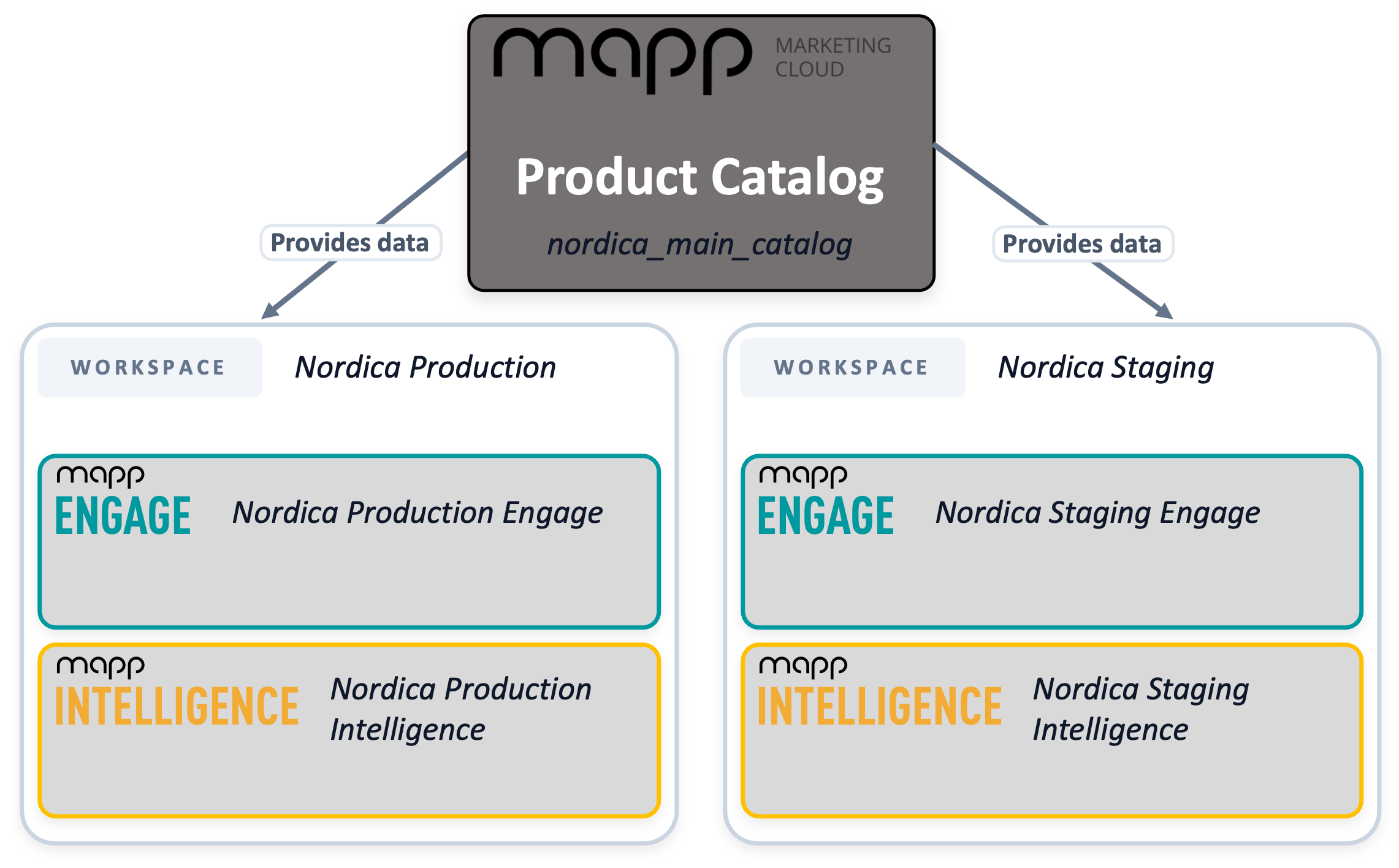
A Product Catalog assigned to multiple workspaces provides the same data to all of them. Each workspace combines its own Mapp Engage and Mapp Intelligence accounts.
Workspace Assignment for the Product Catalog
A Product Catalog can be assigned to one or more workspaces. Assigning a catalog to a workspace makes the catalog and its product data available to the accounts in that workspace. Removing the assignment makes the product data unavailable in that workspace.
When a Product Catalog is assigned to multiple workspaces, all assigned workspaces access the same catalog with the same product data. You manage product data in one Product Catalog, not separately per workspace.
A typical use case for multi-workspace assignment is a brand operating in several markets. The brand can run a global workspace for its main Engage and Intelligence accounts, plus additional country-specific workspaces for regional accounts. All workspaces share the same Product Catalog, which holds localized values for titles, prices, and other attributes. Each workspace can then work with the language and currency appropriate for its market, without requiring separate catalogs to be maintained.
Workspace assignment is required when you create a catalog in the user interface. You can use the new Product Catalog in parallel with the legacy product catalog in Mapp Engage — existing Engage setups continue to work unchanged.
Localization Support
The Product Catalog supports localized product information using standardized language, country, and currency codes.
Supported formats include:
ISO 639-1 language codes (e.g., en, de)
ISO 3166-1 country codes (e.g., US, GB, DE)
ISO 4217 currency codes (e.g., USD, EUR)
BCP 47 combinations (e.g., en-GB, de-DE)
An optional * wildcard for fallback values
Predefined attributes that support localization (such as Product Title, Product Description, Price, Image URL, and PDP URL) accept locale-specific values out of the box.
Custom attributes can also be localized. When you create a custom attribute, choose a localized data format — Localized text, Localized number, or Localized list — to enable per-locale values for that attribute. Custom attributes with a non-localized data format hold a single value across all locales.
Language, Country, and Currency Configuration
For Mapp Intelligence accounts, the language, country, and currency used with the Product Catalog are configured under Intelligence > Account Settings > Product Catalog.
Three settings apply:
Language: Select the language that Mapp Intelligence uses when reading localized product data from the catalog (for example, English).
Country: Select the country that Mapp Intelligence uses for country-specific data such as localized prices (for example, United Kingdom).
Currency: The currency is inherited from the account-level currency setting in Mapp Q3 and cannot be changed in this view.
Prices can vary by country, even when the same currency is used. Make sure the country you select corresponds to the prices you have imported, and that the account-level currency in Mapp Q3 matches those prices. Mismatched currencies cause prices to be imported in one currency but displayed with a different currency symbol.
The Product Catalog does not perform currency conversion. Prices are imported and stored exactly as provided.