Overview
Enriched Product Attributes are generated from your standard product catalog using styling expertise and machine-learning models, converting technical specifications into shopper-friendly language through a three-layer attribute model:
Physical Attributes (e.g., color, sleeve length, fabric)
Contextual Attributes (e.g., occasion, season)
Derived Attributes (e.g., trend, style aesthetic, climate, wardrobe)
They describe why, when, and for whom the product is suitable, bridging technical data with shopper understanding.
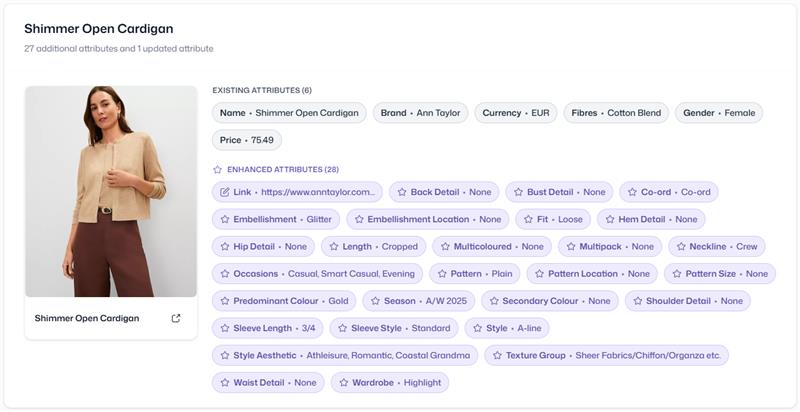
The product shown demonstrates how enriched attributes are applied in practice.
Attribute Breakdown
Physical Attributes | Contextual Attributes | Derived Attributes |
|---|---|---|
Embellishment – Glitter Fit – Loose Predominant Color – Gold | Occasions – Casual, Smart Casual, Evening Season – A/W 2025 | Wardrobe – Highlight |
All three layers together form the Enriched Product Attributes: Physical and Contextual Attributes are labelled per product, while Derived Attributes are computed from them.
Derived Attributes in the Product Catalog
Derived Attributes (formerly referred to as "trends") are rule-based product attributes maintained by Mapp's fashion stylists. They are the one layer that is not labelled product by product: instead, they are computed centrally by evaluating rules against the Physical and Contextual Attributes a product already carries, and describe the context a product belongs to, such as its trend, style aesthetic, climate, or wardrobe role.
Derived Attributes are synchronized into the Product Catalog once per day. Each derived attribute category becomes its own list attribute, named fashion_derived_{category} — for example fashion_derived_climate or fashion_derived_style-aesthetic. An additional combined attribute, fashion_derived_values, holds all values across all categories for simple cross-category filtering. Like other enriched attributes, both can hold several values per product and are available in catalog exports and the Product Catalog API.
Note
Only globally scoped Derived Attributes are currently synchronized. Derived Attributes scoped to a single brand or workspace are not yet supported.
The sync runs once per day. A newly created or changed Derived Attribute only becomes visible in the catalog after the next scheduled run, not immediately.
Application Areas
Enriched attributes can be used across several areas of your product experience. Typical application areas include:
External Search (SEO / AEO): Use enriched attributes in structured data and metadata to better align your content with user queries.
Paid Ads: Use enriched attributes in your product feeds and keyword inputs when setting up paid campaigns.
Onsite Search & Navigation: Use enriched attributes in onsite search, filters, and product grouping.
Benefits
Improved Product Discovery: Enriched attributes make it easier for shoppers to find relevant items.
More Accurate Results: Search outcomes align better with shopper intent thanks to contextual language.
Higher-Quality Traffic: Enriched product data supports performance across organic and paid channels.
Reduced Bounce Rates: Clear, context-rich details help users understand products faster and continue browsing.
Integration
Product attribute enrichment is managed by Mapp’s Style Team. As a retailer, you provide your standard product data. The Style Team, supported by machine-learning models, generates the enriched attributes from it.
In a Product Catalog in Fashion-enabled mode, the enriched attributes are stored as catalog attributes. They are available in catalog exports and in the Product Catalog API. For the attributes, see Product Attribute Model. For exports, see How Catalog Data Flows.
Labelling is based on your product images. Features that are not visible in any image cannot be labelled. To prepare your product data and images, see Prepare Your Product Data for Import.
For the requirements, see the column Enriched Attribute Export in the Prerequisites Matrix. For questions about availability, setup options, or next steps, contact your Account Manager.