Overview
The Mapping tab displays all mappings available for the selected integration and allows users to configure how incoming data from API calls is matched to destinations in Mapp Engage. Each mapping defines the source data, the transformation logic, the destination, and the target attribute.
Each mapping contains a list of relevant default destinations. You can add user data mapping to every mapping type. For example, when you send an email, you can add user attributes to the user profile in a single API call.
The Generic integration only supports import.
Navigation Path
Data Management > Mapp Connect > Add New Integration > Mapping
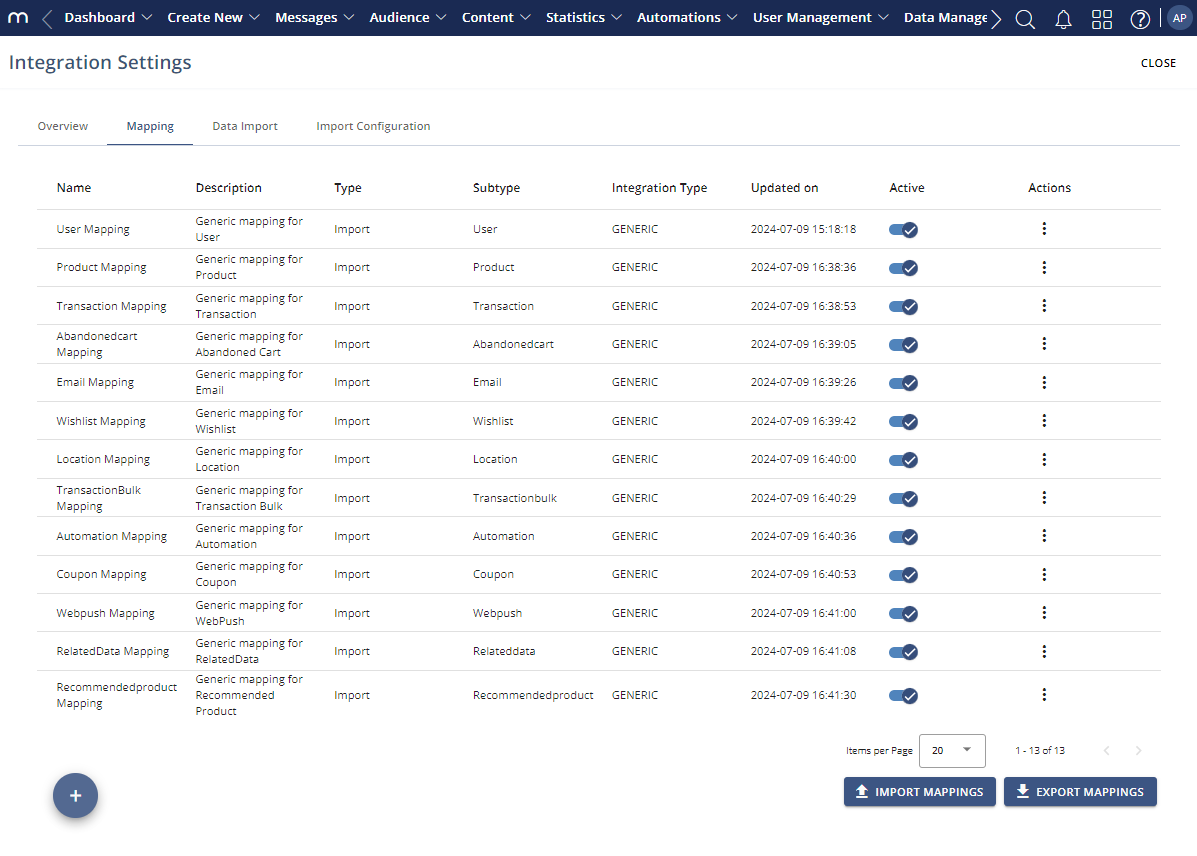
Settings
Available Information
Column | Description |
|---|---|
Name | Displays the name of the mapping. The name reflects the mapped entity or use case, such as user data, product data, or transactional data. |
Description | Provides a short explanation of what the mapping is used for and which type of data it processes. |
Type | Indicates the mapping direction. For Mapp Connect integrations, this value is typically set to “Import,” indicating that data is sent to Mapp Engage. |
Subtype | Specifies the functional purpose of the mapping, such as User, Product, Transaction, or Email. The subtype determines the available destinations and structure. |
Integration Type | Shows the integration on which the mapping is based, for example, “Generic” or a shop system integration. |
Updated on | Displays the date and time when the mapping was last modified. |
Active | Indicates whether the mapping is currently enabled. Active mappings can process incoming data, while inactive mappings are ignored. |
Actions | Provides access to context actions for the mapping, such as editing or managing the configuration. |
Mapping Subtypes
Mapping subtypes determine how incoming data is processed and which destinations are supported for each integration type. Availability of mapping subtypes depends on the selected integration type.
| Mapping Subtype | Integration type | ||||
| Generic | Magento (Adobe Commerce) | Shopify | Shopware | Zapier | |
| User Maps source data into a user profile using these attribute types: Core, Addon, Custom, Member, Related Data, or None. | Predefined | Predefined | Predefined | Predefined | Predefined |
| Email This allows you to send an email (prepared message) and optionally map source data as an email parameter used in the prepared message template. | Optional | Predefined | Predefined | Predefined | Predefined |
| Product Maps product catalog items in Mapp Engage. For more information, see Product Catalog. | Optional | Predefined | Predefined | Optional | unsupported |
| Transaction Maps transactions, e.g. order details, with the default structure of System Transactions. | Optional | Predefined | Predefined | Predefined | Predefined |
| Transaction bulk Imports a file with multiple transactions/orders. | Optional | Predefined | Predefined | unsupported | unsupported |
| Abandoned Cart This function maps source data to the default structure of the Abandoned Cart eCommerce table. For more information, see Product Catalog. | Optional | Predefined | Predefined | unsupported | unsupported |
| Abandoned Browse This function maps source data to the default structure of the Abandoned Browse eCommerce table. For more information, see Product Catalog. | Optional | Predefined | Predefined | Unsupported | Unsupported |
| Wishlist This function maps source data to the default structure of the Wishlist eCommerce table. For more information, see Product Catalog. | Optional | Predefined | Optional | unsupported | unsupported |
| Location This option allows you to map source location data to the default location structure in the metadata service for geofence functionality. For more information about geofence functionality, see Location Management. | Optional | unsupported | Predefined | unsupported | unsupported |
| Automation This mapping is used to trigger whiteboard automation in Mapp Engage. See Whiteboards. | Optional | unsupported | Predefined | Optional | unsupported |
| Coupon For more information, see Coupon Manager | Optional | Predefined | Optional | unsupported | Predefined |
| Related Data This is based on the related data tables and allows for very flexible data use. For instance, in an Abandoned Cart scenario, this mapping allows for storing product information per cart instead of per product in an eCommerce table. Mapping for the Related Data subtype is optional. You can add the Related Data subtype as a Source and choose the Related Data table you want to map to as a destination. | Optional | Predefined | Optional | Optional | Predefined |
| Recommended product For more information, see Product Recommendations in Mapp Engage | Optional | Predefined | Optional | Optional | Predefined |
| SMS It allows you to send an SMS (prepared message) to a contact using their email or mobile number as an identifier. | Optional | unsupported | Predefined | unsupported | unsupported |
| Push This allows you to send a push notification (prepared message) to the contact using email as an identifier. It requires adding the mobile app ID in the API call. | Optional | unsupported | Predefined | unsupported | unsupported |
| Web Push Web Push browser notifications. | Optional | unsupported | Optional | unsupported | Predefined |
| Custom Use for custom mappings that are unsupported within the system. | Optional | unsupported | Optional | Optional | unsupported |
| Newsletter | unsupported | Predefined | unsupported | Predefined | unsupported |
Actions
Action | Description |
|---|---|
Add new Mapping | Creates a new mapping configuration for the selected integration. |
Edit | Opens the selected mapping so its configuration can be modified. |
Import Mappings | Imports mapping configurations from an external source. |
Export Mappings | Exports existing mapping configurations for reuse or backup. |
Close | Closes the integration settings view. |