Overview
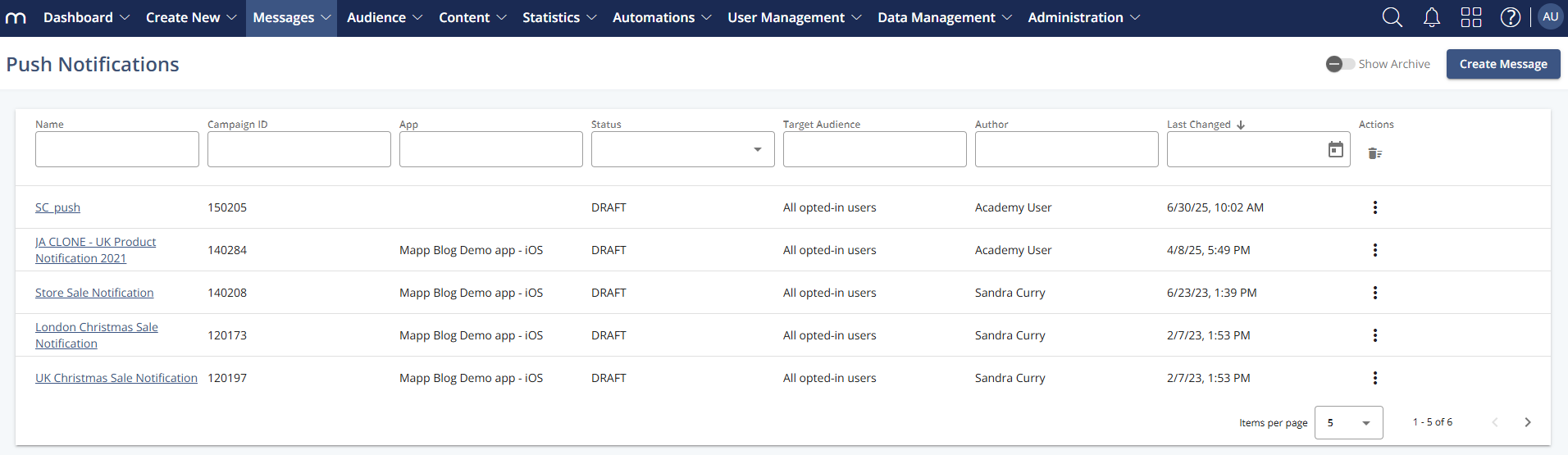
The Push Notifications Overview provides a centralized list of all created push messages. It enables users to view the status, audience, and metadata of existing push campaigns and access message-specific actions like editing, copying, or deleting. This overview helps users monitor progress, reuse successful messages, and maintain campaign consistency.
Navigation Path
Messages > Push Notifications
Information Displayed
Information | Description |
|---|---|
Name | Internal name or title of the push message (usually clickable for quick access). |
Campaign ID | System-generated ID to identify each campaign uniquely. |
App | Indicates which mobile app the push message targets. |
Status | Displays the message status such as:
|
Target Audience | Shows the audience segment the message is intended for (e.g., All opt-ins). |
Author | Lists the user who created or last modified the message. |
Last Changed | Displays the timestamp of the most recent update. |
Message Actions
Action | Description |
|---|---|
| Provides additional actions such as copying, archiving, or deleting the message. |
| Opens the Info step of the Push Message Creation flow. From there, you can move to other steps to view the message. |
| Opens the message for editing (if still in draft or editable state). |
| Creates a duplicate of the selected push notification. The content and settings remain the same, but a new, unique campaign ID is assigned. |
| Permanently removes the selected message. Only messages in “Draft” status can be deleted. Completed messages must be archived instead. |
| Moves the selected message to the archive. Use the Show Archive toggle to view archived notifications. |
| Opens the performance report for the selected push notification. Statistics are only available for messages with the status “Completed.” |
| Stops an active message from being delivered. Useful for halting ongoing campaigns. |
| Reactivates a previously paused message and continues its delivery as configured. |


.png)

.png "image(630).png")
.png)
.png)
General Actions
Action | Description |
|---|---|
| Starts a new push message configuration. |
| Toggles the view to display archived push notifications. |