Website goal and marketing campaign tracking is probably one of the best ways to gain insights and achieve your business objectives. The Marketing Dashboard provides you with the most important performance factors at a glance. Set up website goals and campaigns to get the most out of your data.
Tracking Website Goals
An integral part of Web Analytics is the analysis of website goals, including the calculation of customer journeys based on these. With the tracking data, you can determine which campaigns were directly involved in achieving the previously defined goal. You can currently track the following website goals:
Email Subscription
You can track e-mail subscriptions with the following data layer.
Example
window._ti['eMailSubscription'] = 'true'App Download
App downloads can be measured with an onclick event.
Example
onclick="wts.push(['send','click', {linkId:'app download', customEcommerceParameter:{2:'true'}}])"The corresponding custom e-commerce parameter (2) must first be created by your Mapp Intelligence consultant.
Function | Description |
|---|---|
App download | true = When a user clicks the button App Download. |
Social Sharing
To track social sharing an onclick event is used.
Example
onclick="wts.push(['send','click', {linkId:'social sharing', customEcommerceParameter:{3:'true'}}])"The corresponding custom e-commerce parameter (3) must first be created by your Mapp Intelligence consultant.
Function | Description |
|---|---|
Social sharing | true = When a user clicks on a social sharing button (for example twitter, facebook, and so on). |
Tracking Campaigns
Campaign tracking is used to track your success in marketing activities online as well as offline. With the help of campaign tracking, website targets can be assigned to individual marketing activities. In this way, you can identify valid promotions, costs from campaigns, or the order in which campaigns are received, for example. Campaign clicks allow you to track visits to specific pages or defined references.
Campaign tracking is mainly based on specific parameters that are appended to the target URLs of the advertising media - so-called media codes. You can improve the recording of media codes by appropriate pixelation. Media codes can also be overwritten or supplemented with additional information about campaign parameters.
Learn more about campaign tracking in the training chapter Analyses 3.1 – Campaign Configuration.
The following data sources can define campaigns:
URL parameters (media codes)
pages (specific landing pages)
events (click internal link)
referrers (for example SEO, social media referrers, other referrers)
direct accesses
Since each campaign is individual, there is no basic configuration of Mapp Intelligence for it. This means that you need to contact your consultant to request an individual configuration for you.
If you have not used campaign tracking yet, you can create your campaign URLs using the following parameters for the campaigns:
wt_mc
wt_mc=all.medium.source.campaign.content.
Parameter | Description |
|---|---|
all | Mandatory. This is an obligatory statement so that the campaign can be tracked correctly. |
medium | Identifies a medium such as e-mail or cost-per-click. |
source | Contains either e-mail or affiliate, all other values are ignored. |
campaign | Identifies specific product promotion or strategic campaigns. In Mapp Intelligence, it is used for keyword analysis. |
content | Differentiates ads or links, which point to the same URL. In Mapp Intelligence, it is used for content-targeted ads. |
Campaign URL Builder
To generate a correct campaign URL, we provide you with the Campaign URL Builder. The tool allows you to create a valid URL for campaign tracking simply by entering your values. It helps you define the necessary media codes to track your advertising media in Mapp Intelligence and to create meaningful analyses for traffic and performance. Here you can add your values for the categories in which your ad media are structured in Mapp Intelligence.
Enter your target URL in the provided field.
Define your tagging code by the following values:
Medium (select from the drop-down list)
Source
Campaign
Content
Keyword
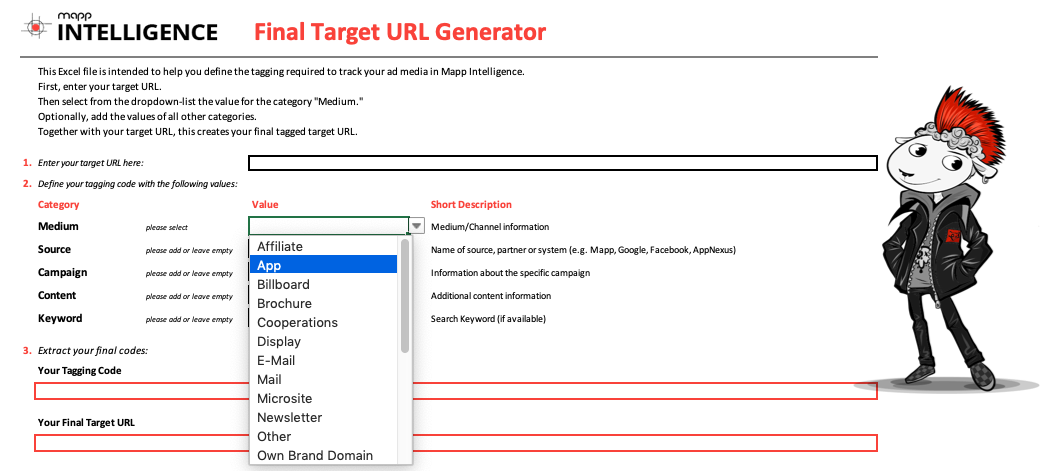
The tagging code and your final target URL are automatically generated. Copy and use them.
For Google campaigns, you can use the following parameters in your URL to analyze them in Mapp Intelligence. In this case the Mapp Intelligence URL Campaign Mapper Plugin.
UTM Parameters Example
utm_source=google
utm_medium=cpc
utm_campaign=autumn_sale
utm_content=logolink
utm_term=outdoor+jackets
Parameter
Description
utm_source
Contains either e-mail or affiliate, all other values are ignored.
utm_medium
Identifies a medium such as e-mail or cost-per-click.
utm_campaign
Identifies specific product promotion or strategic campaign. In Analytics, it is used for keyword analysis.
utm_content
Differentiates ads or links, which point to the same URL. In Analytics, it is used for content-targeted ads.
utm_term
Notes the keywords for this ad. In Analytics, it is used for paid searches.