1 Overview of User-Centric Data
User-centric data includes various metrics and dimensions that provide details on:
Order Behavior: Total orders per user, average order value, and total discounts.
Visit Frequency: Total visits per user and engagement metrics like page impressions.
These insights are essential for both segmentation in analytics and for creating target groups in Mapp Engage.
2 Data Insights with Frequency Calculations: Perspective Examples
For an analyst familiar with standard metrics like page impressions and visits, the user-centric view may initially seem challenging. In this view, we assess data from multiple perspectives to provide a more holistic understanding of each user’s engagement.
Example: Understanding User Visit from Multiple Perspectives
Let’s look at a user’s interactions over three separate visits to illustrate the different perspectives available through user-centric data. Suppose a user visits the website on three different days.
.png)
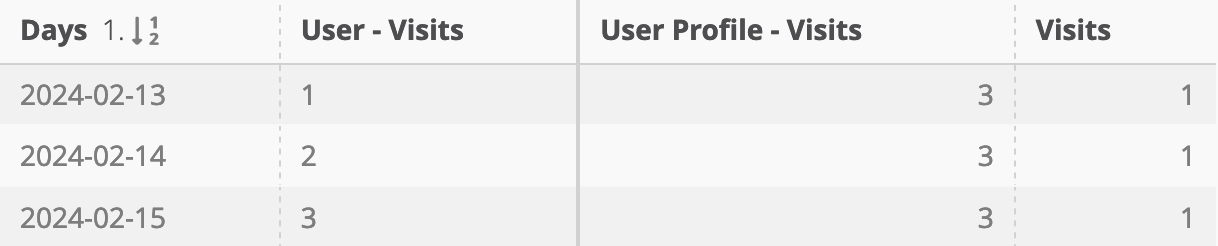
Session View
Metrics in the Session View track each individual visit’s cumulative count up to that point. This means that each visit reflects the user’s total visits to date, showing a sequential tally of interactions across multiple visits. For instance, if a user has visited three times, each visit record shows the cumulative count (e.g., first visit = 1, second visit = 2, third visit = 3)
Identification
Metrics and Dimensions using the Session View do not include “Profile” in their titles (e.g., “User - Visits” or “User - Page Impressions”). Refer to the metric overview below for a complete list.
Profile View:
The Profile View uses the same cumulative logic as the Session View but focuses on the user’s most current state. Instead of associating cumulative counts with individual visits, this view always presents the latest cumulative data for the user, regardless of whether the last visit falls within the analysis period. This provides an up-to-date snapshot of the user’s entire engagement history at any given time.
Identification
Metrics and Dimensions in the Profile View include “Profile” in their names (e.g., “User Profile - Visits” or “User Profile - Page Impressions”). Refer to the metric overview below for a full list.
Regular Metric View:
Standard metrics, like “Visits,” record the total number of interactions within the defined analysis period. Here, you might see how often a user interacted within a specific timeframe, providing a period-based summary.
Each of these perspectives serves a distinct purpose. The Session View gives a visit-by-visit progression, the Profile View captures the user’s latest cumulative state, and the Regular Metric View summarizes activity over a defined period. Together, they help analysts understand user behavior both sequentially and in aggregate.
3 Understanding Visit vs. Order Intervals: Calculation Examples
Intervals in Mapp Intelligence provide insights into the time gaps between consecutive visits or orders, helping analysts understand engagement frequency and timing patterns. By using filters, analysts can further refine these intervals, limiting them to specific events or visits. For more on applying filters, see the Use Cases section below.
Good to Know for Visit and Order Intervals
Date-Based Calculation: Intervals are calculated based solely on the date, not the specific time of day. For example, a user could visit the website at 11 p.m. and then again the next day at 5 p.m., which would be counted as a one-day interval, even though fewer than 24 hours have passed.
Handling of First Interactions:
For Visits: The first visit is excluded from interval calculations, with intervals starting from the second visit onward.
For Orders: For the first-ever order, the interval represents the number of days since the user’s first visit, rather than since a prior order.
Calculating Visit Intervals for a User
To illustrate interval calculations, let’s consider a user who visits the website on three separate days:
.png)
For this user, Mapp Intelligence calculates the interval between each visit:
.png)
Visit Interval “A”: For the second visit, the last contact has been one day ago
Visit Interval “B”: For the third visit, the last contact has been two days ago
Note: For a deeper analysis of user engagement over time, Mapp Intelligence provides cohort analysis tools to examine intervals in days, weeks, or months since a user’s first visit. For more details on setting up and interpreting cohort data, refer to our article on Cohort Analysis in Mapp Intelligence.
Calculating Order Intervals for a User
If the user places orders during these visits, Mapp Intelligence also calculates the time between consecutive orders. Suppose the user makes purchases on their first and third visits, with the first purchase also being their first-ever order and their first-ever visit:
.png)
For this user, Mapp Intelligence calculates the interval between each order:
.png)
Order Interval “A”: For the first order, the days between orders is 0, calculated from the date of the first visit, since it’s the first-ever order.
Order Interval “B”: The number of days between the first order (on the first visit) and the second order (on the third visit) is 4 days.
4 Overview of Dimensions and Metrics
Mapp Intelligence offers a variety of user-centric dimensions and metrics, allowing analysts to track specific aspects of user behavior over time. The following table provides an overview of the available dimensions and metrics in Mapp Intelligence, offering valuable insights for both segmentation and engagement analysis:
Traffic-Related Metrics and Dimensions
Available as | ||||
|---|---|---|---|---|
Metric/value | Designation | Description | Metric | Dimension |
Page Impressions | Total page impressions to date in intervals of ten | X | ||
Total page impressions | X | X | ||
Visits | Total visits to date | X | ||
Total visits | X | X | ||
Days | Days since a visit | X | ||
Days since the last visit to date | X | |||
Days since the first visit to date | X | |||
Avg number of days between visits | X | |||
Number of days between visits | X | |||
Avg number of days between visits | X | |||
Yes | No | Shows whether something occurred within a visitor’s last visit | X | ||
Order-Related Metrics and Dimensions
Available as | ||||
|---|---|---|---|---|
Metric/value | Designation | Description | Metric | Dimension |
Orders | Total orders to date | X | ||
User Profile - Orders | Total orders | X | X | |
Total number of discounted orders to date in intervals of ten | X | |||
User Profile - Orders w. Discount | Total number of discounted orders | X | X | |
Order value | Total order value to date | X | ||
User Profile - Order Value | Total order value | X | X | |
Avg total order value | X | |||
Discount value | User - Discount Value | Total discount value to date | X | |
User Profile - Discount Value | Total discount value | X | X | |
Discount rate % | User Profile - Discounts % | Percentage of discounted orders out of total orders | X | |
Customer Lifetime Value | User – Campaign New Visitor CLV | Total order value to date for a new visitor with campaign click | X | X |
Days | Days since the previous order (or first visit in case of the first order) | X | ||
Days since the last order | X | |||
User – Days between orders | Days between two orders | X | X | |
X | ||||
Yes | No | Shows whether an order was placed during the last visit | X | ||
Allows restricting on the last cycle of the Customer Micro Status stretching across multiple visits. | X | |||
Note on Metrics and Dimensions
In Mapp Intelligence, some data points are available as both metrics and dimensions to support distinct use cases:
Metrics are used primarily for quantitative analysis. They allow analysts to measure the count, sum, or average of specific user actions, such as the total number of visits or orders placed. Metrics are best suited for reporting aggregate numbers and tracking key performance indicators (KPIs).
Dimensions provide categorical context for these actions, enabling analysts to segment data for deeper analysis. For instance, using Page Impressions as a dimension lets you view and filter impressions based on specific attributes like the user’s profile, traffic sources, or other visit details.
Access to both a metric and a dimension for the same data point enables flexible, targeted analyses. For example, analysts can use Page Impressions as a metric to measure total impressions over time, or as a dimension to drill down into impressions by specific user segments or campaigns.
For additional details on how inactive user data is handled, see our FAQ on Data Cleanup Rules.
5 User-Centric Analysis with RfM and RfE Models
Making sense of complex data, such as lifetime and non-lifetime metrics, can be challenging. The RfM (Recency, Frequency, Monetary) and RfE (Recency, Frequency, Engagement) models provide an accessible approach to analyzing user behavior. These models transform intricate data points into actionable insights by offering a structured, pre-defined setup that you can easily adapt to your needs—without requiring deep knowledge of every metric and calculation involved.
This article provides the foundational data that underpins these models, enabling you to work with a straightforward framework that simplifies your analysis. For a more detailed dive into how these models work in practice, the Mapp Academy offers a course titled “RFM and RFE Model”. In this course, you’ll learn not only about the models themselves but also about typical use cases, group assignment methods, and ways to customize the framework to meet specific business goals. It’s an ideal next step to use these models effectively, saving time and reducing complexity.