The Voucher Manager allows you to send personalized discount codes or scannable barcodes to your contacts and track exactly what happens next.
This feature helps you build data-driven, conversion-focused campaigns across email, mobile, and other channels.
Why is this important?
Vouchers in Mapp Engage aren’t just codes — they help you personalize experiences and measure actual customer behavior.
Each voucher is uniquely assigned to a contact. When it is redeemed, you can:
Track who received which code
Analyze opens, clicks, and redemptions
React with follow-up messages and automations
Understand the impact of your campaigns – both online and offline
This makes vouchers a powerful tool to drive conversions, measure success, and create meaningful customer journeys.
Key Use Cases
Email campaigns with individual discount codes
In-store coupons delivered via scannable barcodes
Welcome messages with special offers
Win-back campaigns with personalized incentives
Triggered vouchers based on user behavior (e.g., cart abandonment)
What is a voucher?
In Mapp Engage, a voucher can be:
a coupon → an alphanumeric code, typically used online
a barcode → a scannable image, typically used in physical stores
Both types are managed through the Voucher Manager.
They are assigned automatically to each recipient during message sendout.
When should I use a coupon vs. a barcode?
Use a coupon when the voucher is redeemed online and the recipient enters a code manually, for example during checkout in an online shop. This approach is well suited for email campaigns, automated messages, and other digital touchpoints where the full interaction takes place online.
Use a barcode when the voucher needs to be scanned, such as in physical stores or at the point of sale. Barcodes make it possible to link digital campaigns with offline redemptions and measure conversions that happen outside purely digital channels.
The choice between coupons and barcodes depends on where the voucher is redeemed and how the redemption is technically handled.
What happens in the background?
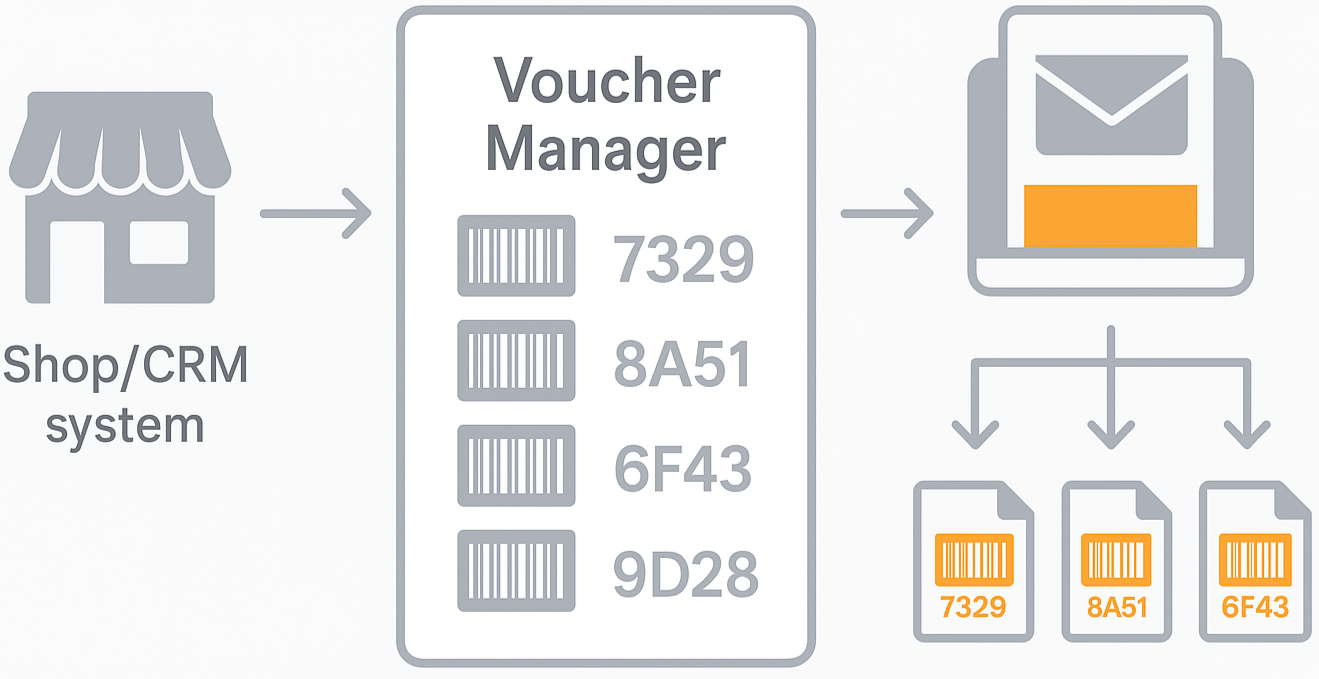
The codes are typically created in an external system, such as an online shop or CRM.
They are then imported into Mapp Engage – usually as part of a coupon list, which serves as the main data source for both coupons and barcodes.
During sendout, the system ensures that:
Each recipient receives one unique code
The code is automatically inserted into the message
The same code is not reused (unless configured otherwise)
Important:
If a coupon message is forwarded, the way it is forwarded can affect how the coupon is used and tracked.
Mapp Engage provides a built-in forward link to ensure proper code assignment and full campaign tracking.
For more details, see the How-To: Add a Forward Link to a Coupon Message.
Barcodes
Barcodes in Mapp Engage are a way to connect digital messages with real-world actions — for example, a scan at the point of sale.
You can generate personalized barcodes from:
a coupon list (e.g., unique discount codes)
a custom attribute (e.g., membership ID)
manually entered data
These barcodes are inserted into messages via placeholders, in the same way as coupon codes. When used in campaigns, barcodes let you:
deliver scannable discounts that work seamlessly at checkout
understand what happens after the message — even offline
They help connect your digital strategy to real-world results.