Overview
The Setup panel defines when a whiteboard plan starts and ends, as well as which event removes contacts from the whiteboard journey. Use these settings to control timing and avoid overcommunication when contacts reach a desired outcome.
Navigation Path
Navigate to Automations > Whiteboards
Create new Whiteboard
Click Setup at the top-right corner of the whiteboard canvas
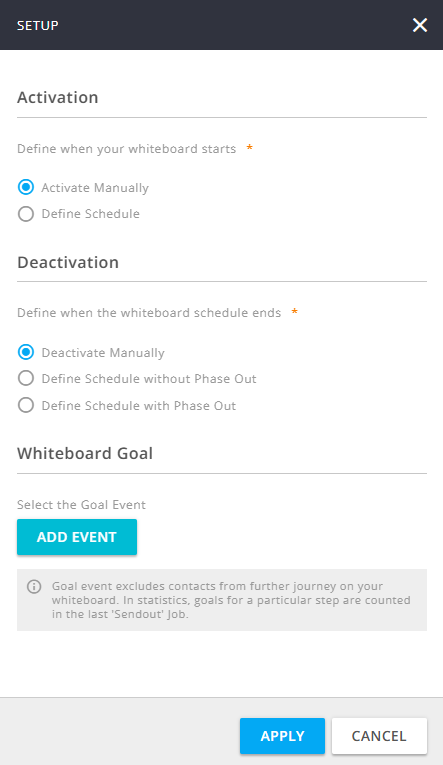
Settings
Setting | Description |
|---|
Activation | Defines when the whiteboard plan starts. Activate Manually: The plan is not scheduled to start on a specific date. To start it, you must click Activate on the whiteboard canvas. Define Schedule: Schedules the plan to start on a defined date and time. After all steps are complete and validated, click Schedule on the canvas. The plan starts automatically at the scheduled time. Start Date: Date on which the scheduled start occurs. Time: Time at which the scheduled start occurs. Time Zone: Time zone used to calculate the scheduled start time.
|
Deactivation | Defines how and when the whiteboard plan ends. Deactivate Manually: The plan is not scheduled to end on a specific date. To end it, you must click Deactivate on the canvas. Define Schedule without Phase Out: Schedules the plan to end on a defined date. All contacts still on the plan exit immediately at that time. End Date: Date on which the plan ends. Time: Time at which the plan ends. Time Zone: Time zone used to calculate the scheduled end time.
Define Schedule with Phase Out: Schedules a date after which no new contacts can enter the plan. Contacts already on the plan continue until they complete their automations. Phase Out Start: Date after which new contacts are no longer added to the plan. Time: Time at which the phase-out starts. Time Zone: Time zone used to calculate the phase-out start time.
|
Whiteboard Goal | Defines which event removes contacts from the plan when they reach a desired outcome, helping to avoid overcommunication. |