Overview
In the Delivery step of AMP Email Message Creation, you define who should receive the message and when it should be sent. This step ensures the message reaches the right audience at the right time.
Navigation path
During email creation, follow the message creation process until you reach Delivery.
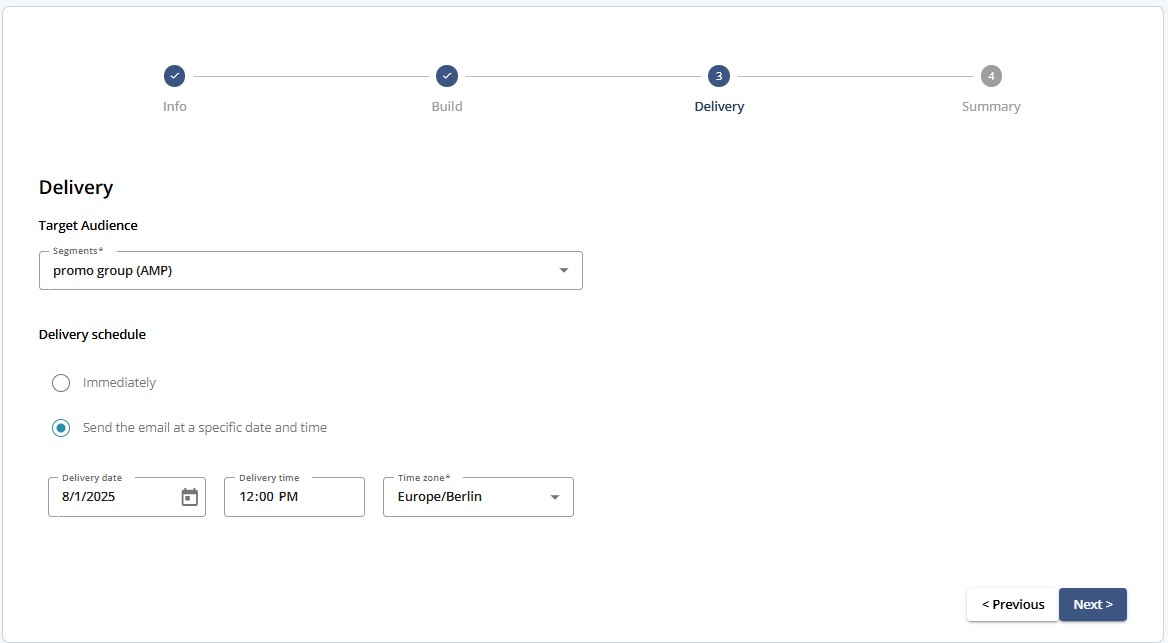
Delivery Settings
Setting | Description |
|---|---|
Target Audience | Select the contact segment that will receive the message. This segment defines the message recipients. |
Delivery Schedule | Choose when the message should be sent. You can send it immediately or schedule it for a specific date, time, and time zone. |
Actions
Action | Description |
|---|---|
Save | Saves the current message information. |
Close | Closes the message editor without saving changes. |
Previous | Returns to Step 2 - Build. |
Next | Proceeds to Step 4 - Summary. |