Overview
Conversion tracking helps measure the impact of your email campaigns by tracking user actions, such as website visits or purchases, after message interactions. This view allows you to manage, monitor, and troubleshoot all conversion tracking configurations within your system.
Navigation Path
Administration > Categories > Conversion Tracking
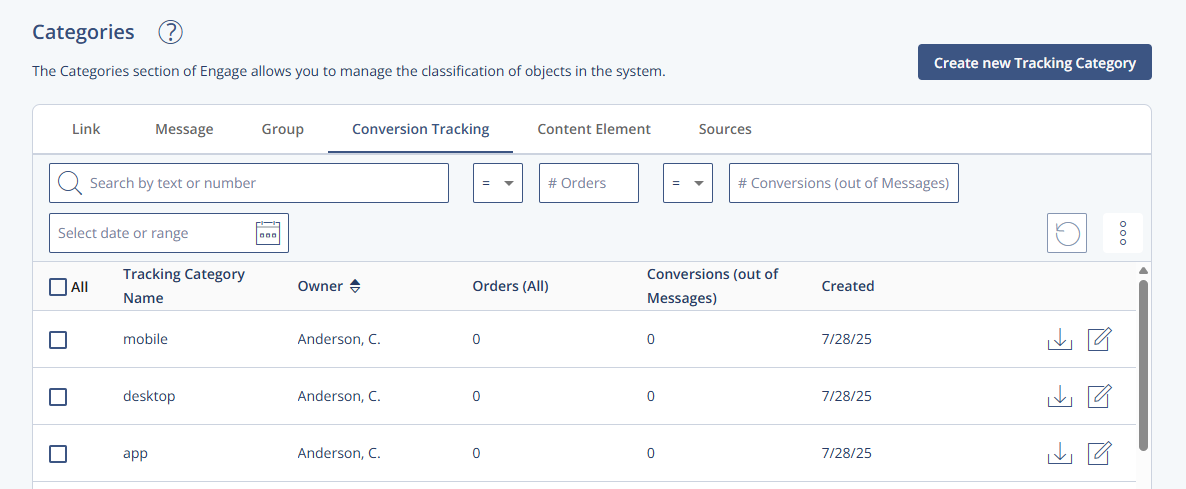
Settings Table
Setting | Description |
|---|---|
Tracking Category Name | The title of the conversion tracking setup. |
Owner | Displays the user who created the conversion tracking. |
Orders (All) | Total number of pixel calls from the order confirmation page. Includes all page views, including organic traffic. |
Conversion (out of Messages) | Tracks orders that originated from Engage emails where conversion tracking was enabled. It is based on the user or message ID from tracking cookies. |
Created | Date when the conversion tracking was created. |
Actions Table
Action | Description |
|---|---|
Create new Tracking Category | Opens a configuration form to create a new conversion tracking setup. |
Edit | Allows editing of an existing conversion tracking setup. |
Archive | Archives selected conversion tracking entries. These cannot be used but are retained in the system. |
Export | Takes you to the Export Contact Data window, where you can configure the export. |
Additional Information
Archived conversion trackings remain stored but are not active.
Pixel tracking depends on the correct placement of confirmation pages and may include calls from non-campaign traffic.
Secure domains must be configured for cookie-based tracking pixel URLs to function correctly.