Overview
In this tab, you can create, edit, prioritize, and review link categories. Link categories group and manage links within messages based on keywords or regular expressions, improving reporting and targeting.
Navigation Path
Administration > Categories > Link
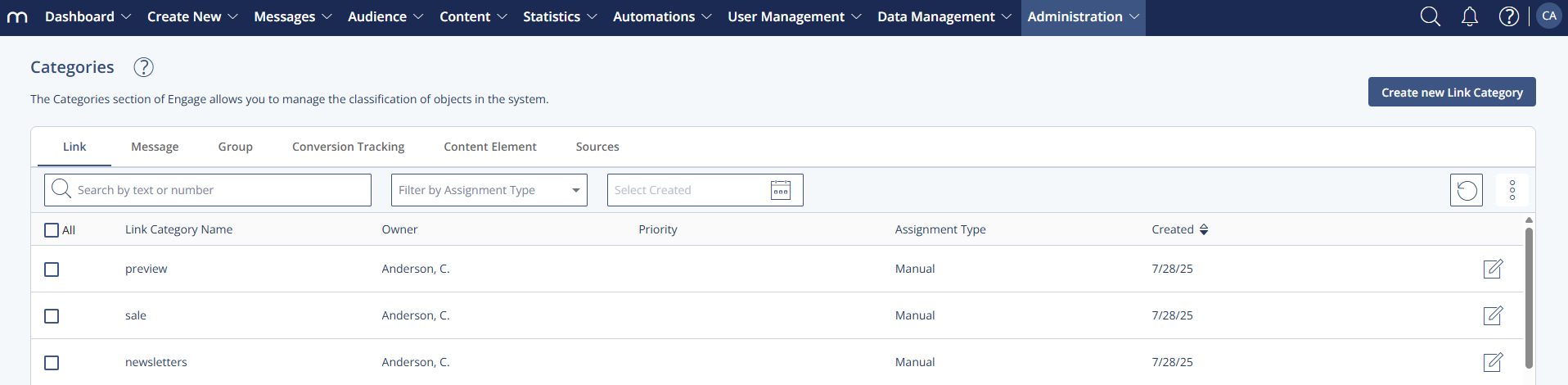
Settings Table
Setting | Description |
|---|---|
Link Category Name | The internal name of the link category was created by the user. |
Owner | The user who last edited and saved the link category. |
Priority | Defines the importance of a link category. If a URL matches multiple categories, it is assigned to the one with the highest priority. |
Assignment Type | Indicates how a link is assigned: “Manual”, “Regular expression”, or “Keyword”. Describes whether the assignment is manual or automatic. |
Created | Date when the link category was first created. |
Actions Table
Action | Description |
|---|---|
Create new Link Category | Opens a form to define a new link category. |
Edit | Opens the selected link category for editing. |
Change Priority | Adjusts the order in which categories are applied when multiple matches are possible. |
Archive | Moves selected link categories to the archive. They can be reactivated later. |
Show archived Link Categories | Displays archived link categories. |
Delete | Permanently removes selected link categories after confirmation. |
Additional Information
A link can only be assigned to one category. If a link matches multiple patterns, the system applies the one with the highest priority.
Link categories apply only to messages created after their definition. They are not applied retroactively.