Overview
The Whiteboards overview lists all existing whiteboards, displaying key information such as type, creator, and status. This helps you quickly see which whiteboards exist and how they are currently used.
Navigation Path
Automations > Whiteboards
.png)
Settings
Setting | Description |
|---|---|
Name | Whiteboard name shown in the list. |
Type | Whiteboard type. Possible values include “Event-based”, “Recurring (sys)”, “Recurring”, “Scheduled”, and “Scheduled (sys)”. |
Creator | Name of the user who created the whiteboard. |
Last updated | Date and time when the whiteboard was last changed. |
Created | Date and time when the whiteboard was originally created. |
Status | Current state of the whiteboard. Possible values include Active, Editing, Ended, Phasing Out, Inactive, Publication failed, Publishing, and Scheduled. |
Tag(s) | Tags assigned to the whiteboard. |
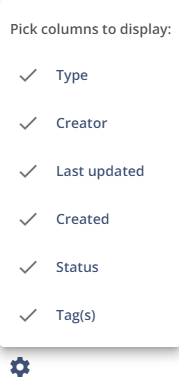
To adjust the view, click on the gear icon on the bottom-left of the Whiteboards and select which columns you want to display:
Actions
Action | Description |
|---|---|
Create new Whiteboard | Creates a new whiteboard. |
| Archives a whiteboard or restores it to the active list. |
| Creates a copy of the selected whiteboard. |
| Opens the selected whiteboard for editing. |
| Opens an archived whiteboard in read-only mode. |
| Deletes the selected whiteboard. |


