Overview
The Abandoned Cart Event is triggered when a contact performs one of the following actions:
Adds products to their cart but does not complete the purchase.
Removes previously added products from their cart.
This event can be used as a start event in workflows.
If the event is not used as a start event, a negative path is available. When used with the Multiple Event filter, this path applies to the entire event sequence rather than individual paths.
Prerequisites
To use this event, Abandoned Cart and/or Wishlist Tracking must be set up. For more details, refer to:
Alternatively, data can be imported into related data in Mapp Engage via API. For more details, refer to:
Configuration
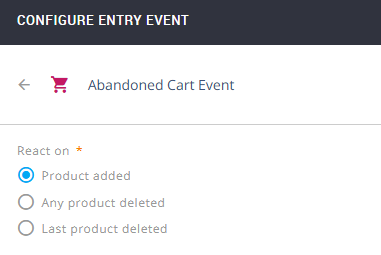
1 React on
You can configure the event to react to specific triggers:
Product added: Triggered when a product is added to the Abandoned Cart eCommerce table.
Any product deleted: Triggered when any product is removed from the Abandoned Cart eCommerce table.
Last product deleted: Triggered when the last product linked to a particular contact is removed from the Abandoned Cart eCommerce table. This option is particularly useful when set as a Whiteboard goal to stop the Whiteboard job once all items in the cart are deleted.
2 Whiteboard Audience
See Whiteboard Audience.
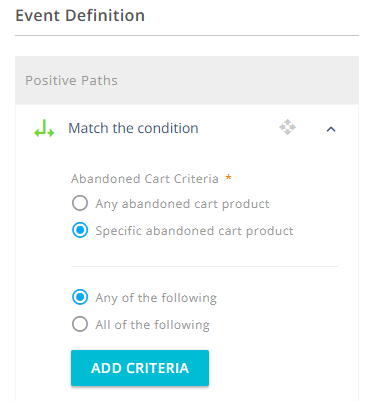
3 Event Definition
You can define specific event conditions:
Any abandoned cart product
Specific abandoned cart product: Add criteria based on Product SKU or Product price and choose how they are combined:
Any of the following: The event is triggered if at least one criterion matches.
All of the following: The event is triggered only if all criteria match.