Overview
Adjust a contact’s read mode for a specific group. Read mode defines which channels the contact can receive and prefer (Email, SMS, Mobile Push) and, where applicable, the message format. These preferences are group-specific and override any read mode values previously imported via XML or CSV. Channel options are only shown if the contact’s profile contains the required identifier (email address, mobile number, or mobile app alias).
Navigation Path
Go to Audience > Contact Management > Group Members
Select a group
In the Actions column, select Read Mode.
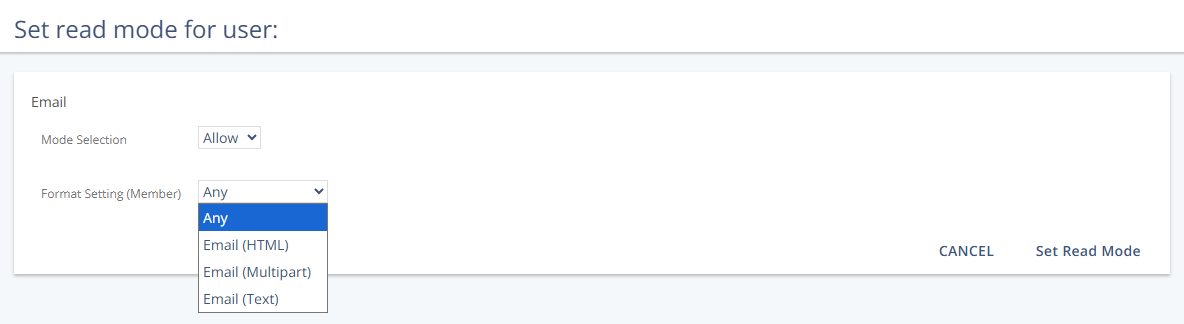
Settings
Mode Selection
Determines whether a channel can be used to contact the member and, if so, whether it is the preferred channel.
Setting | Description |
|---|---|
Allow | Messages are sent to the contact through the channel if available. |
Prefer | Marks the channel as the contact’s preferred communication method. |
Deny | Messages are never sent to the contact through the channel. |
Format Setting (Member)
Defines the message format used when sending through the selected channel.
Channel | Setting | Description |
|---|---|---|
any | No format preference. The system decides based on availability. | |
email-html | Email in HTML format. | |
email-html-multipart | Email in multipart format (HTML and plain text). | |
email-text | Email in plain text format. | |
SMS | mobile-sms | Standard SMS (160 characters). |
Mobile Push | fax-printed | Standard push notification for Mobile Push. |
Actions
Action | Description |
|---|---|
Set Read Mode | Saves the read mode changes and closes the view. |