Overview
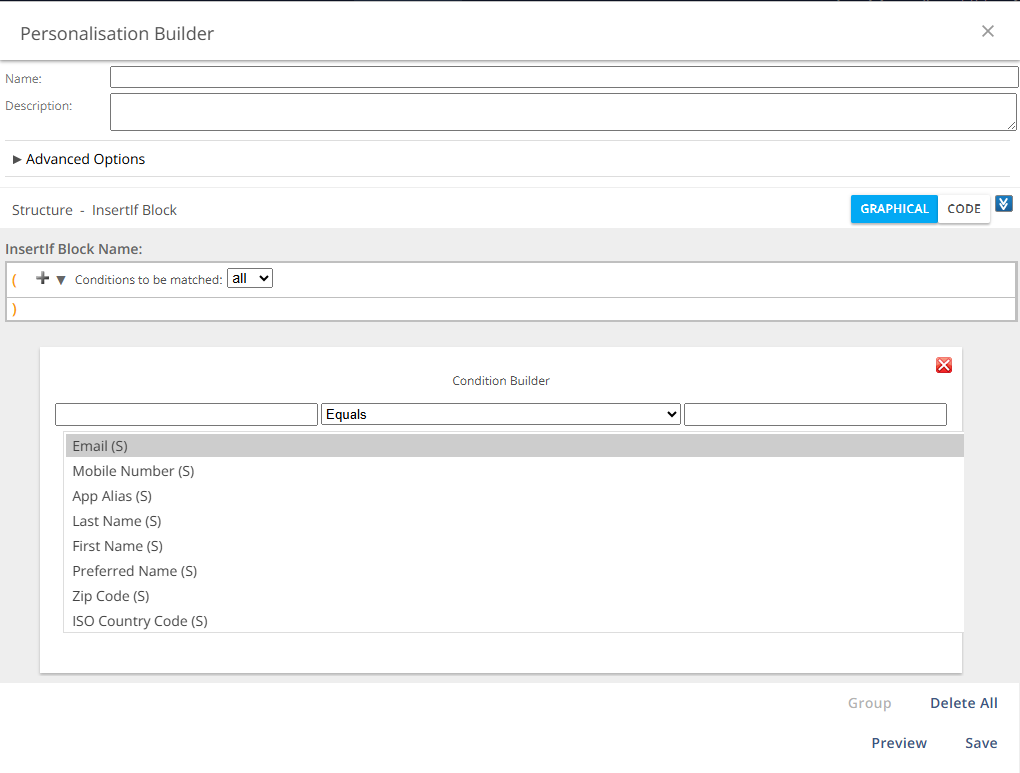
The Condition Builder defines the rule evaluated for an InsertIf or InsertElse block. It allows users to select an attribute, define the relationship to a value, and add the resulting condition to the personalization logic.
Navigation Path
Navigate to Audience > Segmentation > Personalization.
Click Create to open the Personalization Builder.
Click the plus symbol to open the Condition Builder.
Settings
Setting | Description |
|---|---|
First input field | Expands to show all available attributes, including standard and custom attributes. Select the attribute used for evaluating the condition. |
Center drop-down menu | Defines the relationship between the attribute value and the value entered in the second field. Available relationships include:
The list adapts based on the selected attribute. |
Second input field | Specifies the value to be compared with the selected attribute. This must be an exact value. For less strict matching, use "starts with", "ends with", "contains", or regular expressions. Wildcards are not supported. |
Compare two attributes | Allows selection of another attribute instead of entering a fixed value, enabling attribute-to-attribute comparison. |
Note:
With equal and not equal relationships, the value in the attribute must exactly match the value defined in the second input field. To perform a less strict search, use the relationships starts with, ends with, or contains. It is not possible to use wildcards. More detailed queries can be created with regular expressions.
Examples of InsertIf and Content Blocks
For worked examples of InsertIf/InsertElse conditions and content blocks (personalized salutations, loyalty program tiers, subject line capitalization), see Personalization Builder: Examples.