Overview
This step defines how and when your SMS message is sent. You choose the target group, schedule or send immediately, apply segmentation, and optionally save the message for repeated or automated use.
Navigation Path
During message creation, follow the message creation process until you reach Configuration.
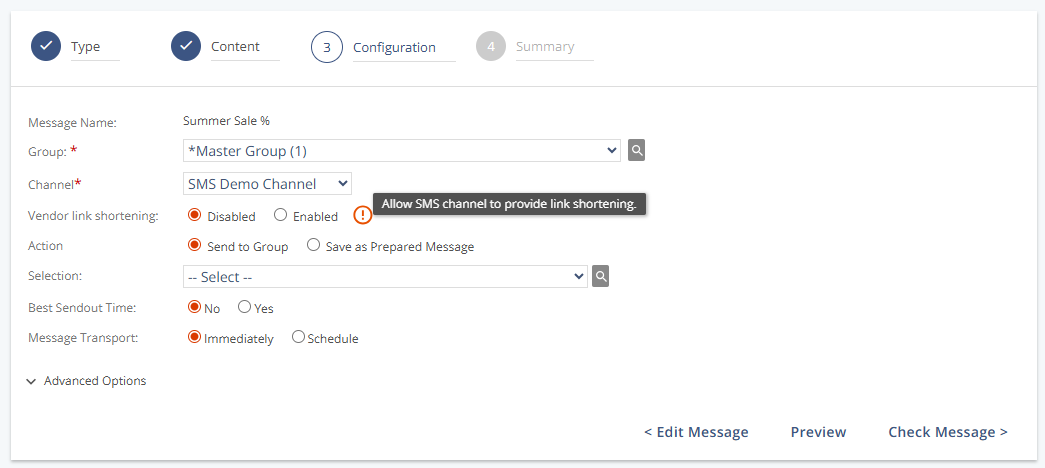
Sendout Settings
Setting | Description |
|---|---|
Message Name | Displays the name of the message. This name is defined in Step 1 (Type) and is not visible to recipients. |
Group | Specifies the recipient group for the message. SuperGroups are marked with an “S”. |
Channel | Selects the SMS channel that will be used for the sendout. |
Vendor link shortening | Enables link shortening for dynamic links. This option is only available for channels configured with the Infobip SMS carrier. |
Action | Determines the message flow:
|
Segment | Applies a contact filter based on predefined criteria. Limits the sendout to specific audience segments. |
Best Sendout Time | |
Message Transport | Defines message delivery timing:
|
Send the Message to All Subgroups | Only appears when a SuperGroup is selected. Sends to all subgroup members, excluding the SuperGroup itself, or vice versa. |
Advanced Options
Setting | Description |
|---|---|
Sendout Size | Controls how many recipients receive the message:
|
Format | Confirms message will be sent as SMS. |
Message Category | Assigns a category for tracking and reporting. |
Actions
Action | Description |
|---|---|
Edit Message | Returns to step 2 - Content. Overwrites the current configuration. |
Preview | Opens preview mode to test the message before sendout. See SMS Message Creation: Preview. |
Check Message | Opens step 4 - Summary to review and finalize content and settings. |