Shows how long an access lasted in seconds (in sum). The value is cumulated for all users; therefore, it does not show an average value.
Short Facts |
|---|
|
This metric is usually not used directly in an analysis but for calculating custom formulas.
The page duration of the last page of a visit (the exit page) cannot be determined. 30 seconds is used as a default value for the exit page. If you want this value adapted, please contact Mapp Intelligence Consulting.
If a link is clicked on the exit page, the time until the click is also considered.
Example for durations on exit pages with and without click:
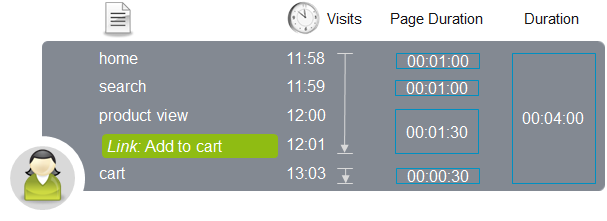
The page duration for the page "product view" is 1:30 mins, because after one minute, the link "Add to Cart" was clicked and afterward within the visit no page was viewed (standard duration avg = 30 sec).
On the page "cart", the page duration is 30 seconds, because on this exit page no link was clicked.
Overview on Durations in Mapp Intelligence
A user views 4 pages:
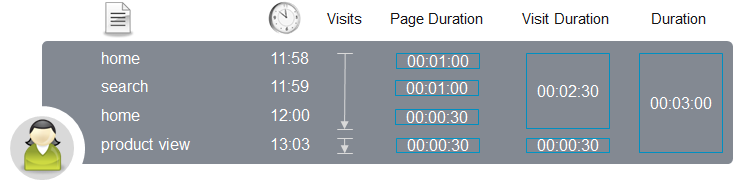
Days Analysis (Visitors > Traffic)
For the corresponding day, the following data is shown:

Pages Analysis (Navigation > Pages > Pages)
The pages analysis yields the following results:

Duration (Seconds) = Sum of all durations on a page
Page Duration Avg = Duration (Seconds) / Page Impressions
Visit Duration Avg = Duration (Seconds) / Visits
Further information
Training document Basic Metrics