Overview
The Product Catalog provides access to all products used in eCommerce features within Mapp. It allows users to search for products, import product data, and review the catalog structure that defines which product attributes are available and required.
Navigation Path
Administration > eCommerce > Product Catalog
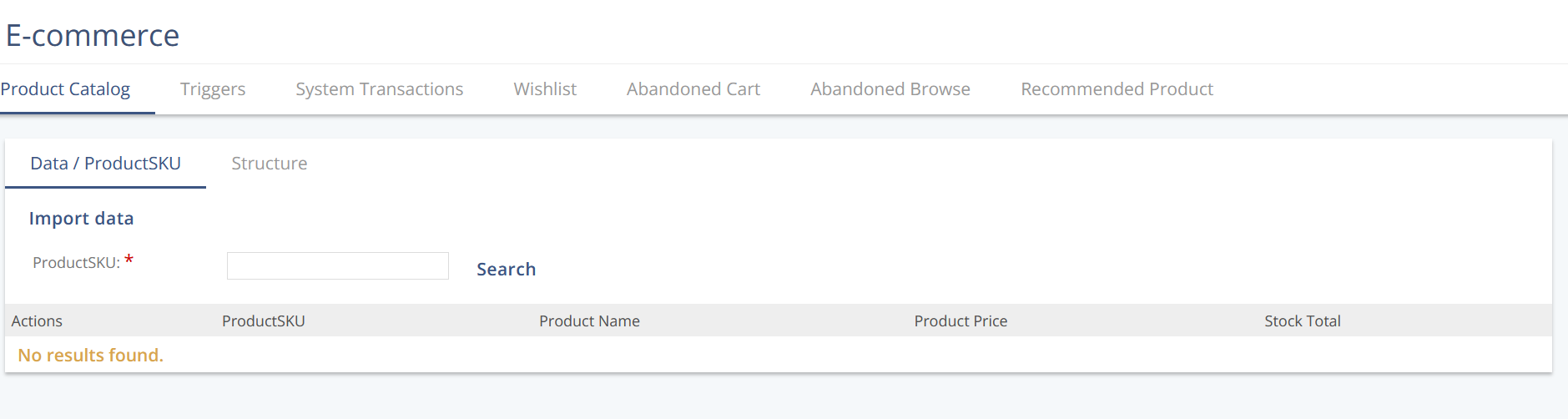
Data / ProductSKU
Action | Description |
|---|---|
Search | Looks up products in the Product Catalog using a Product SKU or key prefix. |
Import data | Manually imports product data into the Product Catalog. |
Structure
The Product Catalog structure defines all available product fields, including required attributes and optional fields for enrichment, stock handling, and localization.
Mandatory Fields
These fields are required for every product in the Product Catalog.
Field | Type | Example |
|---|---|---|
| string |
|
| string |
|
| float |
|
| string |
|
Optional Fields
These fields extend product data and support additional use cases such as stock management, localization, and custom attributes.
Field | Type | Example |
|---|---|---|
| integer |
|
| string-map |
|
| string |
|
| string |
|
| string |
|
| string |
|
| float |
|
| string |
|
| map<Locale, string> | |
| map<Currency, string> | |
| map<Locale, string> | |
| map<Currency, string> | |
| map<Locale, string> | |
| string |
|
| string |
|
| string | |
| string | |
| string |
Stock handling logic
Either stockTotal or variant must be provided.
If only one of these fields is used, it becomes required.
If both are provided, the sum of all values defined in
variantoverrides thestockTotalvalue.