Overview
Import contacts and profile attributes into a selected group from a CSV, XML, or text file. Use this interface for one-off imports (≤ 50 MB; typically fewer than 1 million contacts) when you don’t need to start a campaign immediately and when contacts are stored in CSV or XML. System users cannot be added here.
Navigation Path
Option 1: Via Group Management
Go to Audience > Group Management > Groups.
From the context menu next to the target group, select Members.
Click Import.
Option 2: Via Contact Management
Go to Audience > Contact Management > Group Members.
Select the target group from the drop-down list.
Click Import.
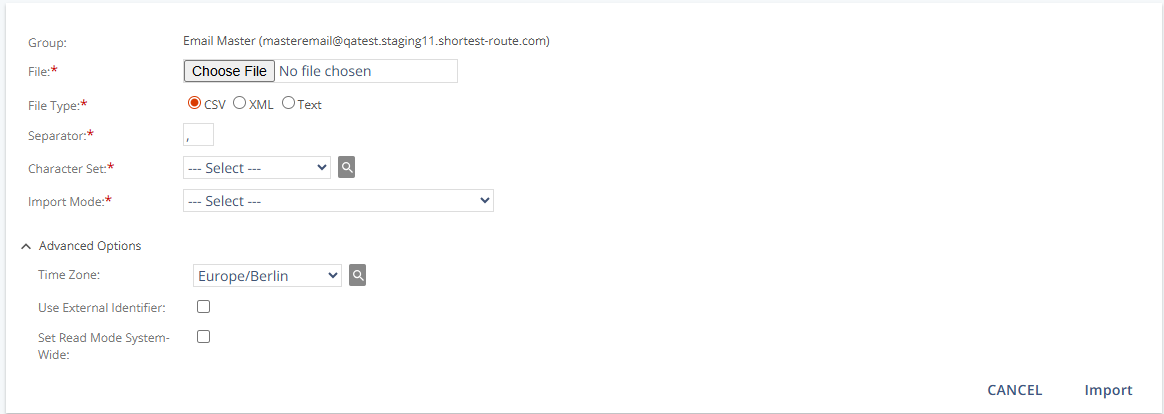
Settings
General Settings
Setting | Description |
|---|---|
Group | Displays the name of the group into which you import contacts. |
File | Select a local file to upload (maximum 50 MB). |
File Type | Choose the format: “CSV,” “XML,” or “Text.” |
Separator | Character used between fields in a CSV. This option is visible only for CSV uploads. |
Character Set | Required character encoding for the file (for example, UTF-8, ISO-8859-15). Ensures attributes import correctly. |
Import Mode | Defines how contacts and profiles in the file affect the target group (see Import Mode behavior below). |
Import Mode behavior
In an import, Mapp Engage differentiates between three types of contacts:
Current Members: Already exist in Mapp Engage and belong to the target group.
Current Contacts (not Members): Already exist in Mapp Engage but are not members of the target group.
New Contacts: Do not exist in Mapp Engage at the time of import.
Import Mode | Current Members | Current Contacts (not Members) | New Contacts |
|---|---|---|---|
Add | Ignored (profile not updated; remains in group). | Added as members; profile not updated. | Created and added as members. |
Add Contacts as Members | Ignored (profile not updated; remains in group). | Added as members; profile not updated. | Ignored (not added). |
Update Current Members | Profile data updated. | Ignored (not added). | Ignored (not added). |
Add and Update All | Profile data updated. | Profile updated and added as members. | Created and added as members. |
Add and Update (Exclude Current Members) | Ignored (remains in group; profile not updated). | Profile updated and added as members. | Created and added as members. |
Replace All | Removes all current group members (group-specific data/statistics for addresses in the file are deleted) and treats all imported as new; profile data is updated, and members are added. | ||
Remove from Group | Members listed in the file are removed from the group; group-specific data and statistics for those addresses are deleted. Members not listed in the file remain unaffected. | Ignored. | Ignored. |
Synchronization Qualifiers by Import Mode
Qualifier | Available for | Description |
|---|---|---|
Keep Unsubscribes | Add, Add Contacts as Members, Add and Update (Exclude Current Members), Add and Update (All), Replace All | Prevents re-importing contacts who previously unsubscribed from the group. |
Overwrite Existing Profiles Completely | Update Current Members Only, Add and Update (Exclude Current Members), Add and Update (All), Replace All | Deletes existing profiles before import and replaces them with data from the file (only file data remains afterward). |
Overwrite Only Attributes from File | Update Current Members Only, Add and Update (Exclude Current Members), Add and Update (All), Replace All | Updates only attributes present in the file; all other existing profile data is retained. |
Keep Responses | Replace All | Preserves contacts’ response status and related sendout data (for example, bounces or complaints). |
Note:
Remove from Group is a distinct option that deletes members listed in the file from the group (group-specific data/statistics for those addresses are deleted; members not in the file are unaffected).
Notification Methods (Subscription Methods)
Setting | Description |
|---|---|
With Notification | Sends a notification message immediately after import (Confirmed Opt-in). |
Without Notification | No message is sent (Single Opt-in). |
Invite | Sends an invitation; recipients have “Pending” status until confirmed. If they do not reply within 14 days, they are automatically deleted from the group (Double Opt-in). |
System messages are automatically sent after import based on the selected subscription method. For example, SysMsgWelcomeToGroup, SysMsgInviteToGroupPassword, or equivalent messages are triggered depending on whether contacts are added with or without notification.
To send notifications or invitations via SMS, enable the corresponding system message for the SMS channel. For instructions, see System Messages via SMS.
Advanced Options
Setting | Description |
|---|---|
Time Zone | Sets the time zone for attributes with date data types. The values must conform to the standardized “tz“ database format, the IANA time zone database. (e.g., |
Use External Identifier | Identifies contacts with a unique external ID instead of email or mobile number. The values must be unique. This type of import requires a specific procedure (see Update Contacts with External Identifier). |
Set Read Mode System-Wide | Applies the read mode from the file to the system-wide read mode for all contacts in the file across all their groups. Available when using Replace, Update Members Only, Add and Update Non-members Only, or Add and Update All. |