Overview
View and manage the groups a selected contact belongs to, including membership status and message counts. From here, you can open the group’s member list or remove the contact from specific groups.
Navigation Path
Go to Audience > Contact Management > All Contacts
In the Actions column of the desired contact, select Memberships.
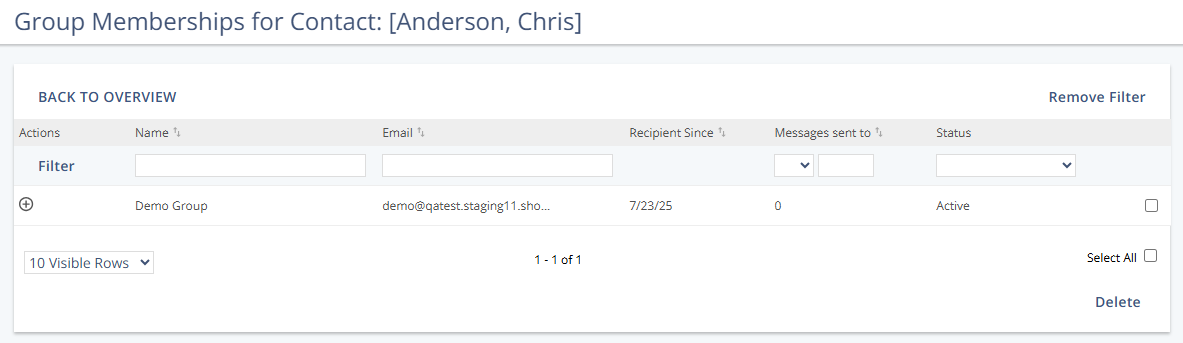
Example
Column Definitions
Column | Description |
|---|---|
Name | Displays the group name. |
Displays the group’s email address. | |
Recipient Since | Shows when the contact joined the group (date and time). |
Messages sent to | Total messages sent to the contact in this group across Mapp Engage channels; excludes system messages and single messages. |
Status | The current membership state in the group (see Status Definitions). |
Status Definitions
Status | Description |
|---|---|
Active | Confirmed member; receives messages from the group. |
Pending | Subscribed but not yet confirmed (e.g., after the first step of a double opt-in). |
Awaiting Approval | Subscription requires owner approval; decision pending. |
Deactivated | Excluded from sendouts due to deliverability issues; can also be deactivated system-wide. |
Actions
Action | Description |
|---|---|
Go to Group | Opens the member list for the selected group. |
Remove | Removes the contact from the selected group(s) after confirmation. The contact remains in the system, and profile data is retained. This change is not tracked as an unsubscribe in group statistics. |