Overview
You can view all contacts in the system and access contact-level management options, such as editing profile data, managing addresses, reviewing message history, anonymizing or deleting a contact, and more.
Navigation Path
Audience > Contact Management > All Contacts
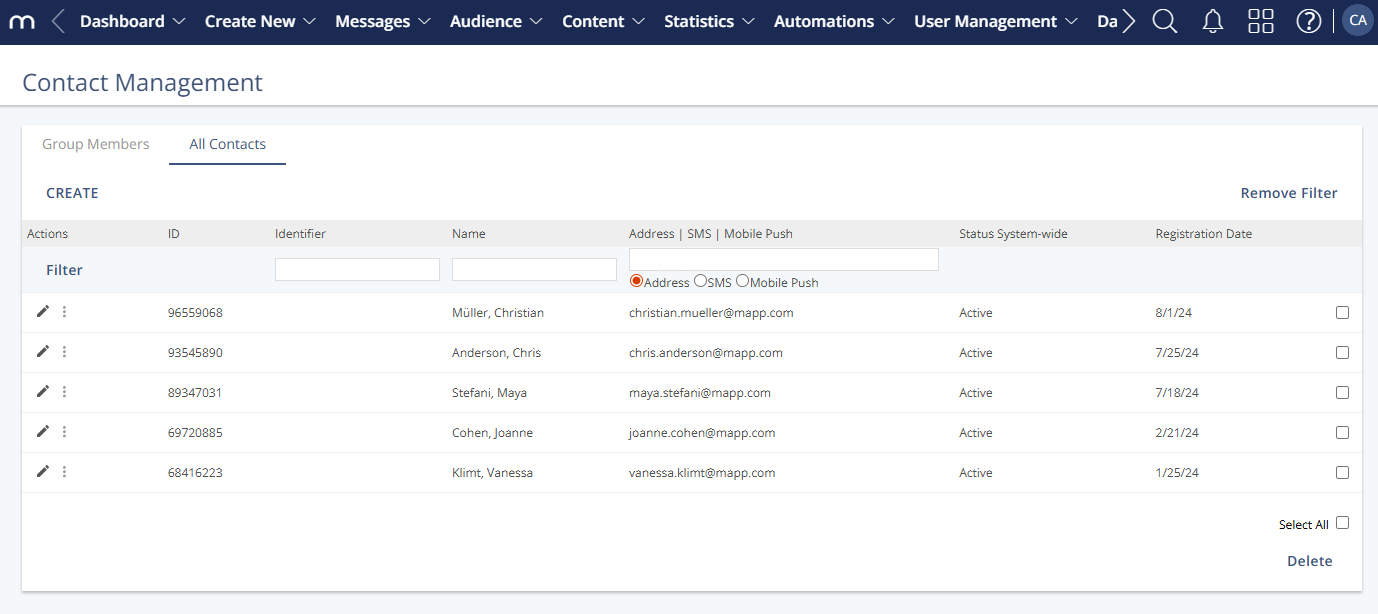
Actions
Contact-level Actions
Action | Description |
|---|---|
Edit Contact Profile | Opens Contact Profile to view and edit stored values for the selected contact. See Contact Profile. |
Control Address | Opens Control Address to manage address-level control for the groups associated with the selected address. See All Contacts: Control Address. |
Password | Opens the Password window for the selected contact. See New Password. |
Blacklist | Opens Add Contact to System Blacklist to add the contact (or related domains) to the system blacklist, preventing future import. When you add a contact to the system blacklist, the system permanently deletes all profile data that is stored for the contact. |
Memberships | Opens Group Members to see the groups where the contact is a member. |
Export Contact | Prepares an export of the selected contact. |
Anonymize Contact | Starts the Anonymize Contact function. Use with care; this function does not require confirmation. When you anonymize a contact, the contact is removed from the system, and this action cannot be recovered. |
Message History | Opens Message History to review messages sent to the contact. See Message History. |
General Actions
Action | Description |
|---|---|
Create | Opens a New Contact Profile to add a single contact that is not assigned to a group. |
Select All | Selects all contacts in the overview. |
Delete | Permanently deletes the selected contact(s) after confirmation, including related history, which cannot be recovered. |
Column Definitions
Column | Description |
|---|---|
Actions | Provides options for handling the contact (see the actions listed above). |
ID | A system-generated Contact ID is assigned when a new contact is added; it cannot be changed. |
Identifier | Optional external identifier (e.g., used to match an external system). Maximum length: “200”. |
Name | Displays last name and first name if stored; empty if not available. |
Address | SMS | Mobile Push | Shows the contact’s email address, mobile number, or push token, depending on available data and configuration. |
Status System-wide | Indicates system-wide status (e.g., “Active”, “Deactivated”). |
Registration Date | Shows the date the contact was registered. |